

Most "Bitbucket vs GitHub" comparisons answer a question almost nobody is asking. They compare pricing tiers and repository limits, which matters if you are choosing a platform from scratch, and hardly at all if you already run one.
The question teams actually have is narrower. How does code review differ, and is that difference worth doing anything about.
This is that comparison. Pull requests, merge checks, reviewer assignment, native AI review, and security scanning, which together decide whether bad code gets caught before it merges.
Where this connects: The gaps below close with tooling rather than migration. CodeAnt AI runs AI code review and security scanning equivalently on Bitbucket and GitHub, including Bitbucket Data Center, so the review experience does not change with the Git host.
Key Facts at a Glance
Question | Short answer |
|---|---|
Review voting | Bitbucket has approve, request changes, and unapprove. GitHub has approve, request changes, comment |
Reviewer assignment | Bitbucket uses default reviewers by branch. GitHub uses a CODEOWNERS file by path |
Merge gating | Bitbucket merge checks. GitHub branch protection rules |
Native AI review | Both have one. Copilot on GitHub, Rovo Dev on Bitbucket Cloud, with no SAST in Rovo Dev |
Native security scanning | GitHub Advanced Security is built in. Rovo Dev does no SAST, so Bitbucket needs a third-party tool |
Self-hosted | Bitbucket Data Center and GitHub Enterprise Server both exist, with different tooling ecosystems |
Issue linking | Bitbucket to Jira via issue key. GitHub to Issues via |
Pull Request Workflow: Where They Diverge
Both platforms centre review on a pull request, and the day-to-day feel is similar. The differences show up in how review gets assigned and enforced.
Aspect | Bitbucket | GitHub |
|---|---|---|
Review states | Approve, Request changes, Unapprove | Approve, Request changes, Comment |
Reviewer assignment | Default reviewers, configured per source and target branch | CODEOWNERS file, matched by file path |
Where that config lives | Repository or project settings | A file committed to the repository |
Gating mechanism | Merge checks | Branch protection rules |
Inline tasks | Native tasks on comments, blockable before merge | Conversation resolution |
CI | Bitbucket Pipelines | GitHub Actions |
Issue linking | Jira issue key | GitHub Issues via |
Two differences matter more than the rest.
Reviewer assignment is branch-based on Bitbucket and path-based on GitHub. Default reviewers apply to a source and target branch pair, so the rule is "changes into main need these people." CODEOWNERS applies to file paths, so the rule is "changes to
/src/auth/need the security team." Teams wanting per-directory ownership on Bitbucket usually build it through repository structure or a convention rather than getting it from the setting.Bitbucket tasks are genuinely useful and often overlooked. A reviewer can convert a comment into a task, and a merge check can require all tasks resolved. It draws a cleaner line between discussion and required work than a general conversation-resolution rule does.
Merge Gating: Merge Checks vs Branch Protection
Same job, different shape.
Capability | Bitbucket | GitHub |
|---|---|---|
Minimum approvals | Merge check | Branch protection rule |
Require CI to pass | Minimum successful builds | Required status checks |
Block on unresolved feedback | No unresolved tasks | Require conversation resolution |
Block on requested changes | No changes requested check | Included in review requirements |
Path-based required reviewers | Not native, approximated with default reviewers | CODEOWNERS, natively required |
External tool can block | Yes, by posting a build status | Yes, as a required status check |
Where configured | Repository or project settings | Repository settings, or a committed file |
The row that decides it
The important shared property is the last-but-one row. On both platforms an external tool blocks a merge by posting a status, and only by posting a status. A tool that writes pull request comments and nothing else cannot gate anything on either platform, however good the comments are.
That single question, does this tool post a status, separates enforcement from advice more reliably than any feature list.
Native AI Code Review: An Uneven Comparison
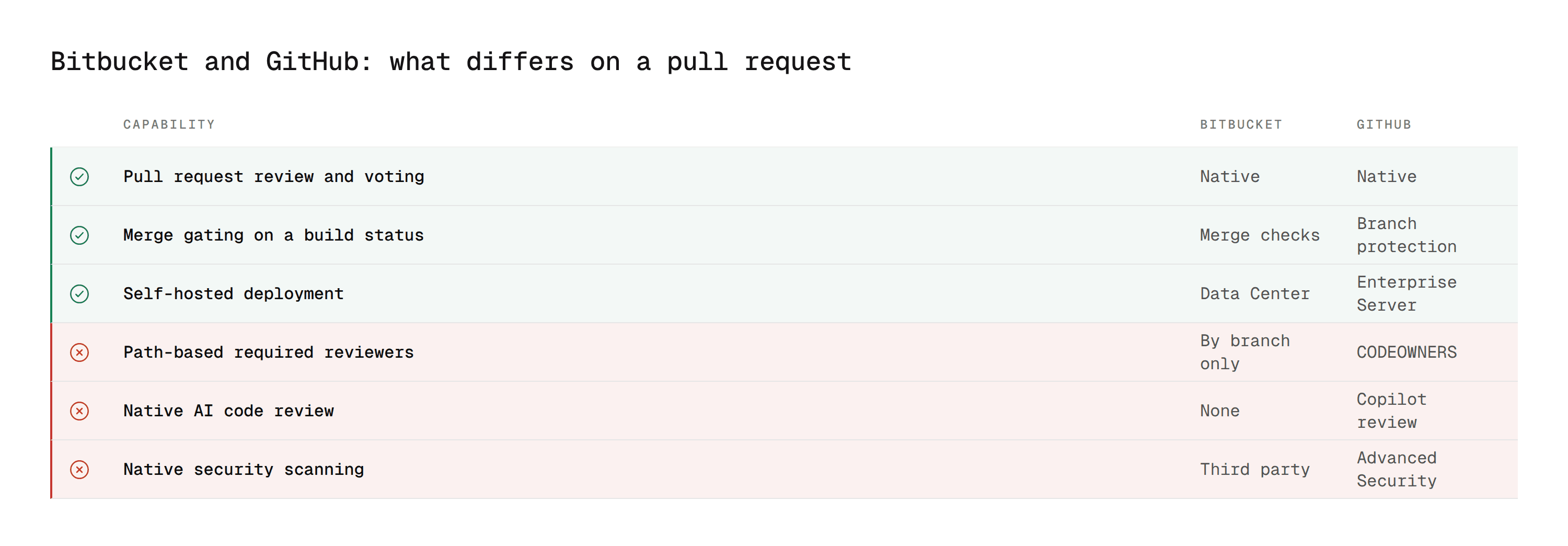
This is where the two platforms differ most, and it is not close.
Where GitHub is
GitHub Copilot code review is generally available on GitHub. You request it like a human reviewer, it posts inline comments and suggestions, and Microsoft has continued investing in it as part of positioning GitHub as the AI-native development platform.
Where Bitbucket is
Bitbucket has Rovo Dev, Atlassian's own AI reviewer, generally available on Bitbucket Cloud. It flags quality, security, and performance issues on the diff, suggests inline fixes, and does one thing Copilot does not: it validates the pull request against the linked Jira issue's acceptance criteria.
The gap is narrower than it looks on paper, and it is not about whether an AI reviewer exists. It is about what sits underneath one.
Rovo Dev has no dedicated SAST, secret, or IaC scanning. It is a general LLM reviewer. Copilot on GitHub has the same limitation, but GitHub Advanced Security sits behind it as a platform capability, and Bitbucket has no equivalent to put behind Rovo Dev.
Two further constraints matter for planning. Rovo Dev's Data Center support is still in beta, so self-hosted teams cannot rely on it yet. And its credit-metered pricing is harder to forecast at high pull request volume than a per-seat model.
What this means for the tool you add
The consequence for a buyer is concrete. On GitHub a third-party review tool extends coverage the platform already provides. On Bitbucket it supplies coverage the platform does not have, which raises the bar for what that tool needs to do.
Some tools make this worse rather than better. CodeRabbit, for instance, is GitHub-first with less mature support elsewhere, and Rovo Dev's own Data Center support is still in beta. Others, including CodeAnt AI, run equivalently across Bitbucket, GitHub, GitLab, and Azure DevOps, which matters specifically for organisations running more than one.
Security Scanning: Built-In Depth Differs
GitHub Advanced Security is a mature native product covering secret scanning, dependency review, and CodeQL-based static analysis, all inside GitHub.
Bitbucket's native security coverage is lighter. Atlassian offers security-related apps through the Marketplace and integrations with scanning vendors, but there is no built-in equivalent to CodeQL sitting in the platform by default. Most teams add a third-party SAST tool, often alongside SCA and IaC scanning, to reach comparable coverage. Our SonarQube comparison covers the most common incumbent in that slot.
This is a structural gap rather than a configuration difference. A team on GitHub enables a setting. A team on Bitbucket buys and deploys something.
For Bitbucket Data Center the gap widens again, because the third-party tool now also has to support self-hosted deployment, which most do not.
Ecosystem: Where Bitbucket Wins
Feature comparisons tend to flatter GitHub because they count features. The Atlassian ecosystem argument does not show up that way and is often the reason teams stay.
Jira integration is native and deep. An issue key in a branch name links the issue, the commits, and the pull request automatically, and the issue's development panel shows all three. Smart commits transition issues from a commit message. On GitHub the equivalent Jira integration exists but is an add-on rather than the default. Our Bitbucket and Jira guide covers the mechanics.
Confluence, Bamboo, and the rest of the suite assume the same identity and permission model. For an organisation already standardised on Atlassian, that coherence is worth more than a feature the other platform has.
Bitbucket Data Center remains a genuine self-hosted option for teams that cannot run source control in a vendor cloud.
None of that closes the AI or security gap. It does explain why teams with that gap frequently choose to close it with tooling rather than by leaving.
Same Pull Request, Two Platforms
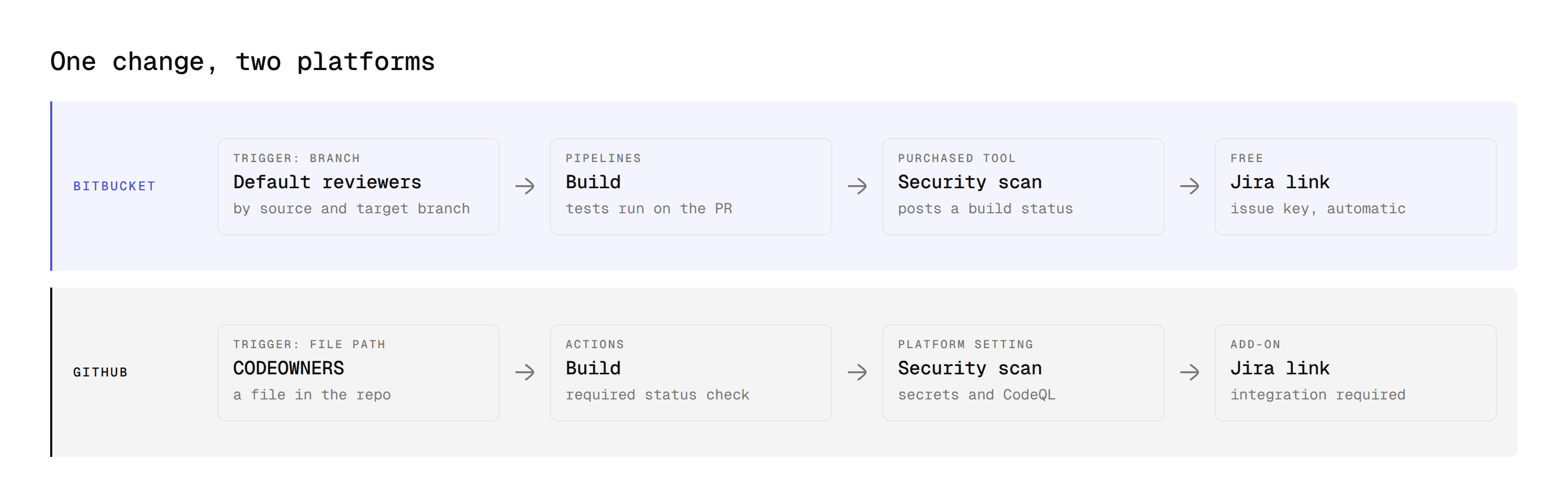
A feature table flattens the difference. Tracing one change through both makes it concrete.
The scenario is the same on each side. A developer changes an authentication module, the security team needs to see it, tests need to pass, and a security scan needs to run before it merges.
On Bitbucket
The developer pushes a branch named PROJ-451-token-refresh and opens a pull request.
Default reviewers fire based on the source and target branch pair, so whoever is configured for changes into main gets added. Notice what did not happen: nothing looked at the file path. If the security team needs to be on this specific change because it touches /src/auth/, that has to come from a repository convention or a separate repository, not from the setting.
Bitbucket Pipelines runs against the pull request. A third-party scanner posts a build status independently of the pipeline.
The developer watches the merge checks panel. Minimum approvals, minimum successful builds, no unresolved tasks. Each has its own state, and Merge stays unavailable until all three clear.
The Jira issue PROJ-451 shows the branch, the commits, and the pull request in its development panel automatically, so the product owner can see progress without opening Bitbucket at all.
On GitHub
The developer pushes a branch and opens a pull request.
The CODEOWNERS file lists the security team against /src/auth/, so they are added automatically because of what the change touches rather than where it is going. The rule is a file in the repository, so it is version-controlled and was itself reviewed in a pull request at some point.
A GitHub Actions workflow runs and posts as a required status check. If Copilot code review is requested, it comments inline. If GitHub Advanced Security is enabled, secret scanning and CodeQL run with no additional configuration, which is the step that simply does not exist on the Bitbucket side.
The developer watches the checks panel, and Merge stays disabled until reviews and required checks pass.
Linking the change to a Jira issue requires the Jira GitHub integration, which works but is an add-on rather than the default.
What the walkthrough shows
The end state is the same on both, a merged pull request that passed review, tests, and scanning. Three differences drive everything above.
Reviewer assignment is triggered by different things. Branch on Bitbucket, file path on GitHub.
Security coverage arrives from different places. A purchased tool on Bitbucket, a platform setting on GitHub.
Issue context is default on Bitbucket and configured on GitHub. The Atlassian advantage running the other way.
Migrating Review Workflows Between Them
If you are moving repositories rather than comparing, four things need deliberate mapping rather than a copy.
What you have | Where it goes | The catch |
|---|---|---|
CODEOWNERS path rules | Default reviewers by branch | Path granularity is lost, so plan how to keep per-directory ownership |
Default reviewers by branch | CODEOWNERS file | You gain granularity, and the file now needs an owner |
Bitbucket tasks | Conversation resolution | Tasks are more explicit, so a convention has to replace the mechanism |
Build status keys | Status check names | Rename in branch protection or the gate silently stops applying |
The fourth row causes the most trouble because it fails quietly. A required check that no longer matches a posted name is not an error, it is a gate that was never evaluated.
Two more worth planning separately.
Issue history does not travel. Jira issues linked to Bitbucket do not become GitHub Issues, and a Jira GitHub integration on the far side links new activity rather than backfilling the old. If the trail matters for audit, export it before the move.
Third-party tools need confirming on the target. A scanner that posts inline comments on one platform may post summary-only on the other. Check the depth of the integration rather than whether the logo appears on a supported-platforms page.
CI: Where the Gate Actually Runs
Review gates rarely stand alone. They sit on top of a CI run that has to pass first, so the CI comparison shapes the review experience more than it looks like it should.
Bitbucket Pipelines | GitHub Actions | |
|---|---|---|
Configuration |
| Workflow files under |
Execution model | Steps in a single file, one pipeline per repo | Multiple independent workflows per repo |
Marketplace | Pipes, a smaller catalogue | Actions, substantially larger |
Self-hosted runners | Yes | Yes |
How it gates | Minimum successful builds merge check | Required status check |
For code review specifically, the deciding factor is rarely which engine is better. It is which one your security and quality vendors have invested in.
A scanner with a polished GitHub Action and a thin Bitbucket Pipe will produce a materially worse review experience on Bitbucket, regardless of how good the underlying analysis is. That gap is a vendor decision rather than a platform one, and it is worth checking per tool rather than assuming parity.
The larger Actions catalogue is a real advantage on GitHub and a real reason Bitbucket teams end up building more of their pipeline themselves.
Bitbucket Alternatives and the Wider Comparison
Teams searching Bitbucket alternatives are usually asking one of two different questions, and it is worth separating them.
Replacing the platform. That is the Bitbucket vs GitHub or Bitbucket vs GitLab decision, and it is a migration project. GitLab sits between the two on this comparison, with native CI and a security scanning layer on its upper tiers, though its review model is closer to GitHub's than to Bitbucket's.
Replacing what is missing on the platform. That is a tooling decision, and it is the one most teams actually want. The Bitbucket pull request workflow is not the problem. The absence of a native AI reviewer and native security scanning on top of it is.
Confusing the two is how a review gap turns into a six-month migration proposal. If your complaint is about what runs on the pull request rather than about the pull request itself, you are in the second category.
When to Use Which
Neither platform is better in general. They are built around different strengths.
Choose GitHub when AI-assisted development and native security scanning are priorities, or the project is open source and benefits from developer familiarity and ecosystem reach.
Choose Bitbucket when your organisation runs on Atlassian, the Jira-to-code trail matters for delivery or compliance, or you need a self-managed platform and prefer Data Center.
If you already run one, the review gaps are not a migration case. Native AI review and security scanning are both closable with a third-party tool in weeks. A platform migration takes quarters, touches every workflow, and breaks integrations nobody has inventoried.
The exception is if you are consolidating two platforms after an acquisition, where the decision is about long-term operating cost rather than code review specifically.
What This Means for Tool Selection
Because Bitbucket's native review and security coverage is thinner, the tool you add matters more there than it does on GitHub.
Three questions decide it.
Does it cover the whole gap or part of it? AI review and security scanning both have to come from somewhere on Bitbucket. A tool covering one leaves you assembling two.
Does it post a build status? Otherwise it comments and cannot gate.
Does it support your deployment? If you are on Data Center, this eliminates most candidates before features enter the conversation.
Our Bitbucket code review tools comparison runs the field against those criteria, and the cross-platform ranking covers the same tools evaluated without a platform filter. If you are evaluating from the GitHub side instead, AI code review tools for GitHub enterprise teams covers the same question from that direction, and Azure DevOps vs GitHub covers the third platform.
Why Teams Add CodeAnt AI to Either Platform
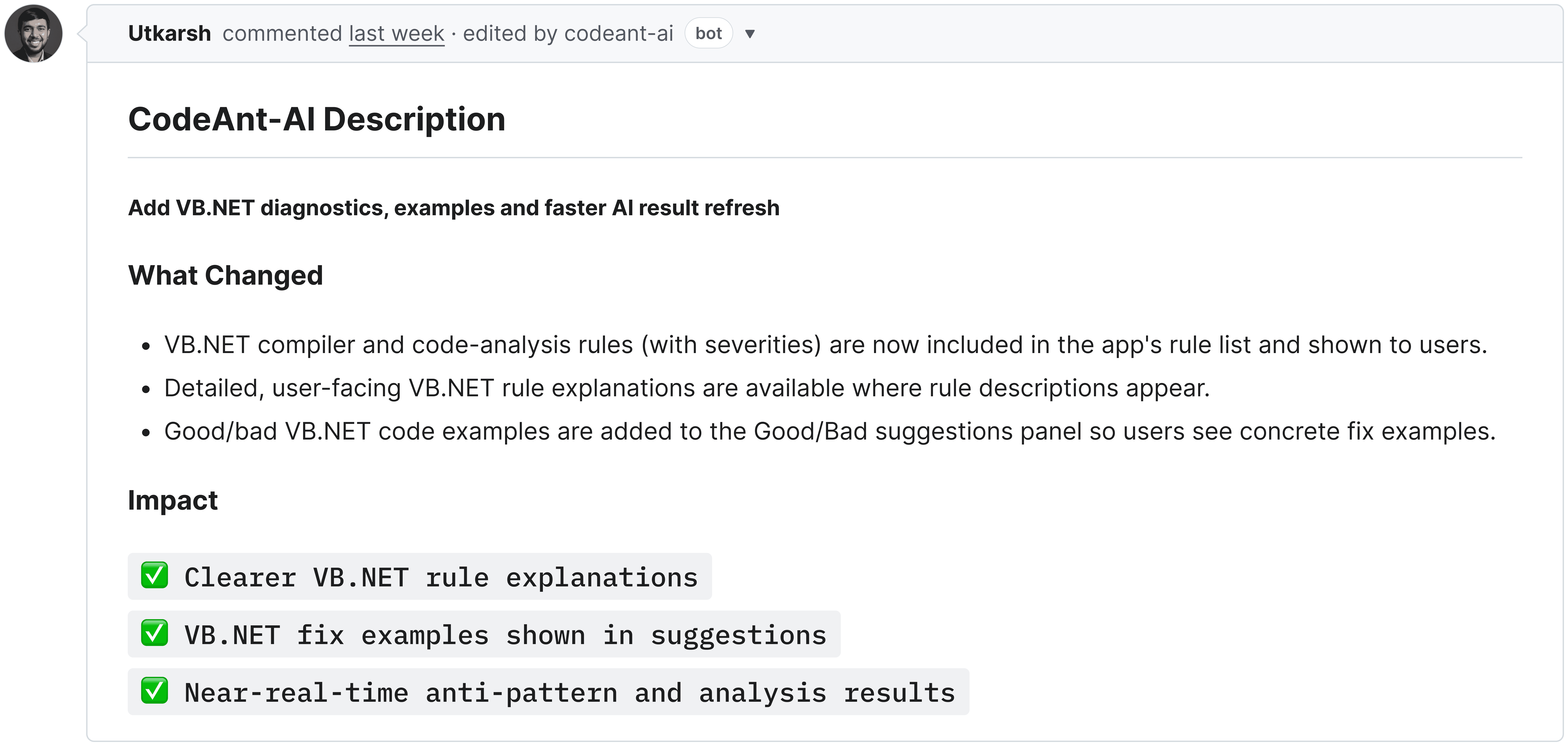
CodeAnt AI is not an alternative to Bitbucket or GitHub. It is the layer that removes the difference between them, which is a different and much cheaper decision than migrating.
Three reasons it holds up against both.
1. It closes both gaps, not one
The two things Bitbucket lacks natively are AI review and security scanning. Most tools supply one.
AI code review and code security run in the same pass on the same pull request, covering SAST, SCA, IaC misconfiguration, and secrets detection. Security findings carry Steps of Reproduction showing the full path rather than a rule identifier.
On Bitbucket that is the difference between one tool and three, each with its own token, its own dashboard, and its own renewal.
2. It posts a status, so it can actually gate
The comparison above turns on one row. An external tool blocks a merge by posting a status, and only by posting a status.
CodeAnt AI posts inline comments and a build status from the same analysis. Require that status in a Bitbucket merge check or a GitHub branch protection rule and a failed security finding stops the merge, rather than sitting in a thread someone resolves to move on.
A tool that only comments cannot do this on either platform, however good the comments are.
3. It works the same on both, including self-hosted
This is the one that matters if your organisation runs more than one Git host, which most do after an acquisition.
GitHub-first tools ship a polished integration on GitHub and a thinner one elsewhere, so the review experience changes depending on which team you are on. CodeAnt AI runs equivalently across Bitbucket, GitHub, GitLab, and Azure DevOps, and supports Bitbucket Data Center alongside Cloud, plus fully on-premises or customer VPC deployment where source code cannot leave the network.
Which means the platform question stops deciding the review question. That is the whole argument of this page, stated as a product rather than as advice.
Close the Gap Without Moving Platforms
The two real differences between Bitbucket and GitHub for code review are native AI review and native security scanning depth. Both currently favour GitHub, and neither on its own justifies moving a platform your organisation already runs, particularly if that platform is load-bearing for Jira.
They are tooling gaps, not architectural ones.
What does change is how much the tool matters. On GitHub it extends what the platform already does. On Bitbucket it supplies what the platform does not, which means asking whether a candidate covers AI review and security together, whether it can post a status and therefore gate, and whether it runs on your deployment.
Where to start this week
Take your most active Bitbucket repository and list what runs on a pull request today. AI review, yes or no. SAST, yes or no. Secrets detection, yes or no. Dependency scanning, yes or no. Then check whether any of them can actually block a merge or whether they only comment. If most are no, that is the gap this comparison describes, and it closes with a tool rather than a migration.
Book a walkthrough with our team →
Related reading
Best Bitbucket Code Review Tools: the field evaluated against gating, coverage, and deployment.
Bitbucket Code Review: Step-by-Step Guide: the native review workflow described above, in practice.
Bitbucket Data Center AI Code Review: what changes on self-hosted Bitbucket.
Bitbucket and Jira Integration: the ecosystem advantage described above, in practice.
Azure DevOps vs GitHub Code Review: the same comparison for the third major platform.
9 Best GitHub AI Code Review Tools for Enterprise Teams: the GitHub side in depth.
8 GitHub AI Code Review Tools for SaaS Teams: the GitHub side for smaller, faster-shipping teams.
10 Best AI Code Review Tools: the platform-agnostic ranking both of these ladder up to.

