

Most "Azure DevOps vs GitHub" comparisons cover pricing, project management, and CI/CD broadly. That's useful if you're picking a platform from scratch, but it doesn't answer the question a team already running one of these platforms actually has: how does code review specifically work differently, and does that difference matter enough to switch, add a third-party tool, or just live with it?
This is that comparison. Not pricing tiers or Boards versus Projects, specifically pull requests, branch protection, native AI review, and security scanning, the parts of the workflow that determine whether bad code gets caught before it merges.
Where this connects: The gaps below are closable without a platform migration. CodeAnt AI runs AI code review and security scanning equivalently on Azure DevOps, GitHub, GitLab, and Bitbucket, so the review experience does not change based on which Git host a team happens to be on.
Key Facts at a Glance
Question | Short answer |
|---|---|
Review voting | Azure DevOps has four states, GitHub has three. No direct equivalent for Approve with suggestions |
Path-based reviewers | Azure DevOps uses a branch policy setting. GitHub uses a CODEOWNERS file in the repo |
Merge strategies | Azure DevOps adds semi-linear merge, which GitHub has no equivalent for |
Native AI review | Mature on GitHub. Limited public preview on Azure DevOps, and comment-only |
Native security scanning | GitHub Advanced Security is built in. Azure DevOps needs a third-party tool or GHAzDO |
GHAzDO limitation | Requires Azure DevOps Server 2022 or later connected to Azure, so no air-gapped support |
Which to pick | GitHub for AI-forward teams, Azure DevOps for governance and on-premises |
Pull Request Workflow: Core Differences
Both platforms center code review on a pull request, but the mechanics differ enough to matter for teams migrating between them.
Aspect | Azure DevOps | GitHub |
|---|---|---|
Terminology | Pull Request (PR) | Pull Request (PR), same term |
Review voting | Approve, Approve with suggestions, Wait for author, Reject | Approve, Request changes, Comment |
Draft PRs | Supported, no policy evaluation until published | Supported, same behavior |
Auto-merge | Auto-complete, merges once all policies pass | Auto-merge, merges once all checks pass |
Merge strategies | Merge commit, squash, rebase and fast-forward, semi-linear | Merge commit, squash, rebase |
Work item linking | Native to Azure Boards via | Native to GitHub Issues via |
REST API | Full PR lifecycle API, covered in our automation guide | Full PR lifecycle API, broadly similar shape |
The vote taxonomy is the detail that trips up teams switching platforms most often. Azure DevOps's four-state vote (Approve, Approve with suggestions, Wait for author, Reject) is more granular than GitHub's three-state review (Approve, Request changes, Comment). "Approve with suggestions" specifically has no direct GitHub equivalent, teams migrating from Azure DevOps often end up approximating it with an Approve plus a follow-up comment on GitHub.
Branch Protection: Branch Policies vs Branch Protection Rules
This is the area with the most structural difference between the two platforms.
Azure DevOps uses branch policies, configured per branch or branch pattern, covering minimum reviewers, build validation, comment resolution, merge type restrictions, and status checks. Our branch policies guide covers every setting in depth.
GitHub uses branch protection rules, covering required reviews, required status checks, and required linear history, plus a separate mechanism, CODEOWNERS, for path-based automatic reviewer assignment.
Capability | Azure DevOps | GitHub |
|---|---|---|
Minimum reviewers | Branch policy setting | Branch protection rule |
Path-based auto-reviewers | Automatically included reviewers (branch policy) | CODEOWNERS file, committed to the repo |
Required status checks | Status checks (branch policy) | Required status checks (branch protection rule) |
Build validation | Native, points at an Azure Pipeline | Native, points at a GitHub Actions workflow or external check |
Linear history enforcement | Merge type restriction (branch policy) | "Require linear history" (branch protection rule) |
Configuration location | Project Settings, in the Azure DevOps UI | Repository Settings, or a |
The CODEOWNERS-versus-Automatically-Included-Reviewers difference is worth understanding on its own, since it changes who can modify the rule and how portable it is. GitHub's CODEOWNERS lives as a file in the repository, so it's version-controlled, reviewable in a PR, and portable if the repo moves.
Azure DevOps's equivalent lives in branch policy settings, configurable only by someone with Edit Policies permission, not committed to the repo itself. Our required reviewers guide covers a full CODEOWNERS-to-Azure-DevOps migration mapping if you're moving between the two.
Native AI Code Review: A Genuinely Uneven Comparison
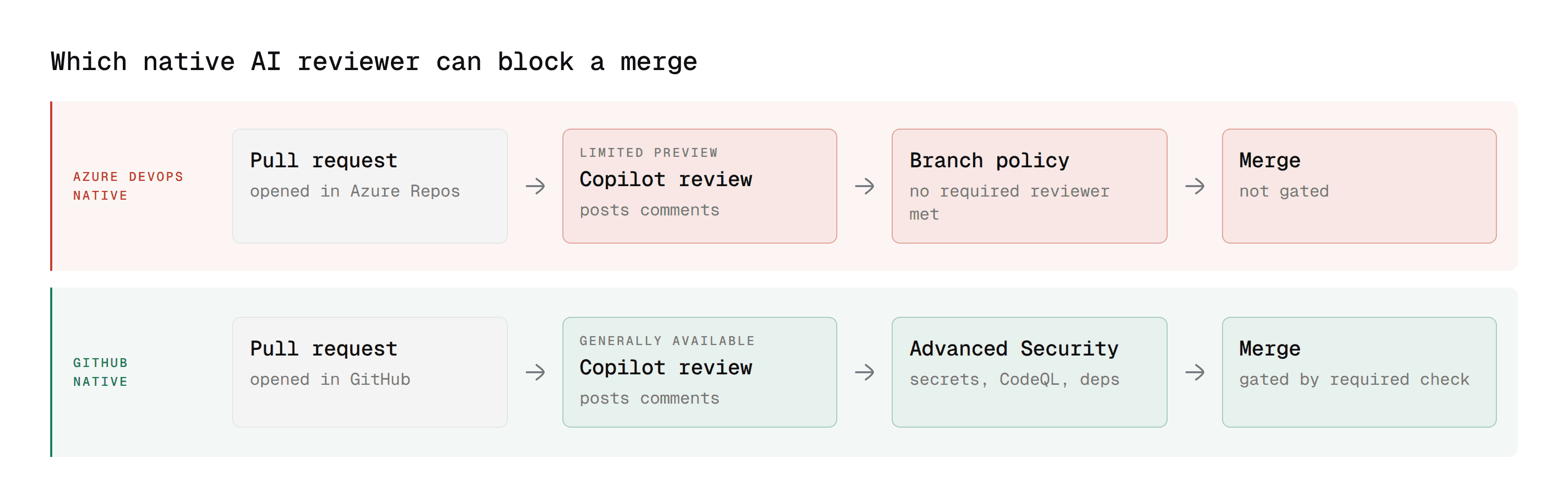
This is where the two platforms have diverged the most heading into 2026, and it's not a close comparison.
GitHub Copilot code review is mature on GitHub: request it the same way you'd request a human reviewer, it posts inline comments and suggestions, and Microsoft has continued investing in it as part of positioning GitHub specifically as the AI-native development platform.
On Azure DevOps, Copilot code review exists only in limited public preview as of mid-2026. It posts comments but explicitly cannot satisfy a required-reviewer branch policy or block a merge, a comment-only voter, not an enforcement mechanism. GitHub Advanced Security for Azure DevOps (GHAzDO) extends some of GitHub's native security tooling to Azure DevOps Server 2022 and later, but only when that server is connected to Azure, which rules it out for fully air-gapped environments.
The strategic direction matters here too: Microsoft has been increasingly explicit that AI investment (Copilot, Workspace, Autofix, agentic development features) is concentrated on GitHub specifically, while Azure DevOps continues as the stable, compliance-oriented enterprise layer.
That's not a criticism of Azure DevOps, plenty of enterprise teams specifically value predictability over frontier AI features, but it does mean native AI code review is currently a GitHub-first capability, not an equally-mature capability on both platforms.
Third-party AI code review tools close this gap differently depending on the tool. Some, like CodeRabbit, are GitHub-first with less mature Azure DevOps support. Others, including CodeAnt AI, are built to run equivalently on both, along with GitLab and Bitbucket, so the review experience doesn't change based on which Git host a given team happens to use. For the full breakdown of how that works on Azure DevOps specifically, see our Azure DevOps AI code review guide.
If you are evaluating from the GitHub side rather than the Azure DevOps side, our comparisons of AI code review tools for GitHub enterprise teams and tools replacing CodeQL cover the same question from that direction.
Security Scanning: Built-In Depth Differs Significantly
GitHub Advanced Security (GHAS) is a mature, native product: secret scanning, dependency review, and CodeQL-based SAST, all built into GitHub directly. Azure DevOps's native security scanning is comparatively limited out of the box; most teams add a third-party SAST tool or GHAzDO for meaningful coverage.
Our SAST integration guide covers the vendor landscape for Azure DevOps specifically, including which tools offer genuine PR-native inline comments versus a dashboard-only experience.
This is a real, structural gap, not a configuration difference. A team on GitHub gets meaningful native security scanning by enabling a setting. A team on Azure DevOps needs to add a third-party tool to reach equivalent coverage.
Status Checks and Quality Gates: Similar Mechanism, Different Names
Both platforms support the same underlying pattern, an external tool posts a pass/fail signal that can block a merge, just under different names and slightly different configuration paths.
Concept | Azure DevOps | GitHub |
|---|---|---|
External tool blocking a merge | Status check (branch policy) | Required status check (branch protection rule) |
Native CI blocking a merge | Build validation | Required status check pointing at a GitHub Actions workflow |
How external tools integrate | REST API, | REST API, similar shape, |
Our branch policies guide covers the Azure DevOps side of this in full, including how an external status becomes a required, merge-blocking policy, and the REST API guide covers the exact API call external tools use to post one.
CI/CD-Triggered Review: Azure Pipelines vs GitHub Actions
Code review quality gates rarely stand alone, they're usually tied to a CI/CD run that has to pass before the gate even evaluates. Comparing Azure DevOps vs GitHub Actions specifically for this purpose matters as much as the review mechanism itself.
Azure Pipelines uses YAML-defined tasks with a distinct execution model, and it's covered in full in our Azure DevOps pipeline guide. Build validation policies point directly at a pipeline, and a failing pipeline blocks the PR the same way a failing status check does.
GitHub Actions uses YAML workflows triggered by repository events, with results surfacing as required status checks on the PR, functionally similar in outcome even though the configuration syntax and marketplace ecosystem differ.
For code review specifically, the practical difference is less about which CI engine is objectively better and more about which one your security and quality tools already have mature task or action support for. A SAST vendor with a polished GitHub Action and a clunky Azure Pipelines task (or the reverse) will shape the actual review experience more than the CI engine's own feature set does.
What This Means for Third-Party Tool Selection
Since native AI review and security scanning aren't equally mature on both platforms, the tools a team adds matter more on Azure DevOps than on GitHub, where the platform itself already covers more ground.
A team on GitHub can often get meaningfully far with native Copilot code review and GitHub Advanced Security alone, adding a third-party tool mainly to extend coverage (multi-file context, custom organizational rules) rather than to fill a fundamental gap.
A team on Azure DevOps is choosing a third-party tool to cover ground the platform itself doesn't, AI-powered review reasoning and built-in security scanning both need to come from somewhere, since neither is a mature native capability yet.
That's worth factoring into a tool evaluation directly: on Azure DevOps, ask whether a candidate tool covers the full gap (AI review plus security scanning) or just part of it, since "part of it" means you're still assembling multiple tools regardless of which platform you're on.
When to Use Which
The honest 2026 answer isn't "GitHub is better" or "Azure DevOps is better," it's that the two platforms are increasingly built for different priorities, and the right choice depends on which of those priorities matters more to a specific team.
Choose GitHub when: AI-assisted development is a strategic priority, not just a nice-to-have. Native Copilot code review, security scanning, and the broader agentic development tooling Microsoft is investing in are meaningfully more mature here. Open-source or community-facing projects also benefit from GitHub's larger developer familiarity and ecosystem.
Choose Azure DevOps when: enterprise governance, compliance, and stability matter more than frontier AI features. Azure DevOps Server's on-premises deployment option, mature Boards-based project management, and predictable release cadence suit regulated industries and large enterprises with existing Microsoft ecosystem investment.
Consider both, deliberately: several organizations run GitHub for developer-facing work (source control, CI, AI-assisted coding) and Azure DevOps for enterprise-facing work (project management, release orchestration, compliance reporting), rather than treating the choice as all-or-nothing. This isn't uncommon at organizations that grew through acquisition or have distinct developer and enterprise-IT cultures.
Whichever platform you're on, the code review gaps described above (native AI maturity, security scanning depth) are closable with the right third-party tooling rather than requiring a platform migration to solve.
Same PR, Two Platforms: A Side-by-Side Walkthrough
It's easier to see the practical difference in a concrete flow than in a feature table. Here's the same scenario, a developer opening a PR that touches an authentication module, walked through on each platform.
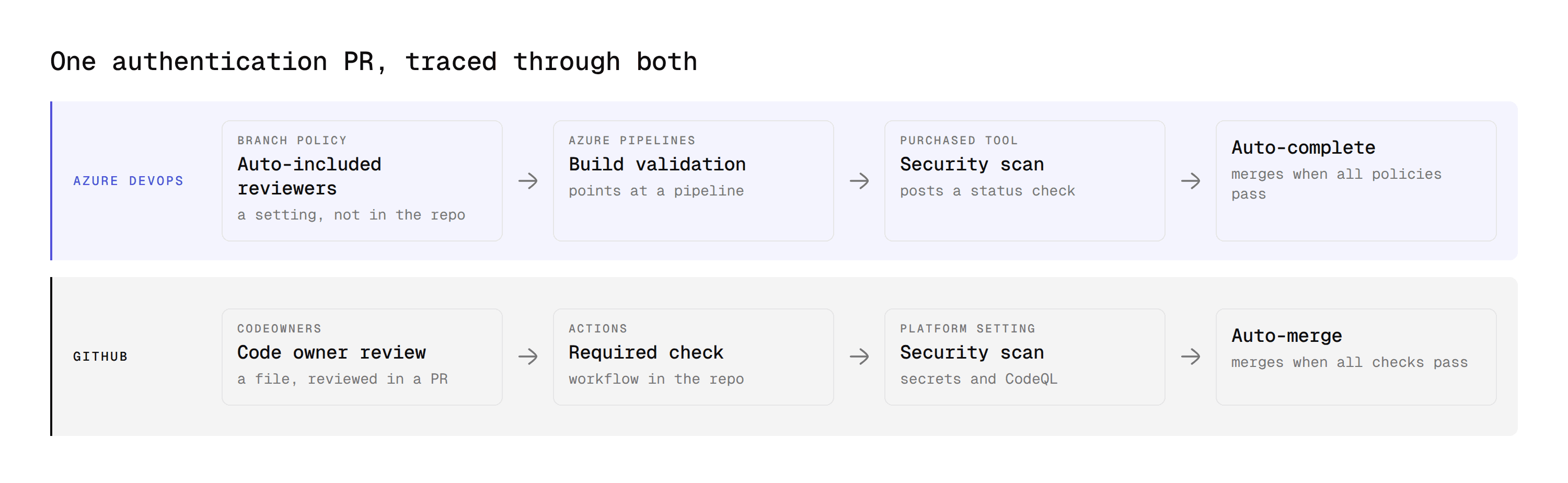
On Azure DevOps
The developer pushes a branch and opens a PR. Because the branch policy has an "Automatically included reviewers" entry for /src/auth/**, the security team gets added as required reviewers automatically. Build validation kicks off against the configured pipeline. If a third-party SAST tool is configured as a status check, it analyzes the diff and posts its result independently of the build.
The developer sees a growing list of pending checks in the PR's policy section: build validation, the security team's review, and the external status check, each with its own pass/fail state. Once all three clear, and assuming the pipeline is set to auto-complete, the PR merges without anyone clicking a button.
On GitHub
The developer pushes a branch and opens a PR. The CODEOWNERS file, which lists the security team against the same /src/auth/ path, triggers the same automatic reviewer assignment, but it's visible as a file in the repo, not a setting buried in project configuration. A GitHub Actions workflow runs the same build and test steps, posting as a required status check.
If Copilot code review is requested, it comments inline within minutes. If GitHub Advanced Security is enabled, secret scanning and CodeQL analysis run automatically without any extra configuration, a meaningful difference from Azure DevOps, where equivalent security coverage requires deliberately adding a third-party tool.
The end state, a merged PR that passed review, tests, and security scanning, looks similar on both platforms. The path to get there differs in exactly the ways described above: more configuration surface and merge-strategy granularity on Azure DevOps, more native AI and security tooling on GitHub.
Migrating Code Review Workflows Between Platforms
If you're moving repositories from one platform to the other rather than just comparing them, a few things need deliberate mapping rather than a like-for-like copy:
CODEOWNERS to Azure DevOps (GitHub to Azure DevOps): recreate each CODEOWNERS path rule as an "Automatically included reviewers" policy entry, and decide who gets Edit Policies permission to maintain it going forward, since it's no longer a file anyone with repo write access can edit directly. Test the path filter syntax carefully during this step, Azure DevOps's path matching (single * versus double **) doesn't behave identically to CODEOWNERS glob patterns, and a rule that matched correctly on GitHub can silently stop matching subdirectories on Azure DevOps if the wildcard isn't adjusted.
Azure DevOps branch policies to GitHub branch protection (Azure DevOps to GitHub): the four-tier vote system doesn't map cleanly to GitHub's three-tier review; teams typically standardize on Approve and Request Changes, dropping the "Approve with suggestions" middle state or handling it as a comment convention instead. Merge strategy restrictions need re-checking too, Azure DevOps's semi-linear merge option has no direct GitHub equivalent, so teams relying on it typically settle for GitHub's rebase-and-merge as the closest substitute.
Status checks and quality gates: if you're running a third-party tool (CodeAnt AI, a SAST scanner) as a required status check on one platform, confirm it supports the other before migrating, not every tool has equivalent maturity on both, as the AI review comparison above makes clear. Check specifically whether the tool's PR comments are inline (attached to a specific line) or summary-only on the target platform, since some vendors ship a fuller integration on their primary platform and a lighter one elsewhere.
Work item and issue linking: Azure Boards work items linked via AB# syntax don't automatically become GitHub Issues, and vice versa. If work item history matters for audit or reporting purposes, plan a separate export rather than assuming the PR migration carries it over.
How CodeAnt AI Covers Both Gaps on Either Platform
Most tools in this category pick a side. They ship a polished GitHub integration and a thinner Azure DevOps one, which means the review experience changes depending on which host a team happens to be on. CodeAnt AI runs the same on both, and on GitLab and Bitbucket, so the comparison above stops being a decision you have to make.
1. It gates the merge, which native Copilot on Azure Repos cannot
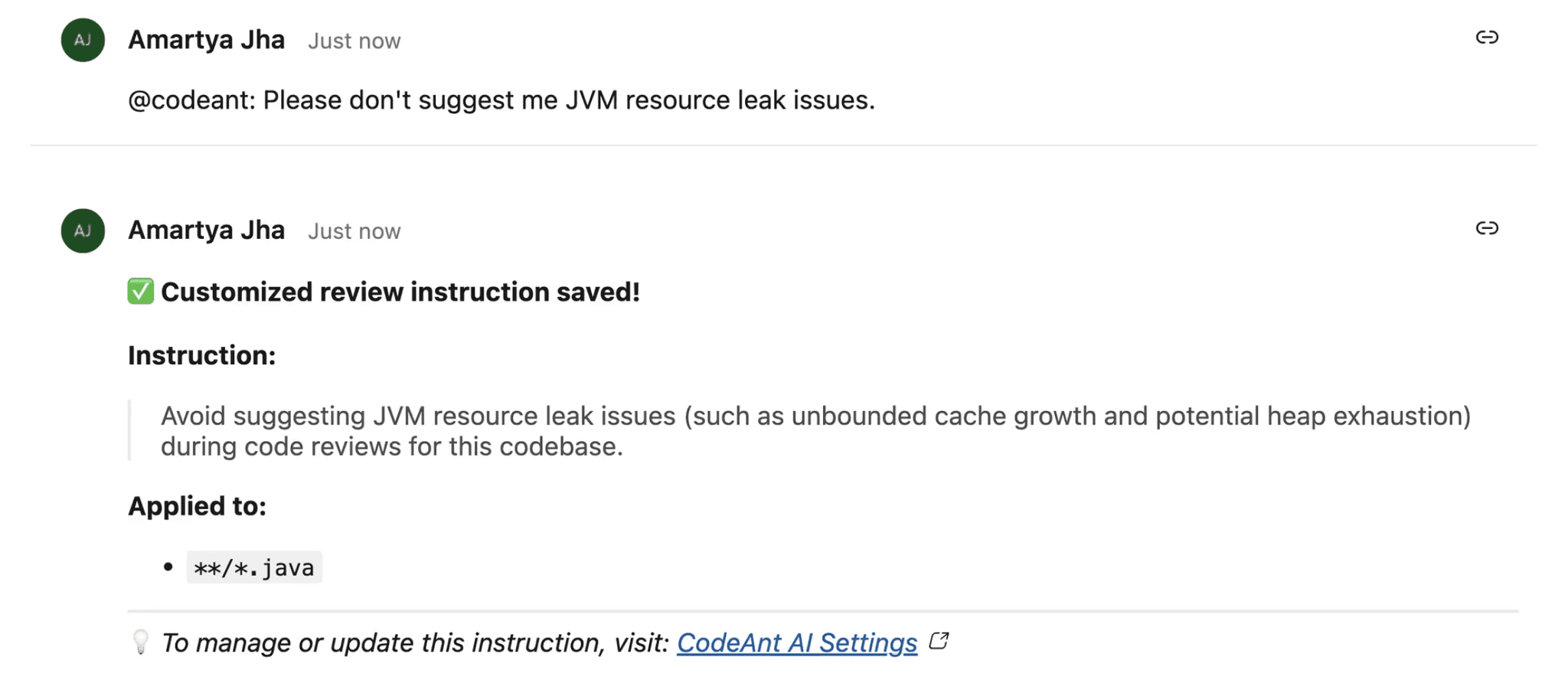
This is the specific failure the AI review section describes. Copilot on Azure Repos posts comments and cannot satisfy a required reviewer, so it never blocks anything.
CodeAnt AI posts a status check alongside its inline comments. Configure that status as a required policy and a failed review stops the merge, the same way a failed build does. The mechanics are in our branch policies guide, and the API call behind it is in the REST API guide.
2. It covers review and security in the same pass
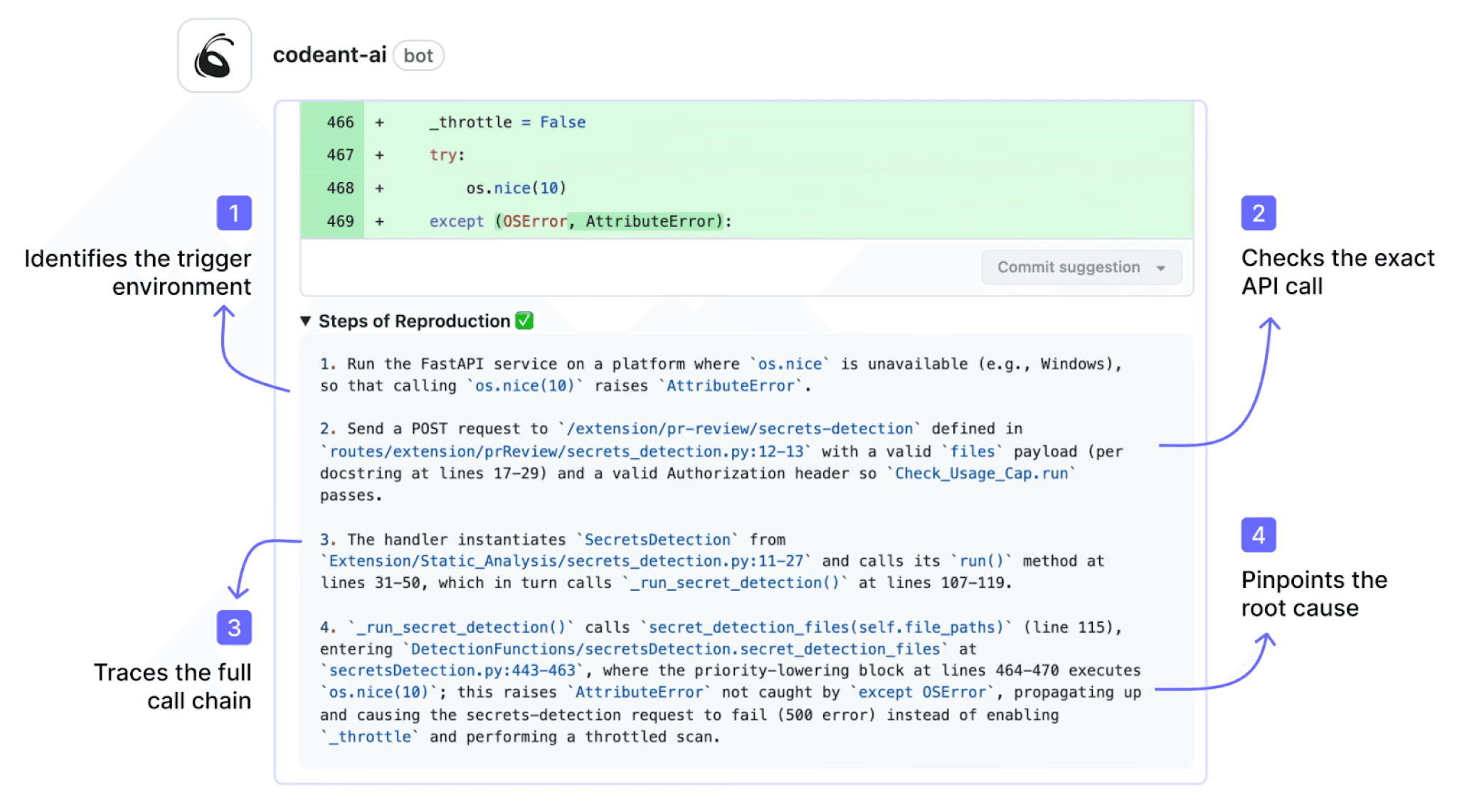
The tool-selection section above asks whether a candidate covers the whole gap or only part of it. This is the answer to that question.
AI code review and code security run together on the same pull request, covering SAST, SCA, IaC misconfiguration, and secrets detection. Security findings carry Steps of Reproduction showing the full attack path, not a rule ID. On Azure DevOps that means one tool instead of the two or three the platform's native gaps otherwise force.
3. It runs where GHAzDO cannot
GitHub Advanced Security for Azure DevOps needs Azure DevOps Server 2022 or later connected to Azure. Air-gapped environments are excluded by design, which is exactly the constraint regulated teams on Azure DevOps Server hit first.
CodeAnt AI deploys fully on-premises or inside your own AWS, GCP, or Azure VPC, with code never leaving your environment. For a Microsoft-stack team that cannot connect to Azure, that is the difference between having an option and not having one.
Close the Gap Without Moving Platforms
The two real differences between Azure DevOps and GitHub for code review are native AI review maturity and native security scanning depth. Both currently favour GitHub, and neither is a reason on its own to migrate a platform your organisation already runs.
They are tooling gaps, not architectural ones. A tool that works equivalently on both closes them in weeks. A platform migration takes quarters and touches every workflow your teams have built.
The decision that actually matters is narrower than the comparison suggests. On GitHub, a third-party tool extends coverage the platform already provides. On Azure DevOps, it supplies coverage the platform does not have.
Where to start this week
Take one repository on whichever platform you are on and list what actually runs on a pull request today. Native AI review, yes or no. SAST, yes or no. Secrets detection, yes or no. Dependency scanning, yes or no. Then check one more thing: whether any of them can actually block a merge, or whether they only comment. If you are on Azure DevOps and most of those are no, that is the gap this whole comparison describes, and it closes with a tool rather than a migration.
Book a walkthrough with our team →
Related reading
Azure DevOps AI Code Review Guide: how automated review works on Azure Repos pull requests.
Branch Policies in Azure DevOps: the Azure DevOps side of the branch protection comparison above.
Required Reviewers in Azure DevOps: includes the CODEOWNERS to Azure DevOps migration mapping.
9 Best GitHub AI Code Review Tools for Enterprise Teams: the same evaluation run from the GitHub side.
Best Code Review Tools for Azure DevOps: what closes the Azure DevOps gaps described above.

