

Copilot will review your pull request in about a minute. It will not approve it.
Both halves of that sentence matter. The first is why teams turn it on. The second is why the merge button is still greyed out afterwards, which surprises almost everyone the first time.
This guide walks through the whole loop: requesting a review, applying and batching its suggestions, pushing back on the ones you disagree with, automating it so it runs on every pull request, and tuning it to your codebase. Then what it cannot do, which is the part that decides what else you need.
Where this connects: CodeAnt AI posts AI code review and security scanning as a status check, so a critical finding holds the merge rather than joining a comment thread. It runs on GitHub, GitLab, Bitbucket, and Azure DevOps equivalently.
Key Facts at a Glance
Question | Short answer |
|---|---|
What you need | A paid Copilot plan: Pro, Pro+, Business, or Enterprise |
CLI requirement | GitHub CLI v2.88.0 or later for |
How it runs | As a GitHub Actions workflow named Copilot code review |
What it costs | GitHub AI Credits, plus Actions minutes on private repositories |
Can it approve | No. It comments only, and never satisfies a required reviewer |
Automating it | A repository ruleset, an organisation policy, or a personal setting |
Tuning it |
|
Re-review on new commits | Only if you enable it in the ruleset, or request it manually |
Prerequisites
Three things before you start.
A paid Copilot plan. Pro, Pro+, Business, or Enterprise. Check yours in GitHub Copilot settings. Organisation-managed accounts inherit the organisation's policy, which overrides anything you set personally.
GitHub CLI v2.88.0 or later, if you want to request reviews from the terminal. Earlier versions cannot pass
@copilotas a reviewer, so you have to use the web interface instead.A repository you can open pull requests against. Anywhere you can push a branch works.
Budget for two meters, not one. Copilot moved to usage-based billing on 1 June 2026. Premium request units were replaced by GitHub AI Credits, metered on the tokens an interaction consumes, and code review carries a published multiplier of 13 against the requests meter.
Separately, because code review now runs on an agentic architecture executed by GitHub Actions, reviews on private repositories also draw from your Actions minutes at the same per-minute rate as any other workflow. Public repositories are exempt from that second meter. Code completions and Next Edit Suggestions remain unmetered.
The practical consequence is that automatic reviews on a repository with heavy bot traffic, Dependabot in particular, now consume from the same Actions pool your CI already uses. Check your spending limits before enabling it broadly.
Step 1: Request a Review
From the pull request page
Open the pull request, find Reviewers in the right sidebar, and select Copilot the same way you would add a colleague.
The review starts immediately. Comments appear within a minute or two depending on the size of the diff.
From the command line
Faster if you are already in a terminal, and it lets you request the review as part of opening the pull request.
--fill populates the title and body from your commit history. The @ on @copilot matters, and the whole thing needs gh v2.88.0 or later.
Watching it run
Copilot code review executes as a GitHub Actions workflow. If you want to see progress, or work out why nothing appeared, the Actions tab has a run named Copilot code review with the same logs as any other workflow.
That is the first place to look when a review does not show up, and it is not obvious unless someone tells you.
Step 2: Read and Apply the Suggestions
When the run finishes, two things appear on the pull request.
A summary comment at the top of the Conversation tab, describing what the change does.
Inline comments anchored to specific lines in the diff. Many include a ready-to-apply suggestion in a fenced block.
Applying one suggestion
Under any comment with a suggestion, click Commit suggestion. GitHub stages the change and lets you write a commit message before pushing. The default is a generic Potential fix for pull request finding, which is worth rewriting into something that will make sense in six months.
Once committed, the pull request updates, the thread collapses, and the original comment is marked Outdated.
Applying several at once
Committing suggestions one at a time produces a commit per fix, which makes a mess of the history.
Switch to the Files changed tab and click Add suggestion to batch instead of Commit suggestion. GitHub queues each one without committing. When you have batched everything you want, click Commit suggestions at the top to bundle them into a single commit.
Handing the whole thing to the agent
If several comments have no ready-made suggestion, or a fix spans multiple files, there is a third option.
Go back to the Conversation tab, find Copilot's summary comment, and click Fix batch with Copilot. The coding agent works server-side and pushes the changes to your branch a few minutes later.
This handles what suggestion blocks cannot, because it writes changes rather than only committing ones already proposed.
Pushing back on a suggestion
Copilot is not always right. Reply to any of its comments mentioning @copilot directly in the thread.
The agent reacts with an eyes emoji to acknowledge, then posts a follow-up a minute or two later. It reads the whole thread including the original summary, so you can ask why a comment matters, disagree with the reasoning, or ask for a different approach.
Knowing when not to apply one
Volume is the failure mode here. Expect a proportion of comments to fall into three buckets:
Conventions your team decided against on purpose, which the model has no way of knowing
Findings that would be correct without context the diff does not contain, such as a guarantee enforced two layers up
Hardening suggestions that are technically fine and make the code longer without making it safer
Click Resolve conversation without applying, and add a short reply explaining why if it is someone else's pull request. The thread collapses and stops competing for attention.
Step 3: Make It Automatic
Requesting a review by hand works until someone forgets, which produces the odd situation where whether a change gets reviewed depends on who opened it.
There are three levels, and they interact.
Repository ruleset, the usual choice
Repository Settings, then Rules, then Rulesets. Click New ruleset and choose New branch ruleset.
Name it something like "Copilot auto review", set Enforcement status to Active, and under Target branches add the branches you want covered, usually the default branch.
Scroll to the bottom of Branch rules and select Automatically request Copilot code review. Two sub-settings sit underneath. One re-runs Copilot when new commits are pushed to an open pull request, which is off by default and is the reason reviews go stale. The other runs it before a human review is requested.
You may be prompted to re-verify your identity, since this counts as a sensitive change.
Organisation policy, which overrides everything
An administrator can turn Copilot code review on or off for the whole organisation under Policies. If it is off there, no repository owner or individual can opt in until it is re-enabled.
Personal setting
Your own Copilot settings have an Automatic Copilot code review toggle that applies to every pull request you open. On an organisation-managed account the organisation policy takes precedence.
Ruleset is the right level for most teams, because it covers everyone working in the repository rather than everyone who happens to have their personal toggle on.
Step 4: Tune It to Your Codebase
Out of the box, Copilot reviews against a generic idea of good code. A .github/copilot-instructions.md file at the root of your repository changes that. The agent reads it before every review.
Two things about this file. Each line is a hint rather than a rule, so it steers without guaranteeing. And keep it short: three to five focused bullets work better than a long document, because long instructions get squeezed out of the agent's context budget.
If Copilot is too noisy, the highest-value thing you can tell it is what your framework already protects against. That is the single largest source of unnecessary comments in any general reviewer.
Path-specific instructions
For a larger codebase, project-wide guidance dilutes. GitHub supports per-path instruction files under .github/instructions/, each ending in .instructions.md with a glob in the front matter.
Copilot loads the matching files for any pull request touching those paths. They stack on top of the project-wide file and override it where the two conflict.
A reasonable arrangement is one file for backend, one for frontend, and one for infrastructure code, rather than a single file trying to cover all three.
Troubleshooting
No review appeared
Check the Actions tab for a run named Copilot code review. Most failures show up there with the same logs as any workflow.
Common causes: the diff is too large or contains binary files, your AI Credit balance or Actions spending limit is exhausted, or there is an active GitHub incident.
The review is stale after pushing new commits
Copilot does not re-run automatically unless you enabled that sub-setting in the ruleset. Click Re-request review next to Copilot in the Reviewers sidebar for a fresh pass.
It flags things that are fine in our framework
That is what copilot-instructions.md is for. Tell it what your framework already guarantees rather than resolving the same comment every week.
Comments differ between runs on the same code
Expected. The reviews are non-deterministic and GitHub changes the underlying models over time, so two runs on an identical diff can surface different comments. Custom instructions narrow the variance, they do not remove it.
The merge button is still disabled
That is not a Copilot problem. See the next section.
What Copilot Code Review Cannot Do
Four boundaries. Each is the reason teams add something alongside it rather than instead of it.
It cannot satisfy a required approval
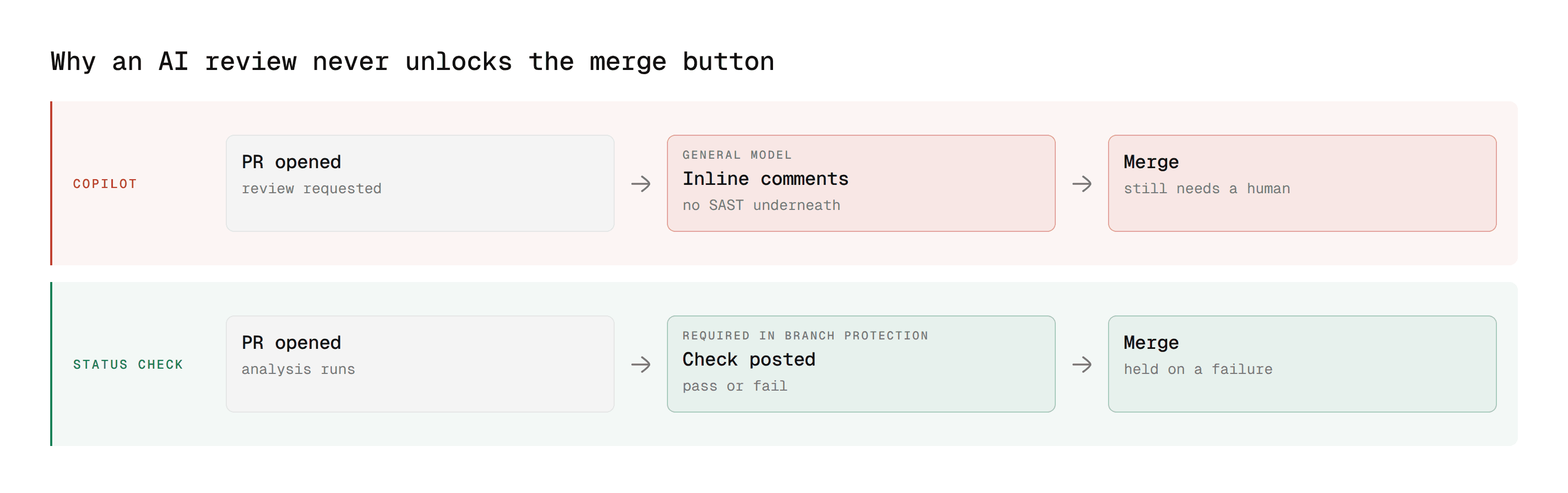
Copilot's output is comments, not an approval. A branch protection rule requiring one approving review is not satisfied by it, and it cannot satisfy a CODEOWNERS requirement either.
The consequence is that Copilot changes nothing about what can merge. A critical issue in a Copilot comment merges exactly as easily as no comment at all, unless a person reads it and acts.
It is not a security scanner
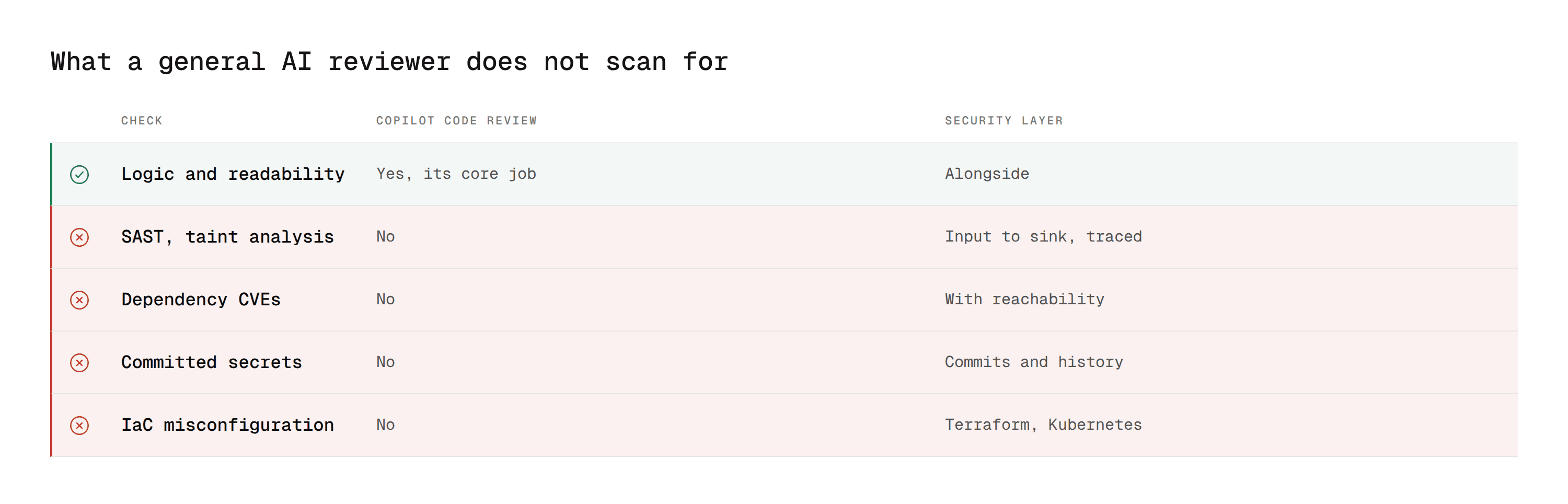
Copilot reads the change and reasons about it. It does not perform static application security testing, secret detection, dependency scanning, or infrastructure-as-code analysis.
GitHub has those as GitHub Advanced Security, a separately licensed product. Copilot does not replace it and does not surface its findings.
A team that adopted Copilot expecting AI review to cover security has a gap, and it is invisible until something reaches production. Our guide to what SAST actually is covers why a general model reading a diff is a different capability from taint analysis.
It is scoped to the change
Copilot reads the diff and relevant surrounding context. It is not indexing your whole repository to trace how a changed function is called three services away.
For most pull requests that is fine. For a change whose blast radius sits outside the changed files, it is the failure mode, and no amount of instruction tuning fixes it.
It does not track findings
There is no state, no ownership, no timestamp on resolution. A comment is a comment. If you need to answer how many open issues of a given type exist across the estate, or prove findings were resolved within a window, that is a different kind of tool.
Copilot Code Review on Azure DevOps
A separate implementation with tighter limits and the same name, which is where most of the remaining confusion sits.
It has moved quickly. Microsoft announced a limited preview in June 2026 and widened it in August, and the terminology has been inconsistent throughout: the August announcement describes a public preview with no sign-up, while the documentation still carries a limited-preview banner with no SLA. Rollout is regional and staged, so availability varies by organisation.
GitHub | Azure DevOps | |
|---|---|---|
Status | Generally available | Public preview, no SLA, staged regional rollout |
Enabling it | Repository ruleset | Organisation, then project, then repository |
Automatic reviews | Repository ruleset | A branch policy setting |
Satisfies a required reviewer | No | No |
Can block a merge | No | No |
Repository types | Git | Azure Repos Git only, no TFVC |
Repository size | No published cap | 10 GB |
Pull request size | Large diffs truncated | 100 changed files |
Other conditions | None | PR must be Active with no merge conflicts, one completed review per merge commit |
Billing | AI Credits plus Actions minutes | AI Credits against the linked Azure subscription |
Three things matter more than the rest. Enabling it takes three levels rather than one, and the automatic-review setting sits under branch policies rather than anywhere obvious. The size caps are hard limits, so a large monorepo is excluded outright. And on a platform whose main strength is policy enforcement, the native AI reviewer sits entirely outside the policy layer.
Combined with Azure DevOps having no native equivalent to GitHub Advanced Security, that leaves a wider gap than the same feature does on GitHub. Our Azure DevOps vs GitHub comparison covers the full picture.
How the Native Reviewers Compare
Every major platform ships one now, and they are more alike than the marketing suggests.
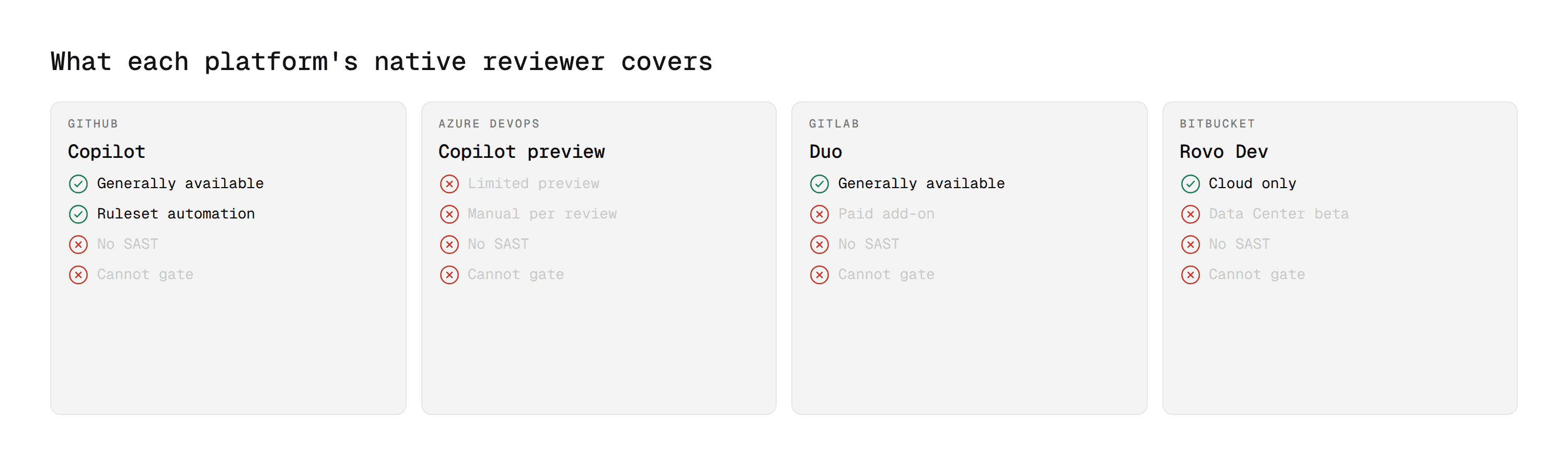
GitHub Copilot | GitLab Duo | Bitbucket Rovo Dev | |
|---|---|---|---|
Licensing | Copilot subscription | Add-on on a paid tier | Credit-metered |
Dedicated SAST | No | No | No |
Satisfies a required approval | No | No | No |
Distinctive strength | Ruleset automation, batching | Chat scoped to the merge request | Validates against Jira acceptance criteria |
Platform security underneath | Advanced Security | Security templates, by tier | None native |
Three things are true of all of them. None does dedicated security analysis. None satisfies a required approval. All three improve the conversation without altering what can merge.
Our comparisons of GitLab Duo and Bitbucket versus GitHub cover the other two in depth.
Where CodeAnt AI Fits Alongside Copilot
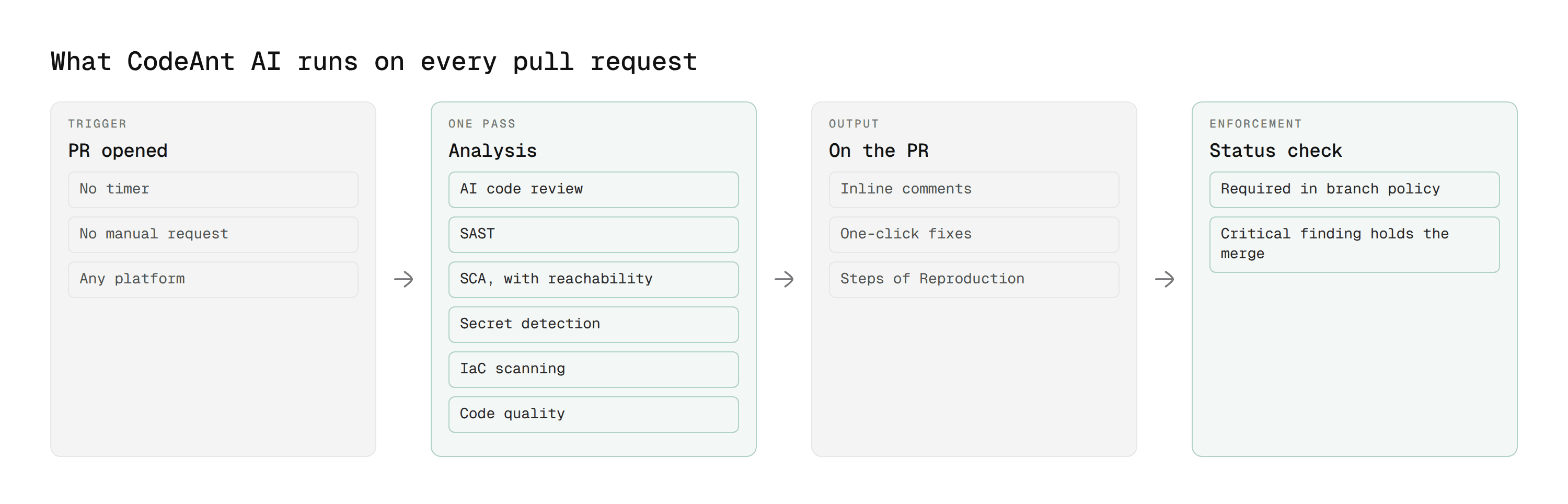
Copilot is a reviewer. The three things it cannot do are gate a merge, scan for vulnerabilities, and behave the same on every platform you run. Those are the three CodeAnt AI is built around.
1. It gates, rather than adding to the thread
The analysis posts a status check, not just comments. Mark that status required in a branch protection rule and a critical finding holds the merge until someone deals with it.
That is the whole difference between a reviewer and a control, and it is the first thing to check when comparing anything in this category. Copilot comments. So does Duo. So does Rovo Dev. None of them changes what can merge.
2. It covers the four categories Copilot does not
SAST, SCA, IaC scanning, and secret detection run in the same pass as the review rather than as a separately licensed platform product, backed by a deterministic engine of more than 30,000 checks across 30 or more languages alongside the AI layer.
The part that decides whether any of it gets triaged is what happens before a developer sees a finding. CodeAnt AI is built as a defensive and offensive platform, so findings are checked for real exploitability first, and each carries Steps of Reproduction showing the full path rather than a rule identifier. On dependency findings, reachability separates the vulnerable functions your code actually calls from the ones it never touches.
That is the difference between a queue a team clears and one it learns to ignore.
3. It works the same everywhere, including self-hosted
Copilot is generally available on GitHub and in public preview on Azure DevOps, where it carries hard repository and pull request size caps and a three-level setup. Duo is GitLab only. Rovo Dev is Bitbucket Cloud, with Data Center still in beta.
Run two platforms, which most organisations do after an acquisition, and that means two review experiences, two sets of limits, and two things to explain to a new engineer.
CodeAnt AI runs equivalently across GitHub, GitLab, Bitbucket, and Azure DevOps, including self-managed instances, with on-premises and customer VPC deployment and zero data retention for teams whose code cannot leave the network. Custom policies are written in plain English rather than rule configuration, so team standards get enforced rather than documented.
A Fast Reviewer Is Not a Control
Set up properly, Copilot gives every pull request a baseline review within a minute, in your team's conventions, with suggestions you can batch into one commit. That is a real improvement on waiting three hours for a human to open the tab.
What it does not do is change what can merge. It does not approve, it does not gate, and it does not scan for vulnerabilities. Those are three separate jobs, and on GitHub they belong to a human, a required status check, and Advanced Security respectively.
Most teams that adopt Copilot and stop looking have covered the first pass and none of the other three.
Where to start this week
Enable the ruleset, including the sub-setting that re-runs on new commits, since that one is off by default and is why reviews go stale. Then write four bullets in .github/copilot-instructions.md telling Copilot what your framework already handles. Those two changes take twenty minutes and remove most of the noise people complain about.
Book a walkthrough with our team →
Related reading
How to Approve a Pull Request in GitHub: why the merge button stays disabled after an approval.
9 Best GitHub AI Code Review Tools for Enterprise Teams: what teams run alongside Copilot at scale.
Azure DevOps vs GitHub Code Review: why the same feature behaves differently on each.
GitLab Duo for Code Review: the GitLab equivalent, with the same boundaries.
What Is SAST: why a general reviewer and a security scanner are different capabilities.

