

GitLab's security scanning is three lines of YAML away from running. It is considerably further than that from actually stopping anything.
That gap is where most GitLab teams live. The templates are included, the pipeline is green, the merge request widget shows findings, and nothing has ever been blocked because of one. The scanning works. The enforcement was never configured.
This guide covers what each scanner does, how the tiers gate them, how to wire a finding so it holds a merge, and where the model runs out.
Where this connects: CodeAnt AI runs SAST, SCA, IaC scanning, and secret detection alongside AI code review on every merge request, on any GitLab tier.
Key Facts at a Glance
Question | Short answer |
|---|---|
How scanning runs | As pipeline jobs, included from templates in |
Config location | The repo, so security is versioned with the code |
What is broadly available | SAST and secret detection in some form across tiers |
What is tier-gated | Deeper analysis, container scanning, DAST, the Vulnerability Report |
Does a finding block a merge | Not by default. It reports. Blocking takes extra configuration |
Where findings appear | The merge request widget, and the Vulnerability Report on upper tiers |
The usual failure | Scanning enabled, enforcement never configured, backlog grows |
How GitLab Security Scanning Actually Works
GitLab does not run security as a platform service sitting beside your pipeline. It runs it as jobs inside the pipeline, which is the design decision everything else follows from.
You include a template, GitLab injects the job, the job runs a scanner in a container, and the scanner writes a report artifact in a defined format. GitLab reads that artifact and renders the findings into the merge request.
Three consequences worth understanding before you tune anything.
Security config is version controlled. The scanning setup lives in the repo, is reviewed in a merge request, and changes with the code. That is genuinely better than a settings page nobody audits.
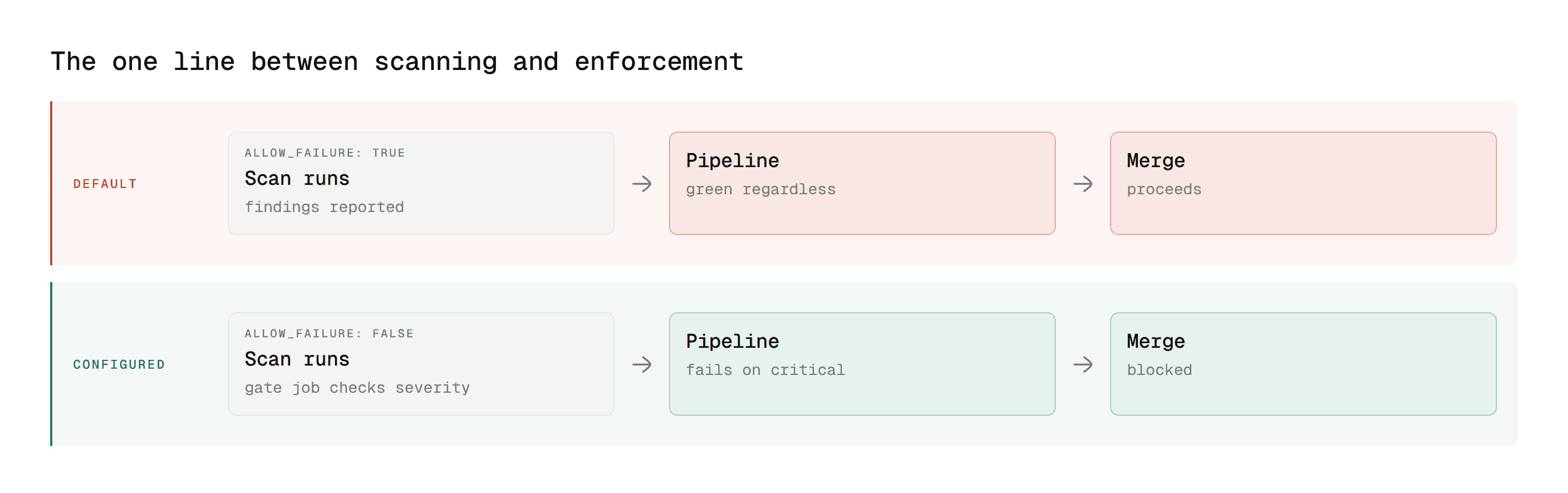
The job is a job. It can be given rules, stages, and dependencies like any other. It can also be made
allow_failure: true, which is the single most common reason scanning never blocks anything.One template can be shared. A hosted
include: remote:or a project template gives every repository the same baseline, changed centrally. For a platform team maintaining consistency across a large estate, that is the whole argument for GitLab's model.
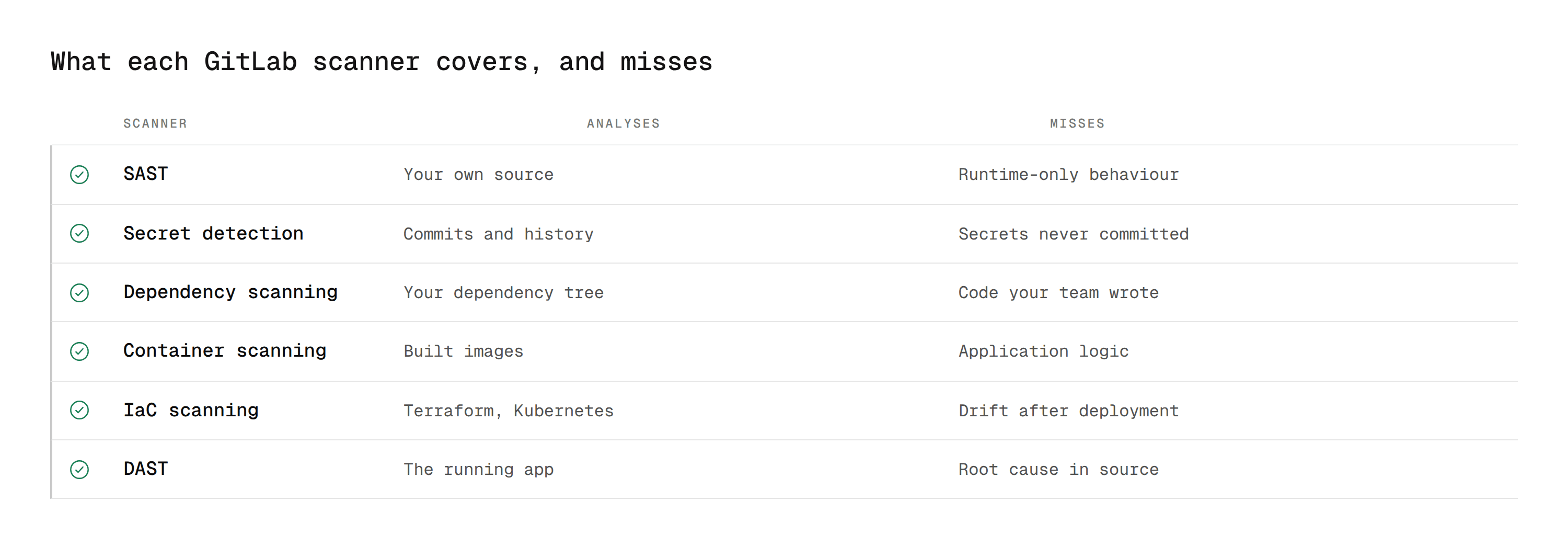
What Each Scanner Covers
Scanner | What it analyses | Catches | Misses |
|---|---|---|---|
Your own source, without running it | Injection paths, unsafe deserialisation, insecure patterns | Anything only visible at runtime | |
GitLab secret detection | Commits and history | Committed tokens, keys, connection strings | Secrets that were never committed |
Dependency scanning | Your dependency tree | Known CVEs in packages you pull in | Defects in code your team wrote |
GitLab container scanning | Built images | Vulnerable OS and language packages in the image | Application logic |
Terraform, Kubernetes, CloudFormation | Public buckets, permissive IAM, open security groups | Drift after deployment | |
DAST | The running application | Auth flaws, misconfigured headers, runtime exposure | Root cause in source |
Two of these have no direct GitHub equivalent, which rarely gets mentioned in platform comparisons. GitLab container scanning and DAST are genuine GitLab advantages, covered in our GitLab vs GitHub comparison.
SAST is not one scanner
GitLab's SAST template dispatches to different analysers depending on what languages it detects in the repository. That is convenient and it hides something: coverage and depth vary by language, and a language your team uses heavily may be served by a thinner analyser than one you barely touch.
Check which analyser runs for your primary language rather than assuming the template means uniform coverage. Our SAST tools comparison covers what depth looks like outside the bundled set.
The Tier Question
GitLab's scanning is layered by plan, and the layering is the thing that decides most buying conversations.
Broadly, basic SAST and secret detection are available widely, while deeper analysis, container scanning, DAST, the vulnerability Report, and the Security Dashboard sit on upper tiers. Specific boundaries move, so verify against GitLab's current documentation rather than a blog post, including this one.
The structural point does not move. The findings view is tier-gated, not just the scanners.
That matters more than it sounds. Without the Vulnerability Report and the GitLab Security Dashboard, findings live in individual merge request widgets. There is no cross-project view, no state tracking, and no way to answer "how many open critical findings do we have" without scripting it from the API.
A team on a lower tier therefore has scanning but no security programme. Which is the real decision: not whether to scan, but whether to buy the tier for the dashboard, script the aggregation yourself, or use a tool that brings its own.
Making a Finding Actually Block a Merge
This is the part most teams skip, and it is the difference between scanning and enforcement.
Step 1: stop letting the job fail silently
Several security templates ship with allow_failure: true. A job that is allowed to fail reports findings and lets the pipeline go green.
Override it explicitly:
Now a failing scan fails the pipeline.
Step 2: fail on severity, not on any finding
Failing on every finding makes the gate useless within a week, because someone will disable it. Fail on what matters.
Two details matter more than the jq. The job prints the specific findings, because a gate that fails without saying what broke teaches people to look for the bypass. And it runs as a separate job with needs:, so the scan result is available to evaluate.
Step 3: require the pipeline in the merge policy
A failing pipeline only blocks if the project requires a successful pipeline to merge. Turn that on, and combine it with approval rules so a security-relevant path also needs a human from the right group.
Named CODEOWNERS sections are the cleanest way to express that:
Step 4: roll it out without a revolt
Turn the gate on in report-only mode first. Leave exit 1 commented for two weeks and let the message appear. Flip it to blocking once the merge requests open at the time of the change have cleared. A gate that fails randomly on day one is a gate someone will route around by month two.
Reading the Report Artifact Directly
Everything GitLab renders into the merge request comes from a JSON artifact the scanner writes. Knowing its shape is what lets you build a gate, an export, or a dashboard that GitLab does not give you on your tier.
The SAST job declares it as a report artifact:
Adding paths: matters. Without it the file is consumed by GitLab as a report and is not available to download or to a later job, which is the most common reason a custom gate job cannot find it.
The structure is stable enough to script against:
Three fields do most of the work. severity is what you gate on, location is what you print so the developer knows where to look, and identifiers is what you map to your own taxonomy if you report against CWE or OWASP internally.
Severity values, and the one that surprises people
The severity field takes a fixed set: Critical, High, Medium, Low, Info, and Unknown.
Unknown is the one to decide about explicitly. Some analysers emit it when they cannot map a rule to a severity, and a gate written as severity != "Low" will then block on findings nobody has assessed. Enumerate the severities you block on rather than excluding the ones you do not.
Pulling findings through the API
On tiers with the Vulnerability Report, findings are queryable rather than only downloadable:
This is how you answer "how many open critical findings across the estate" without clicking through projects. On tiers without it, the equivalent is collecting gl-sast-report.json from each project's latest pipeline and aggregating yourself, which is the hidden cost of the lower tier.
The job artifact is reachable per project:
Running scans only where they are relevant
Security jobs on every pipeline is how pipeline time becomes the reason scanning gets removed. Scope them:
That runs SAST on merge requests that touch source, and on every commit to the default branch, and skips it on documentation-only changes. The default-branch rule matters: without it your baseline never updates and every merge request compares against a stale picture.
Variables Worth Knowing
The templates are configured through CI variables rather than a settings page. These are the ones that come up most.
Variable | What it does |
|---|---|
| Comma-separated paths to skip, the highest-leverage noise control |
| Turn off specific analysers you have replaced |
| The same, for secret detection |
| Scan full history rather than the diff, expensive, run once |
| Dependency scanning exclusions |
| Minimum severity container scanning reports |
| Pin to FIPS images where required |
Set them at the group level rather than per project if you want one place to change them. Project-level values override group-level, which is useful for a deliberate exception and dangerous as a default.
Troubleshooting
The job runs but no findings appear in the merge request
Almost always the artifact declaration. GitLab reads findings from artifacts:reports:sast, not from stdout. If a custom job writes a report but declares it under paths: only, the pipeline passes and the widget stays empty.
The gate job cannot find gl-sast-report.json
Two causes. The gate job has no needs: on the scan job, so it may run in an earlier stage. Or the scan job declared the report under reports: without also listing it under paths:, so it is not downloadable by a later job.
Scanning stopped after an upgrade
Analyser images are versioned and the templates move with GitLab releases. A pinned SAST_ANALYZER_IMAGE_TAG that no longer exists fails the job, and an unpinned one can change behaviour silently. Check the job log for the image tag actually pulled.
The same finding reappears after being dismissed
Dismissals live in the Vulnerability Report, which is tier-gated. Without it there is no persistent state, so every pipeline reports the finding again as though it were new. This is the single most common reason teams on lower tiers stop triaging.
Secret detection reports a secret that was rotated
Secret detection scans commit history, so a credential that was rotated is still present in the commits where it was introduced. Rotating fixes the exposure and does not remove the finding. Removing it from history requires rewriting it, which is a separate decision.
Tuning the Noise Before It Kills Adoption
A first run against an established codebase is the moment most scanning programmes die. Three hundred findings arrive, nobody triages them, and within a month the job is allow_failure: true again.
Four changes, in the order that removes the most noise fastest.
Exclude what you do not own
Test fixtures, vendored dependencies, and generated code produce findings nobody will ever fix.
This alone typically removes the majority of a first-run backlog.
Separate new findings from the existing backlog
The question a reviewer can answer is "did this change introduce something". The question they cannot answer is "why does this repository have two hundred findings".
Gate on findings introduced by the merge request, and track the historical backlog separately on its own schedule. A gate that fails a developer for something committed three years ago by someone who has left is a gate that gets bypassed.
Gate on severity, then tighten
Start at critical only. Once the critical count is genuinely zero for a few weeks, add high. Adding both on day one means the gate fails constantly and the team learns to route around it.
Scan on a schedule as well as on merge requests
Merge request scanning covers the change. A weekly full scan covers the drift, including dependencies that became vulnerable after they were merged.
The two have different audiences. Merge request findings go to the author. Scheduled findings go to whoever owns the backlog, and if nobody owns it, that is the actual problem.
Applying One Baseline Across Many Projects
Configuring scanning per repository is how drift starts. GitLab's include: makes a shared baseline straightforward, and this is the strongest argument for its model over a settings-page approach.
Put the baseline in one project:
Then include it everywhere:
Pin ref: to a tag rather than main if you want changes to roll out deliberately rather than the moment someone merges to the baseline project.
Two things this buys you. A change to the baseline reaches every project without touching them individually, and the audit question becomes "which projects include the baseline", which is one API query rather than an inspection of every repository.
That query is worth running on a schedule. New projects get created faster than governance notices, and a project that never included the baseline has been scanning nothing since it was created.
Where the Model Runs Out
Four limits worth knowing before you build a programme on it.
Scanning is not prioritisation. A DevSecOps programme is judged on what gets fixed, not on what gets found. Every scanner reports what it found. None of them tell you which findings an attacker could actually reach. Severity measures impact if exploited, not whether exploitation is possible in your codebase, and the gap between those two is where security backlogs come from.
Pipeline time is a real cost. Security jobs add minutes to every pipeline. Teams respond by moving them off merge requests onto nightly schedules, at which point findings arrive detached from the change that caused them and nobody has context.
The findings view is the tier. Covered above, and it is the constraint that most often forces a plan upgrade for reasons unrelated to the scanning itself.
Noise is the adoption risk. A scanner producing two hundred findings on first run against a legacy codebase does not get triaged, it gets muted. Tuning is not optional, and the false positive problem is the thing that decides whether any of this survives contact with a deadline.
A Baseline Worth Copying
For a team starting from nothing, this is a reasonable first configuration.
Include SAST, secret detection, and dependency scanning. Three templates, one file.
Set
allow_failure: falseon all three. Otherwise none of them can ever gate.Exclude test and vendor paths. Findings in
node_modulesare noise and they will dominate the first run.Add the severity gate above, in report-only mode. Two weeks.
Require a successful pipeline to merge. In project settings.
Add a CODEOWNERS section for security-sensitive paths. With a required approval count.
Then flip the gate to blocking. Not before.
That is an afternoon of work and it converts scanning into enforcement, which is the whole point.
What Auditors Ask For, and What GitLab Gives You
Most teams configure scanning for engineering reasons and then discover it has to answer compliance questions. The two need different things.
Change management. Your control almost certainly says production changes are reviewed and approved before release. GitLab's approval rules and pipeline requirement prove approvals exist. What strengthens the evidence is showing which automated checks ran on that change and what they returned, which means the scan result has to be tied to the merge request rather than to a nightly job.
Vulnerability management. The control usually requires identified vulnerabilities to be tracked to resolution within a defined window. That needs findings with a severity, an owner, a state, and a timestamp on each transition. GitLab's Vulnerability Report provides this on upper tiers. Below that, you are scripting it from the API or you cannot answer the question.
Segregation of duties. In tightly regulated environments the author of a change cannot be its sole approver. That is a project setting rather than a scanning feature, but the audit export has to make author and approver distinguishable.
Coverage. The question nobody prepares for is not "what did you find" but "which repositories were scanned at all". A project that never included the security baseline has been silently exempt since it was created, and that is the finding an auditor will actually write up.
Request a sample export during evaluation rather than after. If what comes out cannot be handed to a compliance team in a form they accept, the governance case for the configuration was never real.
Where CodeAnt AI Fits
Three things GitLab's model leaves open, regardless of tier.
1. Coverage without the tier
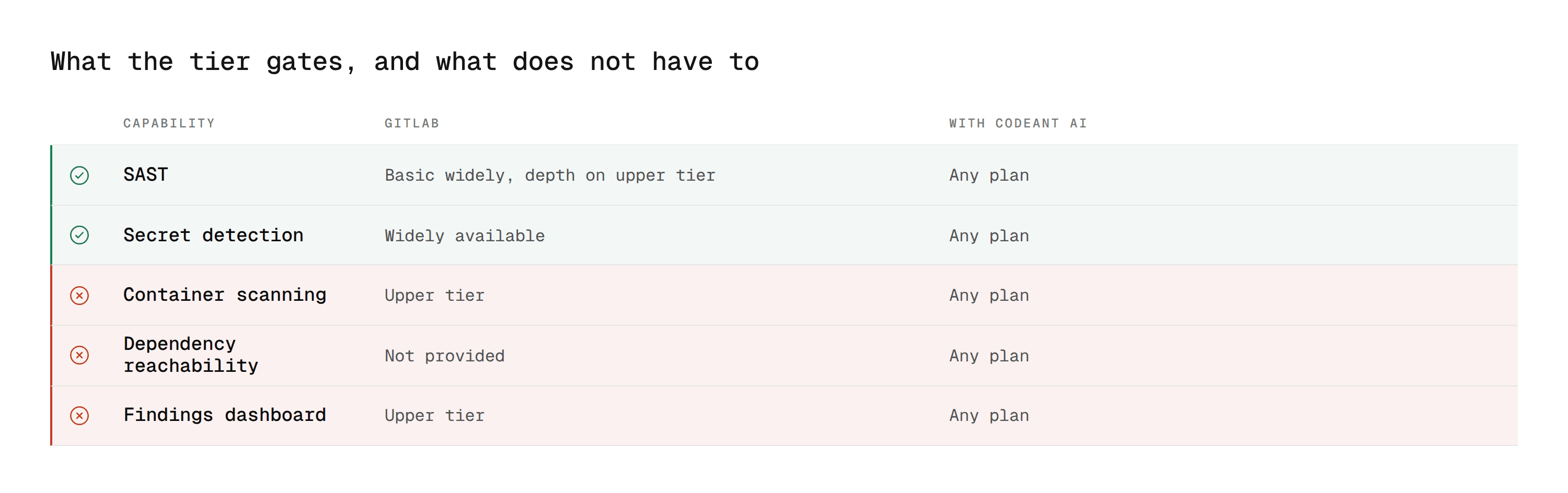
GitLab's deeper analysis, container scanning, and DAST sit on upper plans priced per seat across the whole organisation. A team that needs the coverage but not the rest of the tier is buying a lot to get a little.
SAST, SCA, IaC scanning, and secret detection run on every merge request on any GitLab plan, with code quality tracking on the same analysis rather than as a fourth tool.
2. Exploitability, not just severity
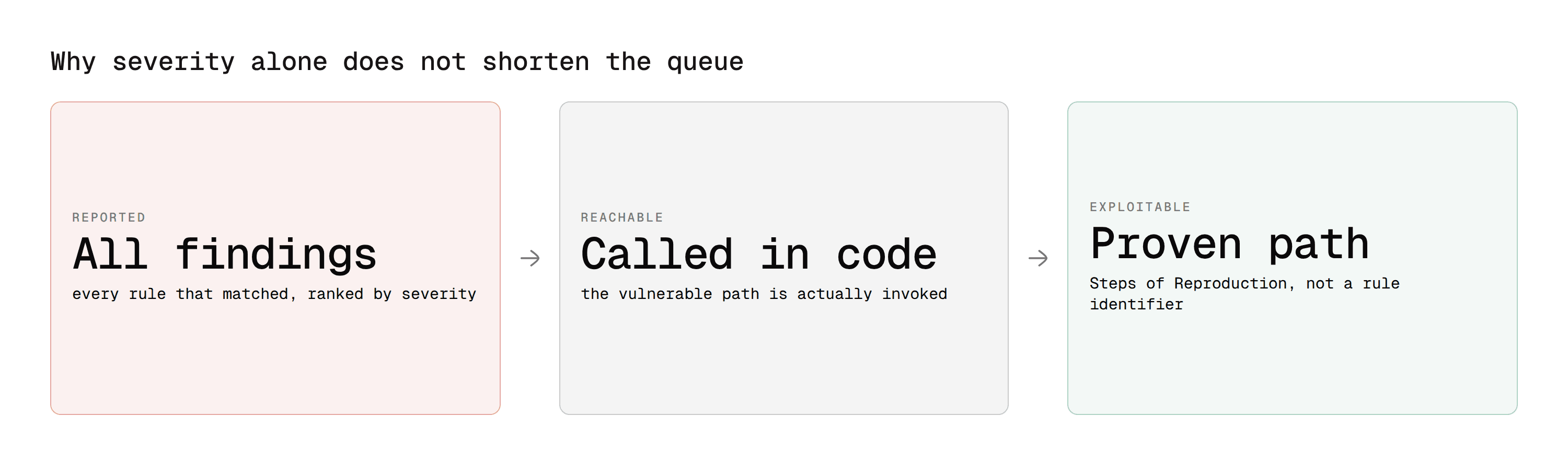
This is the prioritisation problem above, answered directly.
CodeAnt AI is built as a defensive and offensive platform. Static findings are checked for real exploitability before a developer sees them, and each carries Steps of Reproduction showing the full path rather than a rule identifier.
A reviewer can then judge the finding instead of researching it, which is the difference between a queue that clears and one that grows. On dependency findings, reachability separates the vulnerable functions your code actually calls from the ones it never touches.
3. One tool, one gate, one report
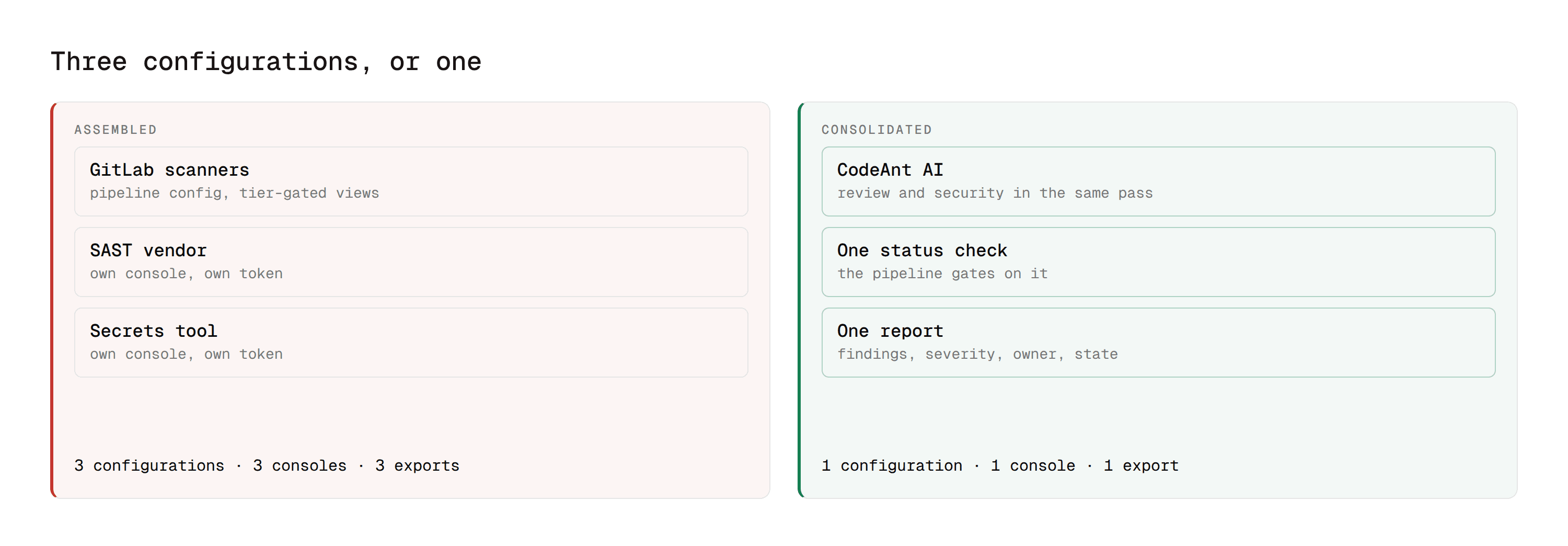
Running GitLab's scanners plus a separate SAST vendor plus a separate secrets tool means three configurations, three consoles, and three exports to reconcile before an audit.
Review and security run in the same pass and post one result the pipeline can gate on. Custom rules can be written in plain English rather than rule configuration, and for teams that cannot send code to a vendor cloud it runs on-premises or in your own VPC with zero data retention.
Reading a Finding Without Guessing
A scanner tells you a rule matched. Turning that into a decision takes four questions, and a team that cannot answer them consistently will triage by severity label alone, which is how backlogs form.
Is the path reachable? A vulnerable function in a dependency your code never calls is a lower real risk than a medium-severity injection path on an authenticated route customers use daily. Severity measures impact if exploited. It says nothing about whether exploitation is possible here.
Is the input actually untrusted? A SAST finding on a value that only ever comes from a config file your team controls is different from one on a value from a request body. The scanner often cannot tell.
Does a control already exist upstream? Validation three functions earlier is invisible to a scanner that starts at the sink.
Who owns the fix? A finding in a shared library used by nine services is a different conversation from one in a single handler, and routing it to the merge request author wastes everyone's time.
GitLab surfaces severity, a description, and the location. The four questions above are the reviewer's, every time, on every finding. That is the real cost of scanning at volume, and it is why the number that matters is actioned findings rather than total findings.
Scanning Is Easy. Enforcement Is the Work
Three lines of YAML gets GitLab scanning your code. Nothing about that changes what can merge.
The configuration that matters is the unglamorous part: turning off allow_failure, gating on severity rather than on volume, requiring the pipeline in the merge policy, and rolling it out in report-only mode so the team trusts it before it blocks them.
Do that and the scanner becomes a control. Skip it and you have a widget that reports findings into a merge request nobody is stopped by.
Where to start this week
Open your .gitlab-ci.yml and check one thing: whether your security jobs have allow_failure: true. If they do, every finding they have ever reported was advisory, and the pipeline has been green throughout. That single line is the difference between a scanning programme and a scanning theatre, and changing it takes longer to decide than to do.
Book a walkthrough with our team →
Related reading
GitLab vs GitHub Code Review: how GitLab's scanning model compares with Advanced Security.
GitLab Duo for Code Review: why the native AI reviewer does not cover any of this.
10 Best GitLab Code Review Tools: the field, including which options gate and which only report.
What Is SAST and Best SAST Tools: the category and the wider field.
Software Composition Analysis: the dependency half, in depth.

