

Most AI code review tools have a Bitbucket integration. Far fewer have one that works on Bitbucket Data Center.
The difference matters more than a checkbox on a pricing page suggests. Teams run Data Center for a reason, usually because source code cannot leave the network, and a tool that needs to reach a cloud API to analyse a diff is not a configuration problem. It is a non-starter.
This guide covers what AI code review looks like on self-hosted Bitbucket, why the Cloud-only pattern is so common, and the specific questions to ask a vendor before you get three weeks into an evaluation and discover the integration was built for Cloud.
Where this connects: CodeAnt AI runs AI code review and code security scanning on Bitbucket Data Center as well as Cloud, and deploys fully on-premises or inside your own VPC, so the analysis happens inside your network rather than against it.
Key Facts at a Glance
Question | Short answer |
|---|---|
What Data Center is | Atlassian's self-managed Bitbucket, the remaining on-premises option since Server reached end of support |
Why tools skip it | Cloud has one stable API surface. Data Center means versioned instances behind a firewall |
What breaks first | Webhook reachability. Your instance has to be able to call the tool, or the tool has to run inside your network |
Licensing | Tiered by user count, so per-seat tooling cost compounds with an already large licence |
Native AI code review | Rovo Dev on Bitbucket Cloud, but its Data Center support is still in beta |
The question to ask vendors | Not "do you support Bitbucket" but "do you support Data Center, and does the analysis run inside our network" |
Data Center Is Not Cloud With A Different Login
Bitbucket Cloud and Bitbucket Data Center share a product name and a mental model. Underneath, they are different enough that an integration built for one frequently does not work on the other.
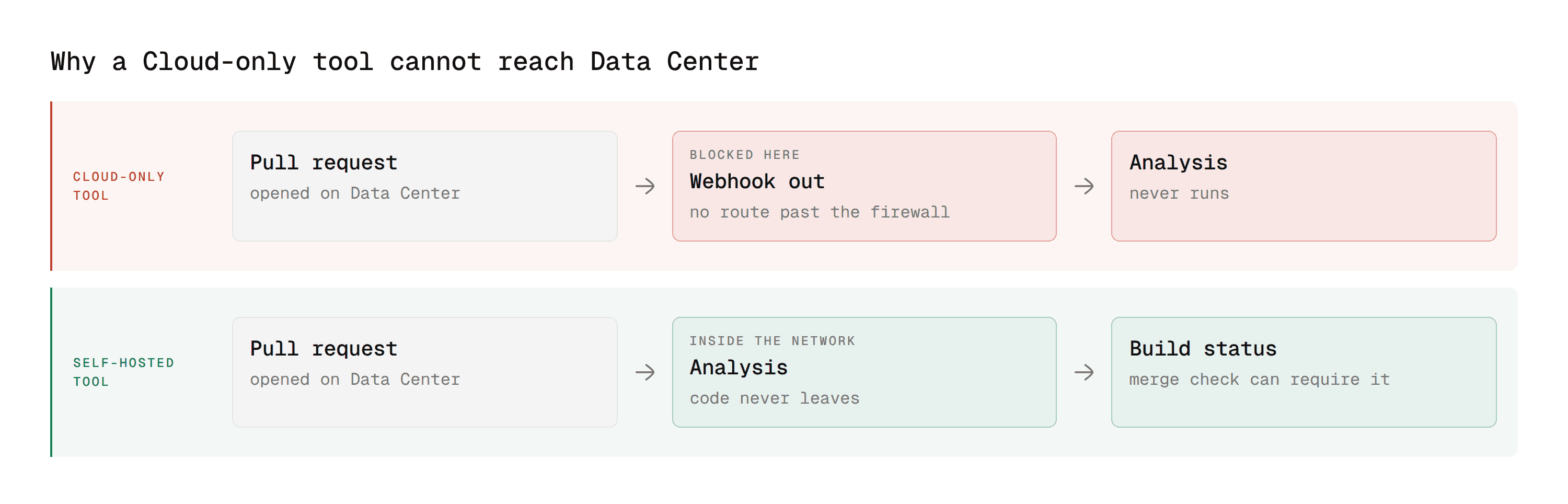
The API surfaces differ. Cloud runs a 2.0 REST API at a fixed hostname. Data Center exposes its own API at whatever hostname your instance lives on, versioned against the Bitbucket release you are running. A tool hardcoded against Cloud endpoints does not simply point somewhere else.
Authentication differs. Cloud uses app passwords and API tokens tied to an Atlassian account. Data Center uses personal access tokens issued by the instance itself, scoped by the permissions that instance grants.
Network direction differs, and this is the one that kills evaluations. A Cloud integration receives a webhook from Atlassian's infrastructure and calls back out to it. A Data Center integration needs your instance to reach the tool, or the tool to run where it can reach your instance. In an air-gapped environment neither happens by default.
Versions differ across your own estate. Cloud is one continuously updated version for everyone. Data Center means whichever release your platform team last upgraded to, which in regulated environments is often several behind current.
Bitbucket Cloud | Bitbucket Data Center | |
|---|---|---|
API | 2.0 REST at a fixed Atlassian host | Instance API at your own hostname, versioned to your release |
Auth | App passwords or API tokens on an Atlassian account | Personal access tokens issued by the instance |
Network direction | Atlassian pushes out, the tool calls back | Your instance must reach the tool, or the tool runs inside your network |
Versioning | One continuously updated version | Whichever release your platform team last deployed |
Vendor visibility | Vendor can see and debug the environment | Vendor cannot see your installation at all |
That last row is why Data Center support is a product decision rather than a configuration flag. A vendor supporting it commits to debugging an environment they cannot look at.
Why Most AI Review Tools Are Cloud Only
This is not vendor laziness. The economics genuinely favour Cloud. A Cloud-only integration is one codebase against one API version, deployed once, updated centrally. Every customer gets the same surface. Support is a single environment.
Data Center support means testing against multiple Bitbucket versions, shipping a deployable artifact rather than a hosted service, handling customer-specific network topology, and supporting an installation the vendor cannot see or debug directly.
For a tool chasing developer-led adoption, Cloud is where the volume is. Data Center support is a deliberate enterprise investment, which is why the field narrows sharply once you filter for it. The practical consequence for a buyer is that the shortlist you build from a general Bitbucket search is not the shortlist you can actually use. Filter for deployment model first, then compare features among what survives.
What AI Code Review Does On A Bitbucket Pull Request
Bitbucket AI code review works the same way whether the instance is Cloud or Data Center. Knowing the mechanics helps you ask better questions during an evaluation.
How the integration connects
The tool authenticates with a personal access token scoped to repository read and pull request write. Bitbucket fires a webhook when a PR is created or updated. The tool pulls the diff, analyses it, and writes back as inline comments on specific lines.
Some tools also post a build status, which is what lets a failed analysis participate in a merge check rather than only commenting.
What separates a reviewer from a linter
A linter evaluates changed lines against a fixed ruleset with no knowledge of what the code is for. A useful reviewer reads past the diff into the surrounding files. When a function signature changes, it checks the callers. When a query is added, it looks at how the input reaching it was validated upstream.
The difference shows up in the comment. A linter says the variable is unused. A reviewer says the early return added above makes the validation below unreachable, and shows the corrected ordering.
Where security scanning fits
Static application security testing analyses source for security defects without running it, tracing data from where it enters to where it gets used. That is how injection paths, unsafe deserialisation, and hardcoded credentials surface.
It is a different job from reviewing logic and style, and most review-first tools do not do it. When it runs in the same pass as the review, findings land on the pull request while the author still has context. When it runs as a separate scheduled scan, findings land in a backlog.
For a Data Center team this matters twice over, because a second tool means a second self-hosted deployment, a second token, and a second thing your platform team maintains.
Connecting a Tool to a Data Center Instance
Four steps, and the order matters because each one fails differently.
Issue a scoped personal access token
Create the token on a dedicated service account, not on an individual. A token on a personal account stops working the moment that person's access changes, and the integration fails silently rather than loudly.
Go to the service account's profile, then Manage account, then Personal access tokens. Grant only what the integration needs.
Permission | Why it is needed |
|---|---|
Repository read | Pull the diff to analyse |
Repository write | Post inline comments on the pull request |
Repository admin | Only if the tool configures its own webhooks |
Skip Project admin and System admin entirely. A review tool has no reason to hold either.
Verify the token before configuring anything else
One call confirms the token, the hostname, and the project key together, which saves a lot of guessing later.
A 401 means the token is wrong or expired. A 404 means the project key or repository slug is wrong. A timeout means the network path is the problem, which is the failure that actually matters on Data Center.
Note the path shape. Data Center uses /rest/api/1.0/projects/{key}/repos/{slug}/, which is not the Cloud 2.0 path. A tool that hardcoded the Cloud shape will not work here regardless of credentials.
Configure the webhook
Repository settings, then Webhooks. Subscribe to pull request opened, source branch updated, and reopened, then point it at the tool's endpoint.
If your instance cannot reach that endpoint, this is where the evaluation ends for a hosted tool. The webhook queues and fails, and the webhook history view shows every attempt.
Confirm the tool can post back
The tool posts its result as a build status against the pull request's head commit.
state accepts INPROGRESS, SUCCESSFUL, or FAILED. The key is what a merge check refers to, so it has to stay stable between runs. A tool that generates a fresh key each run cannot be gated on.
Merge Checks: Making a Review Block a Merge
Bitbucket Data Center enforces quality through merge checks configured per repository or project. A pull request cannot be merged until every enabled check passes.
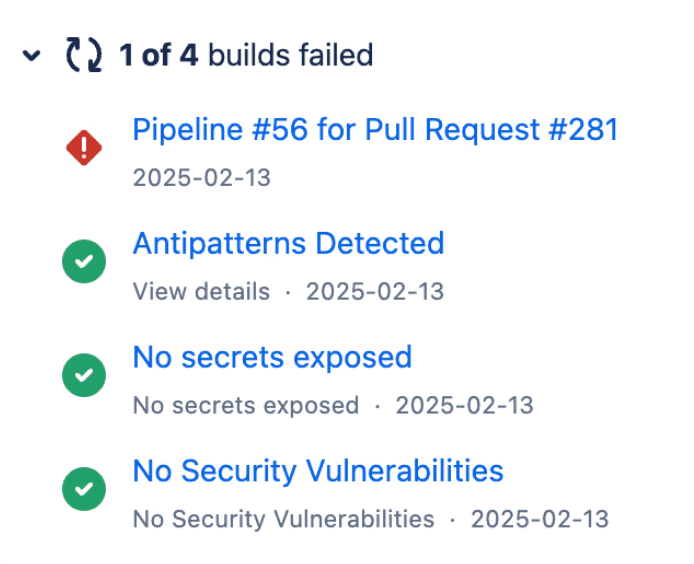
Common checks include a minimum number of approvals, a minimum number of successful builds, no unresolved tasks, and no changes requested by a reviewer.
The one that matters for external tooling is build status. A tool that posts a build status can be made blocking. A tool that only posts comments cannot, no matter how good the comments are.
This is the single most useful question to ask during an evaluation. Not whether the tool reviews well, but whether a failed review can stop a merge, and how.
Default reviewers are the other lever. Data Center lets you assign reviewers automatically based on the source and target branch, and require a set number of them to approve. It is less granular than a path-based rule, so teams wanting per-directory ownership usually combine it with a convention rather than getting it from the setting alone.
What Breaks When You Upgrade Bitbucket
This is the maintenance cost nobody models during an evaluation, and it exists only on self-hosted.
API behaviour changes between releases. The endpoints above are stable, but response shapes and deprecations move across major versions. A tool tested against your current release is not automatically tested against the one your platform team is planning.
Webhook payloads gain and lose fields. An integration parsing a field that moved fails on the first pull request after the upgrade, usually silently, because a webhook that returns 200 and does nothing looks identical to one that worked.
Tokens survive upgrades, permission models sometimes do not. A permission that was implicit in one release can become explicit in the next, which turns a working service account into a 403.
Three things to do about it, none of them expensive:
Ask which Bitbucket versions are tested, not which are supported. Those are different claims and vendors answer the second when asked the first.
Upgrade a non-production instance first and run one pull request through the integration before the production window.
Alert on missing statuses, not just failing ones. A check that stops posting entirely is the failure an upgrade produces, and a required merge check will then block every pull request until someone works out why.
The Licensing Math Nobody Does Upfront
Data Center licences are tiered by user count, and a per-seat review tool multiplies against the same number. Model the combined figure rather than each in isolation.
What it scales with | Cost behaviour | |
|---|---|---|
Data Center licence | User tier | Steps up at tier boundaries |
Per-seat review tool | The same user count | Linear and predictable |
Usage-based review tool | Pull request volume | Unpredictable, worst case hard to bound |
Self-hosted infrastructure | Repository count and size | Hidden, arrives as platform team time |
The fourth row is the one left out of every comparison spreadsheet. A self-hosted tool is infrastructure your team runs, monitors, and upgrades, which is real headcount even when the licence looks cheaper than the hosted alternative.
What To Check Before You Buy
Six questions, in the order they eliminate candidates fastest.
Does it support Data Center, or only Cloud? Ask for the deployment documentation rather than a yes. Cloud-only vendors sometimes answer this question about Bitbucket generally.
Where does the analysis run? Hosted by the vendor, inside your VPC, or fully on-premises. If code cannot leave the network, only the third answer works, and it eliminates most of the market.
Which Bitbucket versions are supported? Check against the version you actually run, not the current release. If you are two versions behind, confirm before the pilot rather than during it.
Can it post a build status? This decides whether the tool is an enforcement mechanism or a commenter.
Does it cover security in the same pass? SAST, dependency scanning, secrets, and infrastructure-as-code misconfiguration. If not, you are deploying and maintaining two self-hosted tools.
How does pricing behave at your seat count? Data Center licences are tiered by users, and a per-seat review tool multiplies against the same number. Model the combined figure rather than each separately.
Our Bitbucket code review tools comparison covers the field against these criteria, including which options are Cloud only, the cross-platform AI code review comparison ranks the same tools without the Bitbucket filter, and the Bitbucket integration page covers how CodeAnt AI connects to either deployment.
Running a Pilot That Tells You Something
Self-hosted pilots fail for different reasons than cloud pilots, and the differences are worth planning around.
Pick two repositories, not the whole instance. One with your longest time to first review, one mid-sized. A bad first week across every repo poisons adoption everywhere at once, and on self-hosted you cannot quietly roll back a hosted service.
Test on your largest repository, not a sample. Analysis time is the constraint that shows up late. A tool benchmarked on a fifty-file service can time out on a real monorepo, and the failure looks like nothing happening rather than an error.
Replay three known incidents. Take three merged pull requests that later produced a bug or a security fix, and run each candidate against them. Two of three caught is a real signal. Total findings count is not.
Count actioned comments, not total comments. A tool posting sixty comments per pull request of which three get acted on is worse than one posting eight of which six do. The ratio predicts whether the team keeps it.
Include your platform team from day one. On Data Center they are the ones deploying, monitoring, and upgrading it, and a tool the platform team dislikes does not survive its first Bitbucket upgrade regardless of how the developers felt.
Ask the two most sceptical engineers. Not the ones who proposed it. If the sceptics found the comments useful, adoption holds after the pilot ends.
Where CodeAnt AI Fits On Data Center
Three things specific to self-hosted Bitbucket.
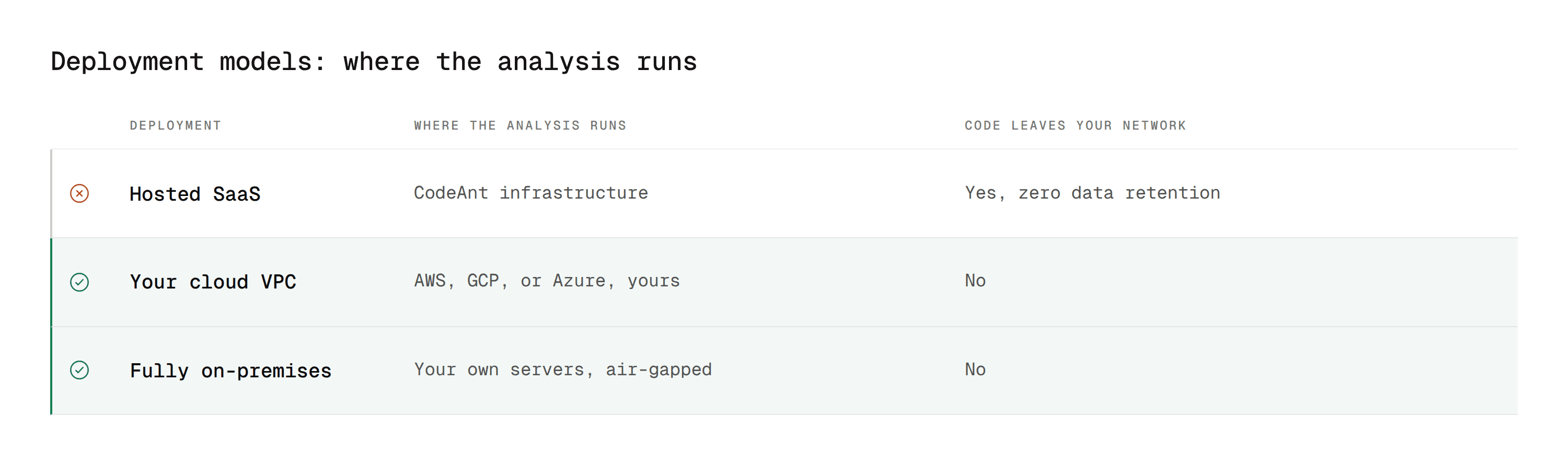
1. It runs inside your network
Deployment options cover hosted SaaS, your own VPC on AWS, GCP, or Azure, and fully air-gapped on-premises. Code never leaves your environment and the platform operates with zero data retention.
For a team on Data Center because of a data-residency or network-isolation requirement, that is the difference between having a shortlist and not having one.
2. It posts a build status, not just comments
Findings arrive as inline comments on the pull request, and the same analysis posts a build status that a merge check can require. A critical security finding blocks the merge rather than sitting in a thread someone resolves to move on.
3. It covers review and security in one deployment
AI code review runs alongside SAST, SCA, IaC scanning, and secrets detection on the same pull request. Security findings carry Steps of Reproduction showing the full path rather than a rule identifier.
On self-hosted infrastructure that means one artifact to deploy, one token to rotate, and one thing to upgrade when Bitbucket does. Code quality tracking runs on the same analysis rather than as a fourth thing to install.
For how this lands at scale, our customer stories cover enterprise teams running it inside their own environment.
Self-Hosted Is a Requirement, Not a Preference
Teams do not run Bitbucket Data Center by accident. They run it because a regulator, a customer contract, or an internal security policy says the source code stays inside the network.
Any tool that asks you to relax that is not solving the problem, it is renaming it. Which is why the deployment question belongs at the start of an evaluation rather than in the security review at the end, where it kills a finalist you have already spent six weeks on.
The field is smaller once you filter properly. It is also much easier to choose from.
Where to start this week
Open your Bitbucket Data Center admin console and note two things: the exact version you are running, and whether your instance can reach an external endpoint at all. Those two answers eliminate most of the market before you look at a single feature comparison, and they take five minutes to find. Take them into the first vendor conversation rather than discovering them in week six.
Book a walkthrough with our team →
Related reading
Best Bitbucket Code Review Tools: the full field, including which options are Cloud only.
Bitbucket Code Review: Step-by-Step Guide: the native workflow these tools sit inside.
Bitbucket and Jira Workflow Integration: the Atlassian-ecosystem side of the same setup.
Bitbucket vs GitHub for Code Review: how the two platforms differ on review, merge checks, and native AI.
Top AI Code Review Tools for GitHub Enterprise On-Prem: the same self-hosted question answered for GitHub Enterprise Server.
Enterprise Code Review Governance: applying policy consistently across a large self-hosted repo estate, written for Azure DevOps but structurally the same problem.
Pricing: per-seat cost to model against your Data Center licence tier.

