

Most GitLab vs GitHub comparisons are really pricing comparisons wearing a feature table.
They are useful if you are choosing a platform from scratch, which almost nobody reading them is doing. The question a team already running one of these actually has is narrower. How does review work differently, and is the difference worth doing anything about.
This is that comparison. Merge requests against pull requests, approval rules against branch protection, native AI review, security scanning depth, and the CI that every gate sits on top of.
Where this connects: The gaps below close with tooling rather than migration. CodeAnt AI runs AI code review and security scanning equivalently on GitLab and GitHub, and on Bitbucket and Azure DevOps, so the review experience does not change with the Git host.
Key Facts at a Glance
Question | Short answer |
|---|---|
Terminology | GitLab calls it a merge request, GitHub a pull request. Same object |
Reviewer assignment | Both use a CODEOWNERS file. GitLab adds approval rules on top |
Merge gating | GitLab approval rules and pipeline status. GitHub branch protection rules |
Native AI review | GitLab Duo on GitLab, Copilot code review on GitHub. Both real, priced differently |
Native security scanning | Both have it natively, which is unusual. Depth sits behind upper tiers on each |
CI | GitLab CI is built in and central. GitHub Actions is built in with a larger marketplace |
Self-hosted | GitLab self-managed and GitHub Enterprise Server, both genuine |
The Real Difference Is Where Security Lives
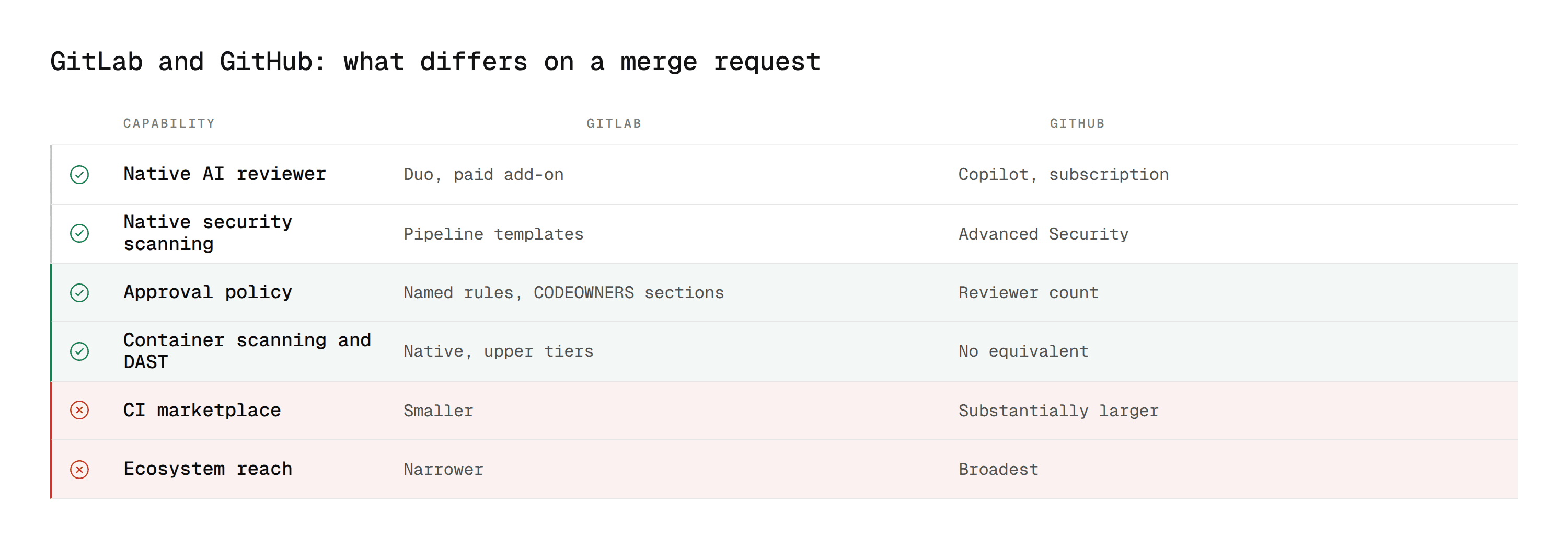
Start here, because it reframes everything else.
On Bitbucket and Azure DevOps, a team adding a review tool is filling a gap the platform left open. Neither ships meaningful native security scanning.
GitLab and GitHub are the two platforms that do. GitLab has SAST, secret detection, dependency scanning, container scanning, and DAST built into the product. GitHub has Advanced Security covering secret scanning, dependency review, and CodeQL.
So the GitLab vs GitHub review comparison is not about who has scanning. It is about tier, depth, and noise. Both platforms put their deeper capabilities behind their upper plans, and both produce findings that a team has to triage before anyone acts on them.
That changes what a third-party tool is for here. On GitLab it is not filling a hole. It is either covering something the tier you pay for does not include, or improving the signal on findings you already get.
Merge Requests and Pull Requests: What Actually Differs
Aspect | GitLab | GitHub |
|---|---|---|
The object | Merge request | Pull request |
Review states | Approve, and comment threads that can require resolution | Approve, Request changes, Comment |
Reviewer assignment | CODEOWNERS plus approval rules | CODEOWNERS |
Approval granularity | Named rules with required approver counts per rule | Required reviewers, count set per branch |
Gating | Approval rules, pipeline status, merge checks | Branch protection with required status checks |
Queued merging | Merge trains | Merge queue |
Merge methods | Merge commit, merge commit with semi-linear history, fast-forward | Merge commit, squash, rebase |
CI | GitLab CI, same repo, same file | GitHub Actions |
Approval rules are GitLab's real advantage
GitHub's model is essentially one rule: require N approvals, and require code owners where CODEOWNERS matches.
GitLab layers named approval rules on top of CODEOWNERS. You can define a Security rule requiring two approvals from one group, a Database rule requiring one from another, and have both apply to the same merge request independently.
For a team with genuine review policy, that expresses the policy directly rather than approximating it. For a small team it is configuration nobody needed.
GitLab's CODEOWNERS also supports named sections, which is the part teams migrating from GitHub tend to miss:
The [2] requires two approvals from that section. There is no GitHub equivalent.
Comment threads and resolution
Both platforms can require conversation resolution before merge. GitLab's threads are first-class objects with their own resolved state, and the setting to block merge on unresolved threads is per project.
The practical difference is small. The policy difference is not: GitLab lets you require resolution and a specific approval count from a specific group as two separate conditions, where GitHub tends to collapse them.
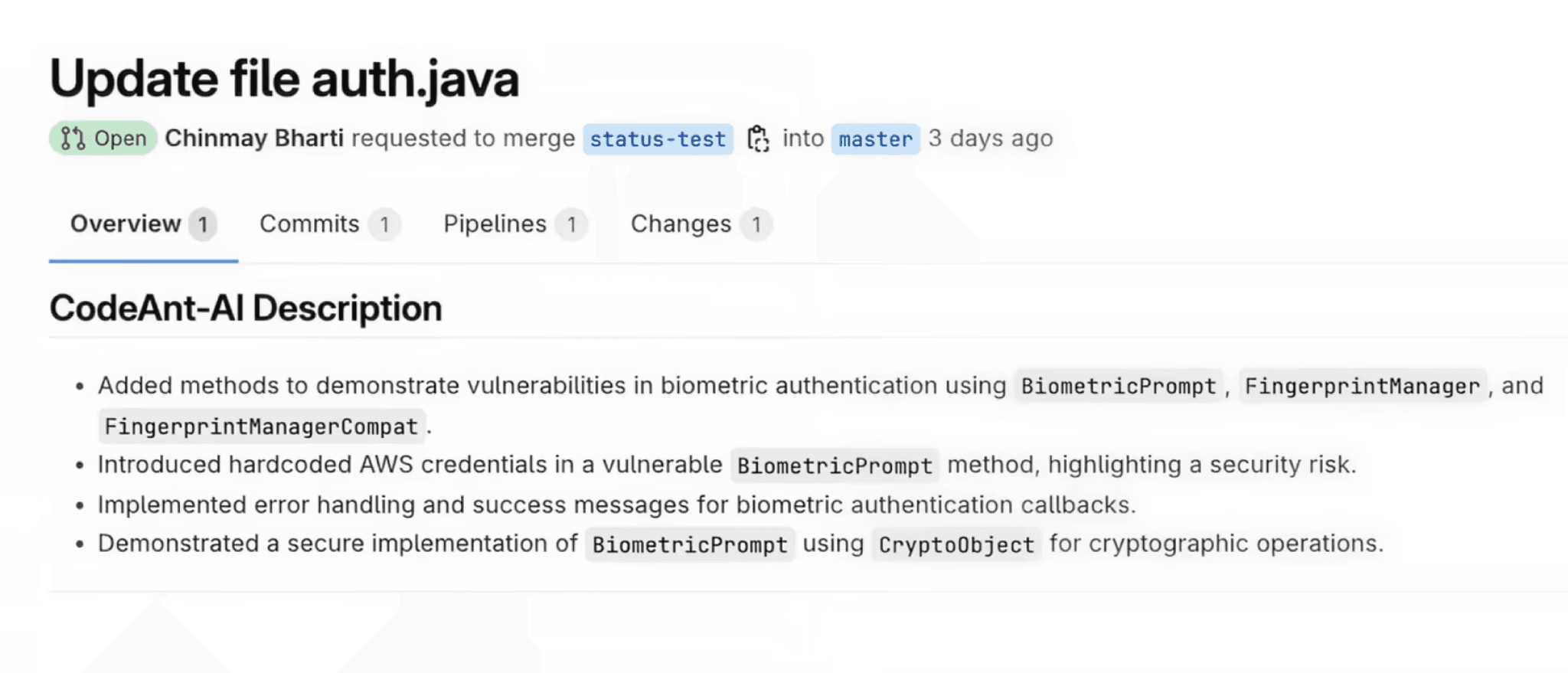
Native AI Review: Duo vs Copilot
Both platforms ship an AI reviewer. This is the row where most comparisons go stale fastest, so treat specifics as worth re-checking rather than settled.
GitLab Duo covers code suggestions, chat, and merge request summaries, with review capabilities that have expanded steadily. It is an add-on rather than an included feature, and it requires a paid GitLab tier underneath it.
GitHub Copilot code review is requested like a human reviewer and posts inline comments and suggestions. It is part of a Copilot subscription.
Two things are true of both. Neither does dedicated SAST reasoning, because both are general models pointed at a diff. And on both platforms, an AI reviewer's comments do not by themselves satisfy a required human approval.
That second point matters more than the feature list. An AI reviewer that comments improves the conversation. It does not change what can merge.
Our GitLab Duo breakdown covers what Duo does and where it stops in more depth, and the Copilot comparison does the same from the GitHub side.
Security Scanning: Both Native, Different Shapes
This is where the two platforms diverge in structure rather than in whether the capability exists.
GitLab bundles scanning into CI. You include a template in .gitlab-ci.yml and the scanner runs as a pipeline job, reporting into the merge request widget and, on upper tiers, into a Vulnerability Report and Security Dashboard.
That is the whole setup for the basic case. The elegance is real: security is a pipeline stage like any other, versioned in the repo alongside the code.
GitHub runs Advanced Security as a platform capability rather than a pipeline job. CodeQL can run as an Action, but secret scanning and dependency review are settings rather than jobs.
GitLab | GitHub | |
|---|---|---|
SAST | Pipeline template, deeper analysis on upper tiers | CodeQL, via Advanced Security |
Secret detection | Pipeline template | Platform setting |
Dependency scanning | Pipeline template | Dependency review and Dependabot |
Container scanning | Pipeline template | Not equivalent natively |
IaC scanning | Included in SAST templates | Limited natively |
DAST | Available on upper tiers | Not native |
Findings view | Vulnerability Report, Security Dashboard | Security tab, code scanning alerts |
GitLab's container scanning and DAST have no direct GitHub equivalent, which is a real point in GitLab's favour and rarely appears in these comparisons.
Where both land in the same place is triage. A scanner reports what it found. Neither tells you which findings an attacker could actually reach, so the backlog grows at the rate the scanners run.
Our guides to SAST and software composition analysis cover the categories themselves, and best SAST tools covers the field beyond what either platform ships.
GitLab CI vs GitHub Actions, for Review Purposes
Every merge gate sits on a pipeline, so the CI comparison shapes review more than it looks like it should.
GitLab CI | GitHub Actions | |
|---|---|---|
Config |
| Workflow files under |
Model | Stages and jobs in one pipeline | Multiple independent workflows |
Reuse |
| Reusable workflows and composite actions |
Marketplace | Smaller, more first-party templates | Substantially larger |
Self-hosted runners | Yes, mature | Yes |
How it gates | Pipeline must succeed, plus approval rules | Required status checks |
GitLab CI's single-pipeline model with include: is cleaner for a security baseline applied across many projects, because one hosted template can be included everywhere and changed centrally.
GitHub's catalogue advantage is real in the other direction. A security vendor with a polished Action and a thin GitLab template will produce a materially worse experience on GitLab, and that is a vendor decision rather than a platform one. Check per tool.
Self-Hosted: Both Real, Different Culture
GitLab self-managed and GitHub Enterprise Server both exist and both are genuinely used.
The difference is cultural rather than technical. GitLab has treated self-managed as a first-class path throughout, and a large share of its install base runs that way. GitHub's centre of gravity is Cloud, with Enterprise Server the enterprise concession.
For review tooling the consequence is practical: a third-party tool is more likely to support GitLab self-managed than GitHub Enterprise Server, simply because more of the GitLab market needs it. If you are on either, confirm before evaluating features, the same way you would for Bitbucket Data Center.
Merge Trains and Merge Queues
Both platforms solve the same problem, and the problem is not obvious until you hit it.
On a busy branch, a merge request that passed CI against main as it was an hour ago may not pass against main as it is now. Merging it anyway is how a green pipeline ends up broken on the default branch.
GitLab merge trains queue the merge request and run a pipeline against the result of merging it on top of everything already queued ahead of it. If that pipeline fails, the merge request drops out of the train and the ones behind it re-run without it.
GitHub merge queue does the same in shape, batching queued pull requests and testing the combined result before merging.
The practical difference is maturity and default reach. Merge trains have been part of GitLab for longer and are more commonly enabled in teams that need them.
Both share the same cost, which nobody mentions in a feature table. A train or a queue multiplies pipeline minutes, because every queued change triggers a pipeline against a moving target. On a team merging thirty times a day that is a real infrastructure bill, and it is the reason teams turn the feature off again.
If your default branch breaks more than once a month from independently-green merges, it is worth the cost. If it does not, it is not.
Migrating Review Workflows Between Them
If you are moving repositories rather than comparing, five things need deliberate mapping.
What you have | Where it goes | The catch |
|---|---|---|
GitLab approval rules | Branch protection with required reviewers | Named rules collapse into one count, so policy granularity is lost |
CODEOWNERS with sections | Plain CODEOWNERS | Per-section approval counts have no GitHub equivalent |
| Actions workflows or Advanced Security settings | Scanning stops being a versioned pipeline job |
Merge trains | Merge queue | Similar, but re-tune the batch size against your pipeline cost |
Vulnerability Report state | Code scanning alerts | Triage state and dismissals do not transfer |
The third row is the one that surprises teams. On GitLab, security configuration is a file that was reviewed in a merge request and lives with the code. On GitHub, much of it becomes a settings page, which means the audit question changes from "show me the commit" to "show me who had admin".
Two more to plan separately.
Approval rule intent needs writing down before you lose it. A GitLab project with six named approval rules encodes a policy somebody agreed to. Flattened into a reviewer count, that policy exists only in the memory of whoever configured it. Document it before the migration, not after.
Pipeline minutes change shape. GitLab's single pipeline per project and GitHub's multiple independent workflows bill differently and parallelise differently. A pipeline that cost an acceptable amount on one can cost noticeably more on the other for identical work.
When to Use Which
Choose GitLab when you want one application covering source, CI, and security rather than assembling them, when self-managed is a requirement rather than a fallback, or when your review policy is complex enough that approval rules express it better than a reviewer count.
Choose GitHub when ecosystem reach matters, when the Actions marketplace saves you building integrations, or when open source and contributor familiarity are part of the calculation.
If you already run one, the review differences are not a migration case. Approval rules and CODEOWNERS sections are nice, and container scanning is a genuine GitLab advantage, but none of it justifies moving a platform every workflow in your organisation is built around.
What This Means for Tool Selection
Because both platforms ship scanning, the question on GitLab is different from the one on Bitbucket.
Does it cover what your tier does not? GitLab's deeper scanning sits on upper plans. A team on a lower tier is choosing between upgrading the whole seat count or adding a tool.
Does it reduce triage rather than add to it? Two scanners producing two backlogs is worse than one. If a tool does not improve the signal, it is adding a dashboard.
Does it gate? On GitLab that means the analysis has to participate in the pipeline or the approval rules, not just comment.
Our GitLab code review tools comparison runs the field against those criteria, and the cross-platform ranking covers the same tools without a platform filter.
Why Teams Add CodeAnt AI on Either Platform
CodeAnt AI is not an alternative to GitLab or GitHub. It is what makes the platform choice stop mattering for review.
1. It covers the tier gap without upgrading the tier
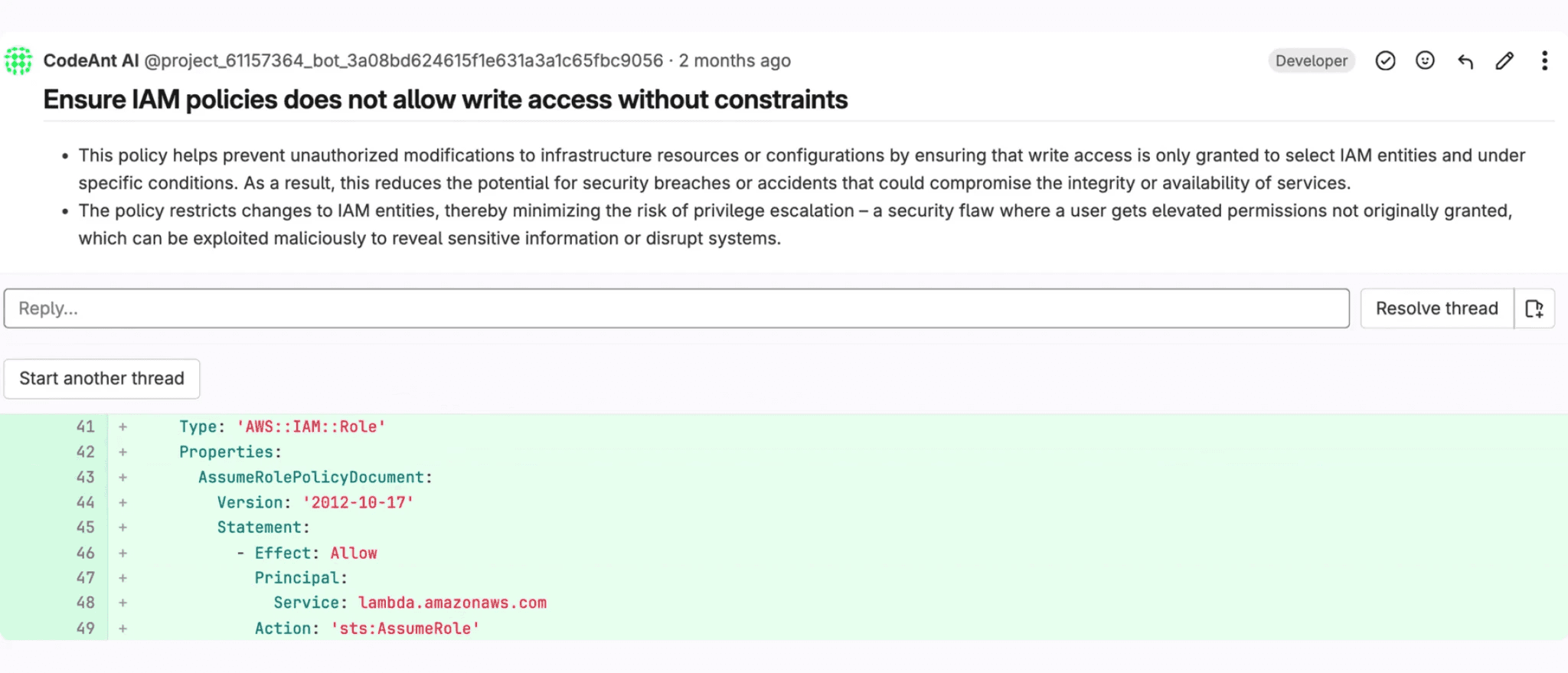
GitLab's container scanning, DAST, and deeper SAST sit on upper plans priced per seat across the whole organisation. For a team that needs the coverage but not the rest of the tier, that is an expensive way to buy one capability.
SAST, SCA, IaC scanning, and secret detection run on every merge request regardless of which GitLab plan you are on.
2. It cuts triage rather than adding to it
Both platforms are good at producing findings. Neither tells you which ones matter.
CodeAnt AI is built as a defensive and offensive platform, so static findings are checked for real exploitability before they reach a developer. Security findings carry Steps of Reproduction showing the full path rather than a rule identifier, which is the difference between a queue you clear and one you learn to ignore.
3. It works the same on both
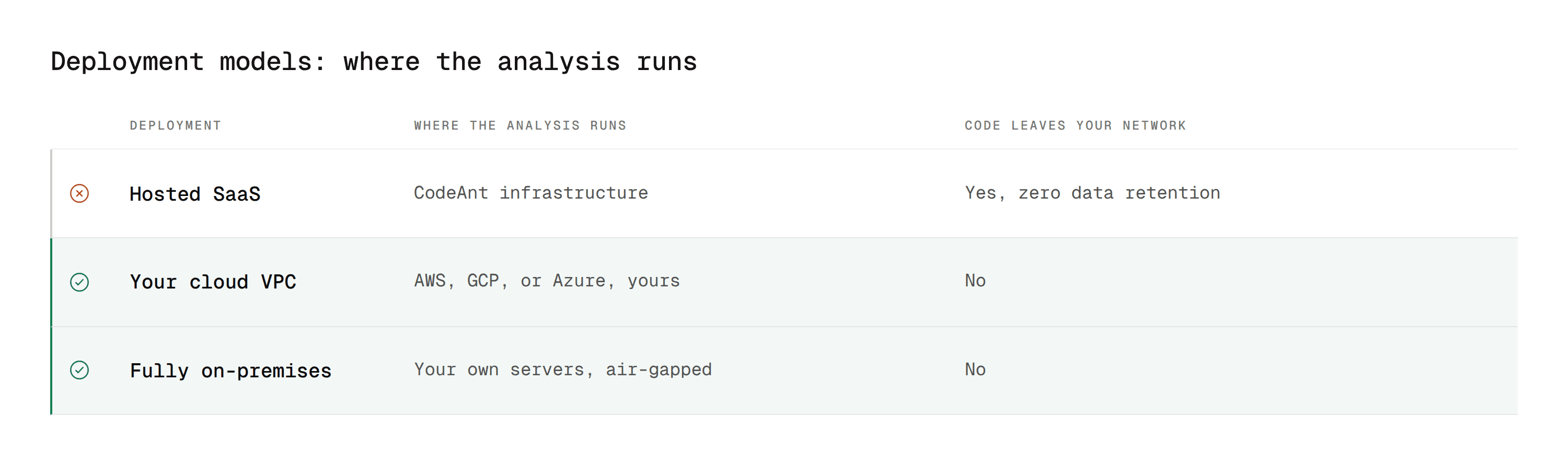
If your organisation runs GitLab in one business unit and GitHub in another, which most do after an acquisition, a GitHub-first tool means two different review experiences and two sets of rules to maintain.
CodeAnt AI runs equivalently across GitLab, GitHub, Bitbucket, and Azure DevOps, including self-managed, with on-premises and customer VPC deployment where code cannot leave the network. The GitLab integration page covers setup.
Same Merge Request, Two Platforms
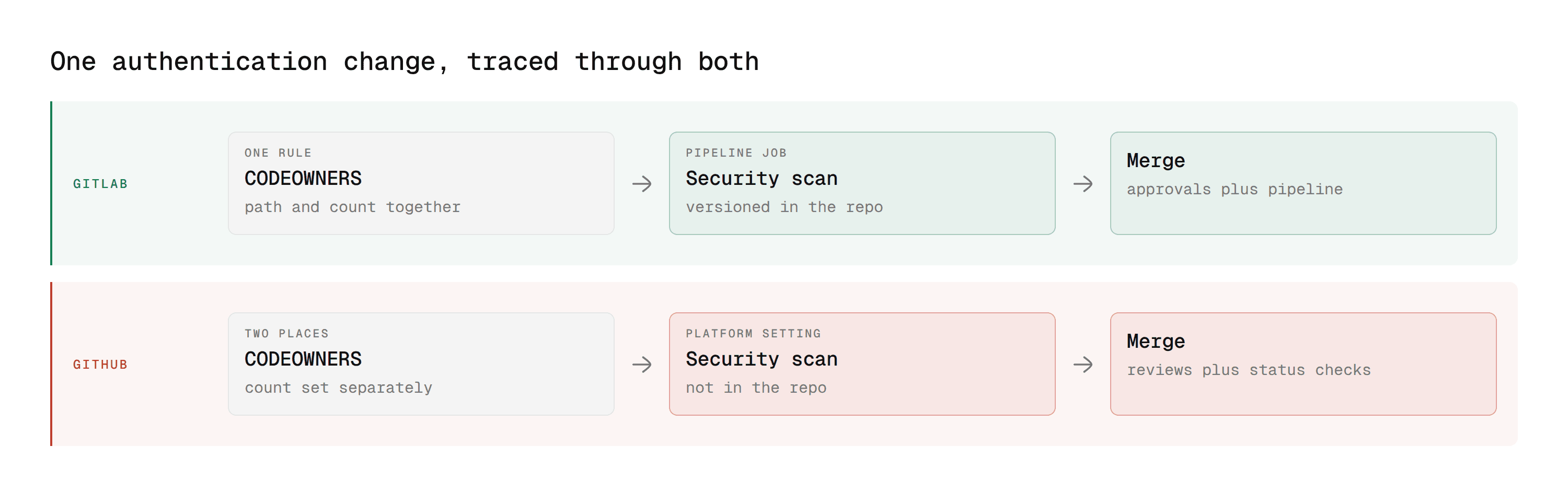
A feature table flattens the difference. Tracing one change through both makes it concrete.
Same scenario each side. A developer changes an authentication module, the security team needs to see it, tests must pass, and a scan must run before merge.
On GitLab
The developer pushes auth-token-refresh and opens a merge request.
The CODEOWNERS file has a [Security][2] section matching /src/auth/, so the security team is added and two of them must approve. That is one rule, and it encodes both who and how many.
The pipeline runs. Because the security templates are included in .gitlab-ci.yml, SAST and secret detection are jobs in that same pipeline rather than a separate system, and their findings render into the merge request widget.
The developer watches the merge request. Approval rules, pipeline status, and unresolved threads each have their own state, and Merge stays unavailable until all three clear. If merge trains are on, the merge is queued and re-tested against everything ahead of it.
On GitHub
The developer pushes a branch and opens a pull request.
The CODEOWNERS file lists the security team against /src/auth/, so they are requested. The count of required approvals is a branch protection setting rather than part of the same rule, so who and how many live in two places.
Actions runs the build and posts a required status check. If Advanced Security is enabled, secret scanning and CodeQL run as platform capabilities rather than as pipeline jobs, surfacing in the Security tab.
Merge stays disabled until reviews and required checks pass.
What the walkthrough shows
The end state is identical. Three differences drive everything above.
Policy lives in one place on GitLab and two on GitHub. The section syntax carries who and how many together.
Security is a pipeline job on GitLab and a platform setting on GitHub. One is versioned with the code, the other is a settings page.
Both gate on the same thing. Approvals plus a green pipeline. Neither gates on an AI comment.
Pick the Platform for the Organisation, Not the Review Table
GitLab and GitHub are closer on code review than any comparison with Bitbucket or Azure DevOps. Both ship an AI reviewer, both ship security scanning, both gate merges on a pipeline.
Where they differ, they differ in opposite directions. GitLab has better policy expression and native container scanning and DAST. GitHub has the larger ecosystem and the deeper marketplace. Neither of those is a migration case on its own.
What actually varies between teams on the same platform is what runs on the merge request, and that is a tooling decision you control regardless of which logo is on the tab.
Where to start this week
Open your most active repository and list what runs on a merge request today. AI review, yes or no. SAST, yes or no. Secret detection, yes or no. Dependency and container scanning, yes or no. Then check which of those can actually block the merge rather than only reporting. Most teams find the list shorter than they expected, and the gap is almost never the platform.
Book a walkthrough with our team →
Related reading
10 Best GitLab Code Review Tools: the field evaluated for GitLab specifically.
GitLab Duo for Code Review: what the native reviewer does and where it stops.
GitLab SAST and CI/CD Security Scanning: the pipeline templates, tiers, and what they miss.
Bitbucket vs GitHub Code Review and Azure DevOps vs GitHub: the same comparison for the other two platforms.
10 Best AI Code Review Tools: the platform-agnostic ranking all four ladder up to.

