

GitLab Duo is the reason a lot of GitLab teams stop evaluating review tools. It is already there, it is from the vendor they already pay, and it posts useful comments.
That is a reasonable place to start and a bad place to stop. GitLab AI code review is a real capability and Duo is a real implementation of it. Duo does a real job well. It also has a shape, and knowing the shape is what stops a team discovering the gap six months in, usually during a security review.
This guide covers what Duo does on a merge request, how the licensing actually works, where it stops, and what teams put alongside it.
Where this connects: CodeAnt AI runs AI code review and security scanning on the same merge request, on any GitLab tier, including self-managed. The GitLab integration page covers setup.
Key Facts at a Glance
Question | Short answer |
|---|---|
What Duo is | GitLab's AI assistant, spanning code suggestions, chat, and merge request help |
What it costs | A paid add-on on top of a paid GitLab tier, not an included feature |
Where it runs | Inside GitLab, on merge requests and in the IDE |
What it reviews | The change, as a general model reading a diff and surrounding context |
What it does not do | Dedicated SAST, secret, dependency, or IaC scanning |
Can it block a merge | No. Duo comments. Approval rules and pipelines gate |
Self-managed | Supported, with configuration that differs from GitLab.com |
What Duo Actually Does on a Merge Request
Three things, and they are genuinely useful.
It summarises the change. A merge request description generated from the diff, which for a large change is the difference between a reviewer opening it and a reviewer deferring it.
It comments on the code. Suggestions on the diff covering logic, readability, and common defect patterns, in the same place a human reviewer would leave them.
It answers questions about the change. Duo Chat scoped to the merge request, so a reviewer unfamiliar with the area can ask rather than reverse-engineer.
That last one is underrated. Most review friction is not disagreement, it is a reviewer without context deciding whether to spend forty minutes acquiring it. A chat interface pointed at the change removes some of that.
How the Licensing Works, and Why It Surprises People
This is where teams get caught, so it is worth being precise about the shape even though specific plan names and prices move.
Duo is not included with a GitLab subscription. It is an add-on, purchased per seat, on top of a paid tier. That means two line items rather than one, and the add-on is priced per user across the users you assign it to.
Three consequences.
The maths is per seat, twice. A team of sixty engineers on a paid tier adding Duo is paying for sixty of each, unless you assign the add-on selectively, which then creates a two-tier review experience inside one team.
It does not lower your GitLab tier. Duo sits on top of Premium or Ultimate. If the reason you were considering Ultimate was security scanning, Duo does not substitute for it.
Self-managed adds configuration. Running Duo against a self-managed instance involves more setup than switching it on, and the available capabilities have historically lagged GitLab.com.
Check current pricing and tier requirements directly with GitLab before budgeting. This is the part of the product that changes most often.
Where Duo Stops
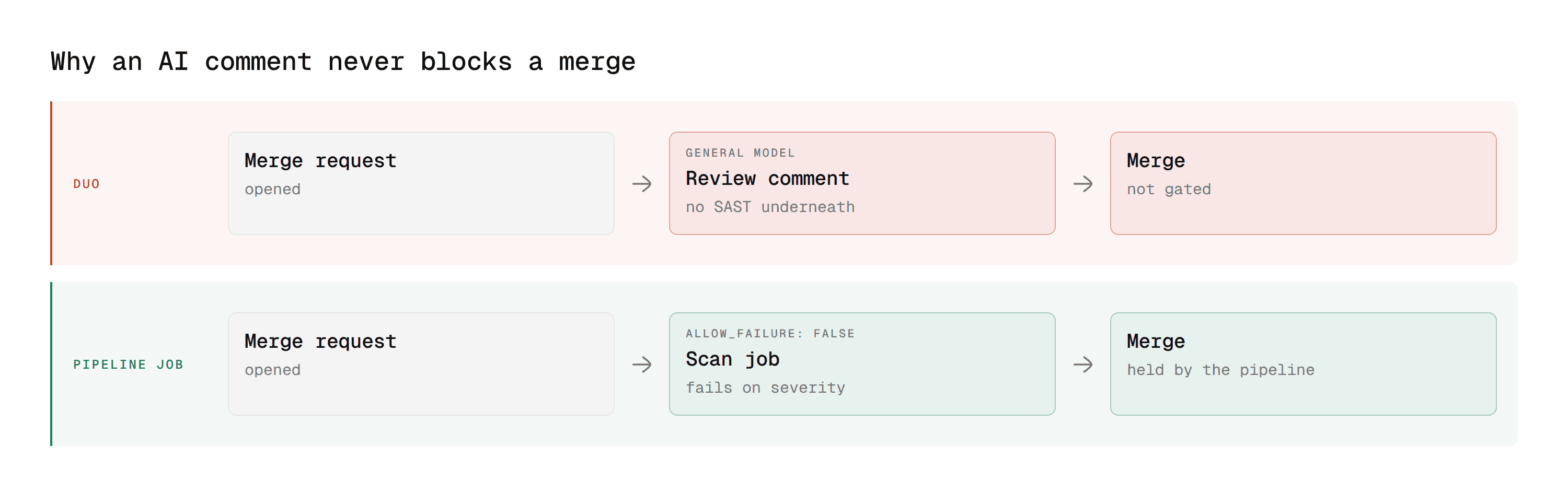
Not criticisms so much as boundaries. Each one is the reason a team eventually adds something.
It is a general reviewer, not a security scanner
Duo reads the change and reasons about it. It does not perform static application security testing, secret detection, dependency scanning, or infrastructure-as-code analysis.
GitLab has all of those. They are separate features, configured as pipeline jobs, and gated by tier. Duo does not replace them and does not surface their findings as part of its review.
So a team that adopted Duo expecting "AI review covers security" has a gap, and it is invisible until something reaches production. Our guide to what SAST actually is covers why a general model reading a diff is a different capability from taint analysis.
It comments, it does not gate
Duo's output is comments. Comments do not satisfy an approval rule and do not fail a pipeline.
That is the line between a reviewer and a control. If your merge policy requires two approvals and a green pipeline, Duo changes neither. A critical finding in a Duo comment merges exactly as easily as no comment at all.
Anything you want to block a merge on GitLab has to be a pipeline job or an approval rule. Our GitLab SAST guide covers how to wire a scanner so it actually gates.
It is scoped to the diff and its surroundings
Duo reads the change and relevant context. It is not indexing your whole codebase to trace how a changed function is called three services away.
For most merge requests that is fine. For a change whose blast radius sits outside the changed files, it is the failure mode.
It is priced to be selective, which fragments review
Because the add-on is per seat, teams frequently assign it to some engineers and not others. The result is that whether a merge request gets AI review depends on who opened it, which is a strange property for a quality control.
Configuring the Gate Duo Cannot Provide
Duo comments. If you want a review result that holds a merge, it has to be a pipeline job or an approval rule. Here is the minimum version, so the boundary is concrete rather than theoretical.
A job that fails when a scan reports anything above a severity threshold:
Then require a successful pipeline to merge in project settings, and add an approval rule for the paths that need a human from a specific group:
None of that is Duo. That is the point. Duo improves the conversation on the merge request, and these two mechanisms decide what can merge, and they do not overlap.
Our GitLab SAST guide covers the full configuration including rollout sequencing.
GitLab Duo Pricing in Practice
Worth modelling before a pilot rather than after, because the shape catches people out.
Two per-seat charges, not one. A paid GitLab tier, Premium or Ultimate, plus the Duo add-on, both priced per user. For sixty engineers that is sixty of each. Duo Pro and Duo Enterprise are separate packages with different capability sets, so the question is not only whether to buy Duo but which Duo.
Assigning selectively creates a split experience. Teams frequently buy fewer Duo seats than engineers. The consequence is that whether a merge request gets an AI review depends on who opened it, which makes it a perk rather than a control.
It does not replace the tier you were buying anyway. If GitLab Ultimate was on the table for container scanning or the Vulnerability Report, Duo sits on top of that decision rather than instead of it. A team on GitLab Premium wanting both ends up with three line items.
Self-managed carries setup cost. Running Duo against a self-managed instance is more than a toggle, and capability parity with GitLab.com has historically lagged.
The honest comparison is not Duo against a third-party tool at list price. It is the paid tier plus Duo, against the tier plus something that also covers the security half. Run that number before deciding, and check current pricing with GitLab directly since it moves.
Turning It On, and Who Gets It
The mechanics matter because they decide the two things teams get wrong: who ends up covered, and what happens on a self-managed instance.
Seat assignment is deliberate, not automatic
Buying the add-on does not switch it on for everyone. Seats are assigned, and the assignment is visible and queryable:
Cross that against your assigned seats and you get the list of engineers who open merge requests that no AI reviewer ever looks at. On most teams that list is longer than anyone expects, because seats were bought for a pilot and never revisited.
That is the failure mode worth naming. A review capability assigned to some engineers and not others is not a control, it is a benefit, and it produces the odd situation where whether a change gets reviewed by AI depends on who wrote it.
Group-level settings cascade, project-level settings override
Duo availability is set at the group level and inherited by projects underneath, with project-level overrides possible. That is convenient and it means a project can silently have a different configuration from its group, usually because someone changed it during an incident and never changed it back.
Audit it the same way you would audit any other inherited setting, which is to say on a schedule rather than when something surprises you.
Self-managed adds real steps
On GitLab.com, Duo is a purchase and an assignment. On self-managed it is a deployment decision, and the questions are the ones any AI feature raises inside a controlled network.
Where does inference run. What egress does the instance need. What is logged, and where. Whether your version supports the capability you are buying it for, since self-managed trails GitLab.com.
None of that makes it a bad choice. It makes it a platform team project with a timeline, rather than a line item, and it is worth scoping before seats are committed.
GitLab Duo vs GitHub Copilot Code Review
The most common comparison, and the answer is that they are more alike than either vendor's marketing suggests.
GitLab Duo | GitHub Copilot code review | |
|---|---|---|
Scope | Suggestions, chat, MR summary and review | PR review, suggestions |
Licensing | Add-on on a paid tier | Part of a Copilot subscription |
Native to the platform | Yes | Yes |
Dedicated SAST | No | No |
Satisfies a required approval | No | No |
Self-hosted support | Yes, with configuration | GitHub Enterprise Server only |
Underlying platform scanning | GitLab security features, by tier | GitHub Advanced Security |
Both are general reviewers. Both sit next to a separate platform security product rather than including it. Neither gates.
The meaningful difference is what sits underneath, and there GitLab is arguably stronger: container scanning and DAST have no direct Copilot-side equivalent. Our GitLab vs GitHub comparison covers that in full.
Should You Use Duo, and What Alongside It
Use Duo if you are already on a paid GitLab tier, you want summaries and chat as much as review comments, and your security coverage is handled separately and deliberately. Do not rely on Duo alone if security scanning is a requirement rather than an aspiration, you need a review result that can block a merge, or you are on a tier whose scanning does not cover what you need.
The common end state is two things. Duo for the conversational layer, and a dedicated tool for the parts that need to be deterministic and gating. That is not redundancy. It is covering two different failure modes with tools built for each. If you are deciding between them rather than stacking them, our GitLab code review tools comparison covers the field.
A Practical Evaluation, Two Weeks
Feature lists do not tell you whether a reviewer is useful. This does.
Replay five incidents. Take five merged merge requests that later produced a bug, an outage, or a security fix. Run each candidate against them and count hits. This measures detection rather than volume, and it is the only test that matters.
Count actioned comments, not total comments. A tool posting forty comments per merge request of which two get acted on is worse than one posting six of which four do. Track the ratio per team.
Check what happens on a security-relevant change. Open a merge request that introduces a hardcoded credential or an unparameterised query. See which candidates flag it, and whether any of them can stop the merge.
Measure time to first review before and after. This is the number the purchase is meant to move, and most teams never baseline it.
Ask the sceptics. Not the people who proposed the tool. If the sceptics found the comments useful, adoption survives the pilot.
Self-Managed GitLab Changes the Calculation
A large share of GitLab's install base runs self-managed, and this is where Duo's shape matters most.
Setup is not a toggle. Enabling Duo against a self-managed instance involves configuration, network considerations, and decisions about where inference happens. That is a platform team task rather than a project setting.
Capability parity has lagged. Features generally reach GitLab.com before self-managed, so a capability you read about may not be available on your instance for some time. Check against your version rather than the docs' latest.
Air-gapped environments are the hard case. If your instance has no outbound path, an assistant that depends on an external inference endpoint has a problem that configuration does not solve. This is the same constraint that rules out most review tooling on self-hosted platforms generally, covered for the Atlassian equivalent in our Bitbucket Data Center guide.
Upgrades move underneath it. On GitLab.com features arrive continuously. On self-managed they arrive when your platform team upgrades, which in regulated environments can be several versions behind.
None of this makes Duo a bad choice on self-managed. It makes it a project rather than a purchase, and worth scoping with the platform team before committing seats.
Troubleshooting
Duo is enabled but nothing appears on the merge request
Check seat assignment first. Availability at the group level and an assigned seat for the specific user are two separate things, and the absence of the second produces silence rather than an error.
It works for some engineers and not others
The same cause, and it is the most common report. Seats were assigned to a subset during a pilot.
A capability exists in the documentation but not on our instance
Self-managed trails GitLab.com. Check the feature against your installed version rather than against the current docs, which describe the latest release.
Suggestions stopped after an upgrade
Duo capabilities move between packages, and what was included in one tier can move. After a major upgrade, re-check which package your seats are on rather than assuming continuity.
It reviews the diff but misses something obvious three files away
Expected. Duo reads the change and its immediate context, not a whole-repository index. A change whose consequence sits outside the changed files is the known limit, and no amount of configuration fixes it.
Where CodeAnt AI Fits Alongside Duo
CodeAnt AI is not a Duo replacement in the sense of doing the same job slightly better. It covers the three boundaries above.
1. It brings the security layer Duo does not have

SAST, SCA, IaC scanning, and secret detection run in the same pass as the review, on every merge request, on any GitLab tier.
That last part matters on GitLab specifically, because the platform's deeper scanning is tier-gated. A team that needs the coverage but not the rest of the tier has a cheaper path than upgrading every seat.
2. It gates, rather than adding to the thread
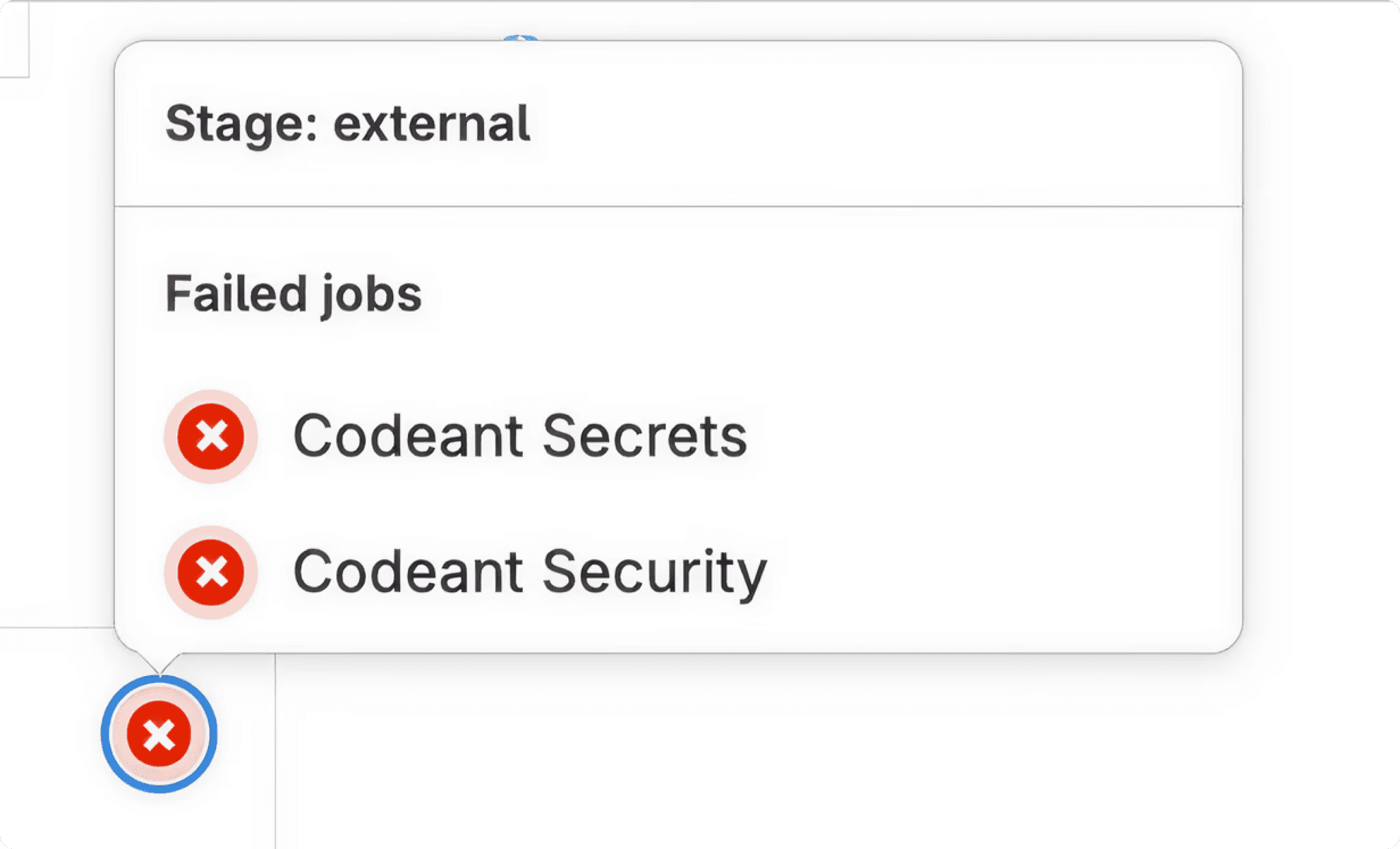
Findings arrive as inline comments, and the same analysis participates in the pipeline so a merge request with a critical finding does not merge. Duo comments. This is the difference between a reviewer and a control, and it is the single most useful thing to check when comparing any tool on this list.
3. It reduces triage instead of adding a second backlog
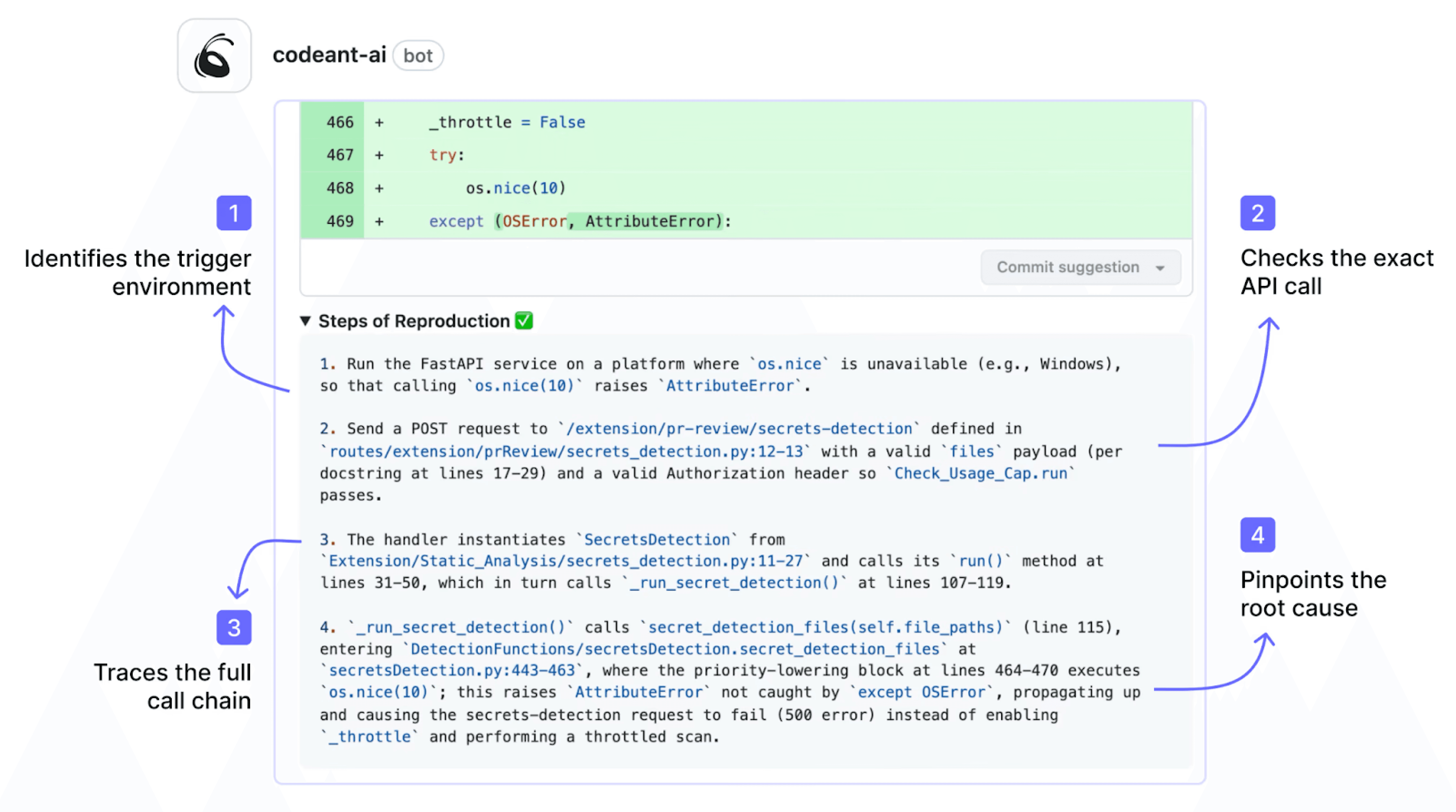
The failure mode of adding a scanner is two queues nobody clears. CodeAnt AI is built as a defensive and offensive platform, so findings are checked for exploitability rather than reported by rule. Security findings carry Steps of Reproduction showing the full path, so a reviewer can judge the finding instead of googling a rule identifier.
Custom rules can be written in plain English rather than rule configuration, which is how team-specific standards get enforced rather than documented. For teams that cannot send code to a vendor cloud, it runs on-premises or in your own VPC.
What Teams Usually End Up Running
Almost nobody stays on Duo alone past the first security review. The common end states, in rough order of frequency.
Duo plus a dedicated security tool
Duo handles summaries, chat, and conversational review. Something else handles SAST, secrets, dependencies, and the merge gate. This is the most common shape because the two cover genuinely different failure modes.
GitLab's own scanning plus Duo, on Ultimate
Works, and keeps everything with one vendor. The cost is the tier across every seat, and the triage problem remains, because GitLab's scanners report findings without telling you which are reachable.
A consolidated tool, with Duo as the conversational layer
One tool covering review and security together, with Duo kept for chat and summaries where teams like it. Fewer consoles, one gate, one export at audit time.
Duo alone
Viable only where security coverage genuinely comes from somewhere else, such as a separate AppSec programme scanning outside the merge request. Worth being honest about whether that is the situation or just the assumption.
The question that decides it is not which reviewer writes better comments. It is which of these can stop a merge, and how many consoles the answer requires.
Duo Is a Good Reviewer and a Poor Control
The mistake is not adopting Duo. It is assuming that adopting it means AI review is handled.
Duo reads the change, explains it, and comments on it, and it does that well enough that teams stop looking. What it does not do is scan for vulnerabilities, and what it cannot do is stop a merge. Both of those are the job of something else, and on GitLab that something else is either an upper tier or a tool.
Knowing which of those you are buying, and why, is the whole decision.
Where to start this week
Open the last ten merged merge requests in your busiest project and check two things. How many have a Duo comment on them, and how many of those comments led to a code change. Then check whether any merge request in that set could have been blocked by anything other than a human clicking approve. The second number is usually zero, and that is the gap worth closing first.
Book a walkthrough with our team →
Related reading
GitLab vs GitHub Code Review: how Duo and Copilot sit inside the wider platform comparison.
GitLab SAST and CI/CD Security Scanning: the pipeline layer that actually gates a merge.
10 Best GitLab Code Review Tools: what teams run alongside or instead of Duo.
What Is SAST: why a general reviewer and a security scanner are different capabilities.
10 Best AI Code Review Tools: the cross-platform ranking, if you run more than one Git host.

