

The mechanics of code review, branch policies, required reviewers, permissions, are the same whether a team has 5 developers or 500. What actually changes at scale isn't the mechanics, it's the coordination problem: how do you apply the same standards consistently across 50 repositories instead of configuring each one by hand, how do you prove to an auditor that the standards were actually enforced, and how do you manage access for hundreds of developers without either locking everyone out or leaving the door open.
This guide covers that layer specifically, the Azure DevOps governance and compliance architecture that sits on top of the individual mechanisms. If you haven't set up the underlying pieces yet, our branch policies, required reviewers, and permissions guides cover those in full depth. This one assumes those mechanisms exist and focuses on running them consistently across an organization, not a single repo.
Where this connects: Consolidation is the governance lever at this size. CodeAnt AI covers AI code review and code security scanning from one platform, and deploys fully on-premises or inside your own AWS, GCP, or Azure environment for organisations whose source code cannot leave the network.
Key Facts at a Glance
Question | Short answer |
|---|---|
What changes at 50+ developers | Not the mechanics. The coordination problem across many repositories |
Repository pattern that scales | One repository per deployable service, not one giant repository |
Project structure | Map Projects to organisational boundaries, not one default container |
Policy application | Script it via Azure CLI. Manual UI configuration drifts silently |
The audit nobody runs | Which repositories are missing policies entirely, checked on a schedule |
Biggest hidden risk | Personal Access Tokens on personal accounts, never revoked at offboarding |
Evidence auditors ask for | Policy changes, permission grants, PR completions, and bypass events |
Hardest thing to change later | Repository and Project structure. Decide it first |
Repository and Project Structure at Scale
The first governance decision, and one that's hard to unwind later, is how repositories and Azure DevOps Projects are organized.
One repository per service, not one giant repository. For a SaaS platform with multiple services, the pattern that scales is separate repositories per deployable unit: a customer-facing web app, its API, a billing service, a notifications service, a shared UI library, an authentication service, each independently versioned and independently governed. This aligns naturally with microservice architectures and lets different services have different review requirements without one repo's policies being a compromise across every team touching it.
Azure DevOps Projects should represent organizational boundaries, not just be a default container. A common mistake is putting every repository into a single default Project because that's what Azure DevOps creates automatically. At scale, Projects work better mapped to actual organizational units, for example, a Customer Platform project containing customer-web, customer-api, and mobile-api; a separate Internal Systems project for HR and payroll tooling; a Developer Platform project for shared components and infrastructure tooling. This structure improves security management, reporting, compliance boundary-setting, and team autonomy simultaneously, since permissions, policies, and audit scope can all be reasoned about at the Project level instead of purely at the repo level.
Decide the monorepo-vs-multi-repo question deliberately, not by default. Both are legitimate at scale. A monorepo simplifies cross-service atomic changes and shared tooling, at the cost of broader blast radius for permissions and review scope. Multi-repo isolates concerns cleanly but multiplies the governance surface area, more repos each needing consistent policy application. Most large Azure DevOps organizations land on multi-repo with strong cross-repo tooling to manage the consistency problem that creates, which is what the rest of this guide addresses.
Applying Consistent Policies Across Many Repositories
Configuring branch policies through the UI works fine for one repository. It doesn't scale to 50, and manual configuration drift, where repo #12 quietly has different reviewer requirements than repo #3, is one of the most common real governance failures at this size.
The fix is scripting policy application rather than clicking through it repo by repo. Our branch policies guide includes ready-to-use scripts for applying standard policies (minimum reviewers, linked work items, build validation) across every repository in a project via the Azure CLI, and for auditing which repos have policies configured versus which don't. At enterprise scale, that audit script is worth running on a schedule, not just once, since new repos get created faster than governance teams typically notice.
For organizations with genuinely large repo counts (dozens to hundreds), template-based policy management, defining the standard policy set once and referencing it from every pipeline or repo rather than duplicating configuration, keeps drift from creeping back in every time a new repo is created.
Personal Access Token Governance
PATs are a real, underappreciated attack surface at enterprise scale, and they're worth their own governance process rather than being left to individual developer habits.
Enforce expiration. Azure DevOps allows PATs with lifetimes up to a year, but "allowed" isn't "recommended." Enterprise governance typically means enforcing shorter maximum lifetimes and requiring active rotation, so a leaked or forgotten token has a bounded window of risk rather than a year-long one.
Scope tokens to the minimum required. A PAT used for a specific automation task (posting status checks, as covered in our REST API and webhooks guide) should have exactly the scopes that task needs, Code Read, Pull Request Threads Read & Write, Code Status, not a broad token with organization-wide access used because it was convenient at setup time.
Use service accounts for automation, not personal accounts. Every automation, CI step, or third-party tool integration should authenticate as a dedicated service account with its own PAT, not as a developer's personal token. This isn't just cleanliness, it's what keeps automation running when that developer changes teams or leaves the company, and it's what makes an audit trail actually attributable to a system rather than ambiguously to a person.
Revoke systematically during offboarding. PAT revocation should be a standard, checked step in offboarding, not something that depends on someone remembering. A departed employee's still-valid PAT is a real, avoidable compliance gap.
Identity and Access: Conditional Access and Microsoft Entra ID
Enterprise Azure DevOps deployments increasingly lean on Microsoft Entra ID (formerly Azure AD) for identity, not just Azure DevOps's own permission groups, and Conditional Access policies extend that further.
Conditional Access can enforce multi-factor authentication before granting access, evaluate device compliance (is the accessing device managed and up to date) before allowing a session, and apply risk-based access decisions based on sign-in patterns Microsoft's identity platform flags as anomalous.
For code review governance specifically, this matters because it extends security enforcement to the access layer, not just the policy layer: even a correctly-configured branch policy doesn't help if the account approving PRs was compromised through a weak authentication path Conditional Access would have blocked.
Centralizing identity through Entra ID also simplifies offboarding significantly. Disabling one Entra ID account removes access across Azure DevOps and every other Entra-integrated system at once, instead of hunting down access in each tool separately.
Audit Logs and Compliance Evidence
The question every enterprise Azure DevOps deployment eventually has to answer for an auditor: can you prove the review process was actually followed, not just that it was configured to be followed.
Azure DevOps audit logs provide traceable records of system activity, policy changes, permission grants, PR completions, bypass events, that support incident investigation and audit readiness. The gap most organizations hit isn't that this data doesn't exist, it's that nobody designed a retention and reporting strategy for it before an audit made that urgent.
Two things worth deciding in advance rather than under audit pressure: how long audit log data needs to be retained to satisfy your specific regulatory requirements (this varies meaningfully by industry and framework), and what a compliance report actually needs to show, individual events, or aggregated evidence that policies were enforced across all repositories for a given period.
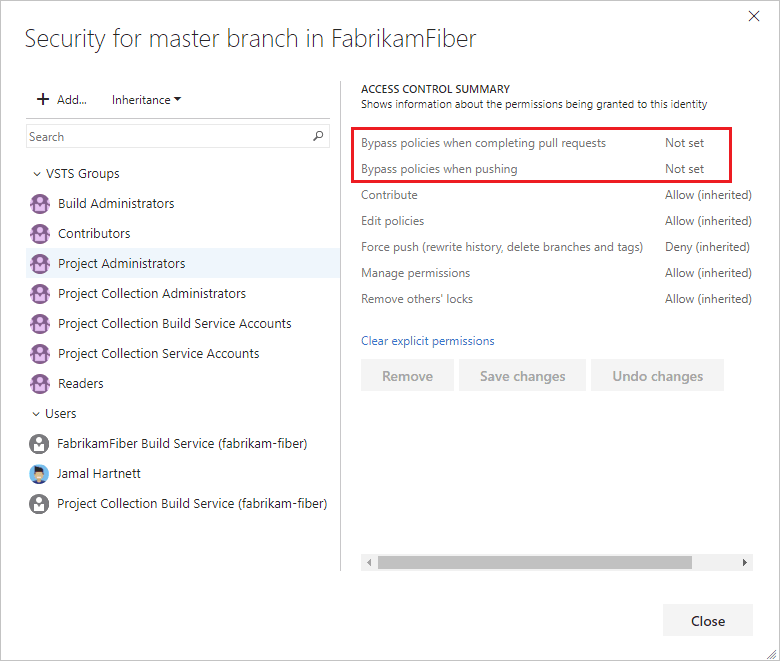
Bypass events specifically deserve their own attention in audit reporting. Every "Bypass policies when completing pull requests" action, covered in our permissions guide, is logged, and a healthy governance posture means someone actually reviews that log periodically rather than treating the audit trail as something that only gets read after an incident.
Standardizing Workflow Governance Across Teams
Azure DevOps supports inherited process templates, letting an organization define a standard workflow once and have every project inherit it rather than each team configuring its own from scratch. For code review specifically, this extends to standardizing which branch policies, which required status checks, and which merge strategies are the organizational default, with individual teams able to add stricter requirements but not silently opt out of the baseline.
This matters more at 50+ developers than it sounds like it would. Without an enforced baseline, governance becomes whatever the most security-conscious team happens to configure, while other teams quietly run with weaker defaults nobody centrally notices until something goes wrong in exactly the team that skipped a policy.
A related, often-overlooked lever: inherited processes also apply to work item types and workflow states, not just branch policies. Standardizing how a PR's linked work item moves through its lifecycle (which states require which approvals, which fields are mandatory before a work item can close) creates the same kind of consistency for project tracking that scripted branch policies create for code review, and the two reinforce each other for compliance reporting, since a complete audit trail needs both "was the code reviewed" and "was the work properly tracked" to tell a coherent story.
Where This Gets Harder Than the Documentation Suggests
A few things worth knowing before they become surprises rather than planned-for friction:
Cross-project reporting is genuinely harder than single-project reporting. If Projects are structured around organizational boundaries as recommended above, getting an org-wide view of review compliance means aggregating across Projects, which Azure DevOps's native reporting doesn't do particularly well out of the box. Most enterprise deployments end up exporting data via the REST API into a separate reporting layer for this reason.
New repos are created faster than governance keeps up, by default. Unless repo creation itself is gated or immediately triggers a policy-application step, new repositories start with zero governance until someone notices and fixes it. The audit script approach mentioned above catches this after the fact; gating repo creation through a request process catches it before.
Security scanning coverage tends to be inconsistent across a large repo estate, even when it's been rolled out deliberately, since older repos often predate whatever the current standard tool is. Auditing actual coverage (which repos genuinely have a security scanning status check configured and required, not just which ones were told to add one) periodically is worth doing separately from auditing branch policy coverage.
Team autonomy and central governance genuinely pull against each other, and that tension doesn't fully resolve. A platform or governance team wants consistent policies everywhere; individual product teams often have legitimate reasons a specific repo needs a different configuration (a legacy system with different risk tolerance, a team mid-migration that can't meet the standard yet). The realistic goal isn't zero exceptions, it's making exceptions visible and time-bound rather than invisible and permanent, which is itself a reason the audit-script approach matters more than a one-time rollout.
Rollout Sequencing for a 50+ Developer Organization
None of the pieces above need to land simultaneously, and trying to roll all of them out at once tends to produce exactly the kind of inconsistent, half-configured state this guide is trying to prevent.
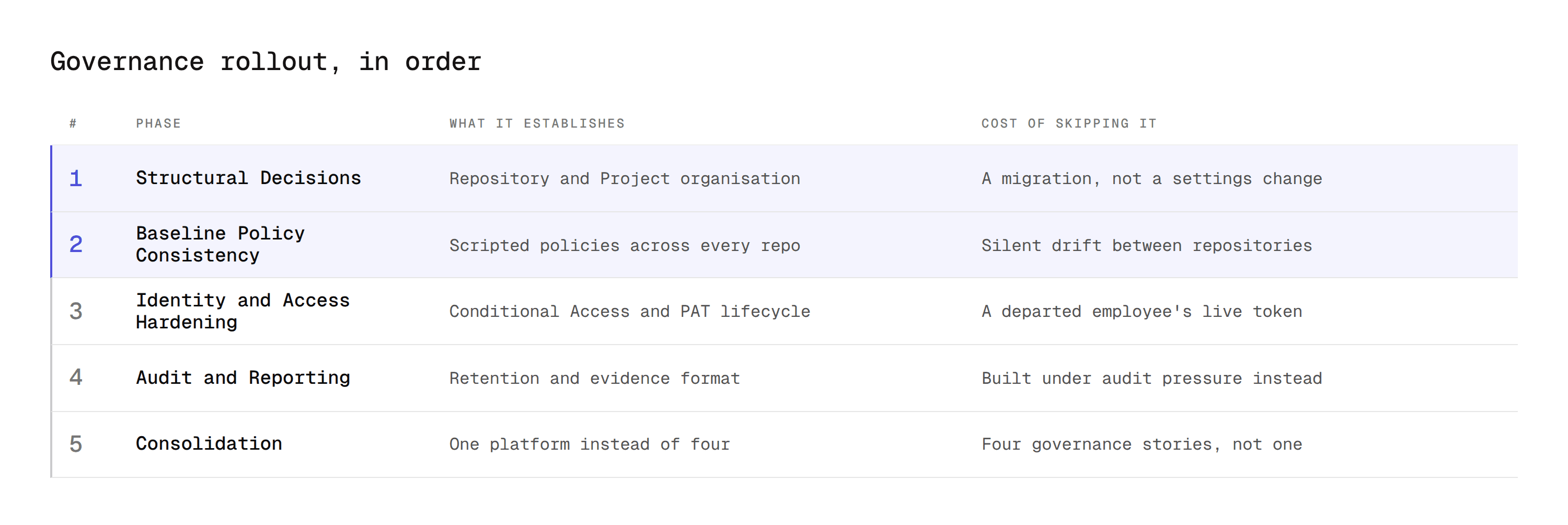
A realistic sequence:
Phase 1: Structural Decisions. Finalize repository and Project organization first, since it's the piece that's genuinely expensive to change once dozens of teams have built workflows around it. Getting this wrong and fixing it later means real migration work, not a settings change.
Phase 2: Baseline Policy Consistency. Script and apply the minimum viable policy set (required reviewers, build validation, comment resolution) across every existing repository, and audit for gaps. This is the highest-leverage phase, since it closes the most common real failure (silent drift between repos) with the least organizational friction.
Phase 3: Identity and Access Hardening. Layer in Conditional Access, PAT governance, and offboarding process changes once the policy baseline is stable. These are lower-visibility but genuinely high-impact for the compliance story specifically.
Phase 4: Audit and Reporting Infrastructure. Build the retention and reporting strategy for audit logs before an actual audit forces it into existence under time pressure. This phase is the easiest to defer indefinitely precisely because nothing breaks visibly when it's missing, until it's urgently needed.
Phase 5: Consolidation. Once the governance foundation is solid, this is where reducing tool sprawl (one AI review and security platform instead of several) pays off most, since a consolidated tool is easier to govern consistently than several separate ones each needing their own policy-application and audit story.
Where CodeAnt AI Fits at Enterprise Scale
Consolidation matters more at 50+ developers than at 5. Running separate tools for AI review, SAST, SCA, and secrets detection across dozens of repositories means dozens of configuration surfaces, dozens of dashboards to check, and a compliance story that requires stitching data together from multiple sources.
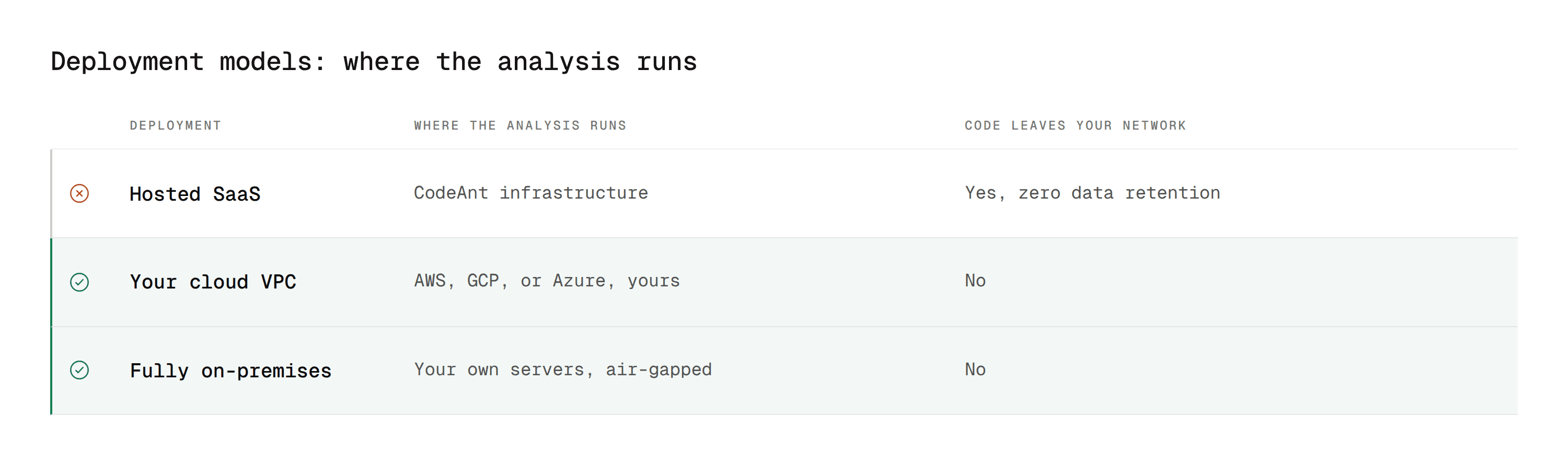
CodeAnt AI supports deployment as fully air-gapped on-premises, inside a customer-managed cloud VPC on AWS, GCP, or Azure, or as hosted SaaS, with code never leaving your environment and zero data retention. That matters directly for the identity and data-residency governance questions covered above, and the review layer itself is covered in our Azure DevOps AI code review guide.
On the governance side specifically, it carries single sign-on against your existing identity provider, role-based access control, and audit logs and reporting built for CISO and compliance visibility rather than added afterwards. Compliance certifications are listed on the enterprise page, which is the source to cite rather than repeating a list here that can go stale.
Applying it consistently across an organization follows the same principle as the policy-scripting approach earlier in this guide: configure once, apply as a required status check across every repository via the same branch policies mechanism, rather than a per-team, per-repo decision that drifts over time.
Governance Is What You Can Prove, Not What You Configured
At 50 developers the question stops being whether your branch policies are correct. It becomes whether they are correct on every repository, including the twelve created since anyone last checked, and whether you can show an auditor that they were enforced rather than merely enabled.
Every failure mode above is the same failure. Configuration that was right once and drifted, because applying it was a manual act and nobody scheduled the re-check.
The fix is not stricter policies. It is making policy application and policy auditing scripted and recurring, so consistency is the default state rather than something a governance team maintains by hand.
Where to start this week
Run one query: how many repositories exist in your largest Azure DevOps Project, and how many of them have a branch policy configured on their default branch. Most organisations have never compared those two numbers, and the gap between them is your actual governance posture rather than the one described in your policy document. If the gap is larger than zero, scripted policy application is the highest-leverage thing on this page and everything else can wait.
Book a walkthrough with our team →
Related reading
Branch Policies in Azure DevOps: every setting and the CLI scripts for applying them across many repositories at once.
Code Review Permissions in Azure DevOps: the permission model behind bypass events and who can change policy.
Required Reviewers in Azure DevOps: path-based assignment for security-sensitive directories across a repo estate.
Automate Pull Requests in Azure DevOps: the REST API layer behind policy scripting and audit-data export.
Azure DevOps AI Code Review Guide: the review and security layer applied consistently across the estate.

