

Most teams learn the Azure DevOps REST API the hard way: a one-off script somebody wrote three years ago to solve a specific problem, half-documented, copied between repos, breaking quietly when an API version changes.
This guide is the reference that script should have come with. It covers authenticating against the API, the core pull request endpoints you'll actually use, real automation scripts for the tasks teams hit most often, and service hooks (Azure DevOps's name for webhooks) for triggering automation the moment something happens to a PR, rather than polling for it.
This is the practical companion to the raw Azure DevOps pull request API reference, built around real automation, not the parameter list. If you haven't automated anything yet and just want to understand how pull requests work day to day, start with our pull request guide instead. This one assumes you already know what a PR is and want to script around it.
Where this connects: CodeAnt AI runs on exactly this pattern. A service hook notifies it when a pull request opens, it pulls the diff through the REST API, then posts AI code review and security scanning findings back as inline comments and a status check.
Key Facts at a Glance
Question | Short answer |
|---|---|
What Azure DevOps calls webhooks | Service hooks. Same mechanism, different product name |
Current API version |
|
Auth inside a pipeline |
|
Auth outside a pipeline | A PAT scoped to Code Read and Write, on a service account |
Can a service hook block a merge | No. It notifies. Only a posted status check gates the merge |
Most common first error | Branch names missing the |
Rate limiting | Rolling consumption window, returns |
Why Automate Pull Requests at All
Three situations come up often enough to be worth automating rather than doing by hand.
Keeping a long-lived branch in sync. A develop branch that should always be mergeable into main, or a fork that needs to stay current with upstream, benefits from a scheduled job that opens (or refreshes) a sync PR automatically instead of someone remembering to do it.
Machine accounts that need to interact with PRs. A release bot that auto-approves dependency bumps under a certain risk threshold, or a pipeline step that needs to create a PR as part of a larger workflow, needs API access, not a human clicking buttons.
Reacting to PR events the moment they happen. Posting a Slack notification when a PR opens, running a custom check when a PR updates, or triggering an external review tool, all need something faster than a script that polls the API on a timer.
The REST API covers all three. Service hooks cover the third one specifically, and more efficiently than polling does.
Authentication: Personal Access Tokens and Service Connections
Every REST API call needs to authenticate as something. Two approaches cover almost every use case.
Personal access tokens (PATs)
The simplest option for scripts and one-off automation. Generate one from your Azure DevOps profile under Personal Access Tokens, scope it to exactly what the script needs (Code: Read & Write for most PR operations, nothing broader), and set an expiration date you'll actually remember to rotate before it lapses.
A PAT authenticates over Basic auth with an empty username:
In Bash:
PATs tied to a personal account are the wrong choice for anything that needs to keep running after that person leaves. For pipeline automation, use the pipeline's own built-in System.AccessToken instead, scoped automatically to the running job and revoked when it finishes.
Service connections and Azure Pipelines' built-in token
Inside an Azure Pipeline, you don't need a PAT at all for most tasks. $(System.AccessToken) is available automatically (enable it under the pipeline's "Allow scripts to access the OAuth token" setting) and authenticates as the pipeline's own identity:
This is the preferred approach for anything running inside a pipeline. It doesn't require managing a secret, and its permissions are scoped and audited automatically.
Core Pull Request REST API Endpoints
The Azure DevOps pull request API is really the same Git REST API surface most Azure DevOps automation ends up touching, PRs are just one resource type within it. The full reference lives in Microsoft's own API documentation, which is the right place for the complete parameter list. What follows are the endpoints teams actually reach for, with the parts that matter in practice.
Create a pull request
The Azure DevOps pull request API call every automation starts with:
sourceRefName and targetRefName need the full refs/heads/ prefix, not just the branch name, the single most common mistake in a first attempt at this call.
Get a pull request
Returns the full PR object: status, reviewers and their vote, source and target branches, and merge status. Useful for polling in scripts that check whether a PR is mergeable before taking the next action.
List pull requests
searchCriteria.status accepts active, completed, abandoned, or all. Add searchCriteria.sourceRefName or searchCriteria.targetRefName to filter further, useful for a script checking "is there already an open sync PR from develop to main before I create another one."
Update a pull request (vote, complete, set auto-complete)
To set auto-complete:
To vote (a machine account approving under specific conditions):
Vote values are fixed integers: 10 is Approve, 5 is Approve with suggestions, 0 is No vote, -5 is Wait for author, -10 is Reject.
Post a status (for external tools)
If you're building anything that gates a merge the way a status check does:
state accepts pending, succeeded, failed, or error. This is the same mechanism our branch policies guide covers for making an external status required, this endpoint is what actually posts it.
Real Automation Scripts
Three scripts covering the situations that come up most.
Script 1: auto-create or refresh a sync PR
Checks whether a develop-to-main sync PR already exists; creates one only if it doesn't, so a scheduled job can run daily without spamming duplicate PRs.
Script 2: auto-complete a PR once policies pass
Runs inside a pipeline, sets auto-complete on the current PR so it merges the moment required policies are satisfied, rather than waiting for someone to click Complete.
Script 3: machine-account approval under defined conditions
A common pattern for low-risk automated changes (dependency bumps under a patch version, for instance): a pipeline checks a condition, and if it passes, approves the PR as a service account rather than waiting on a human for something genuinely low-stakes.
Treat this pattern carefully. Auto-approval is easy to over-apply; keep the condition narrow and specific, and log every automated vote somewhere a human can audit later.
Webhooks (Service Hooks): Event-Driven Automation
Azure DevOps service hooks are what most people mean when they search for Azure DevOps webhooks, "service hooks" is Azure DevOps's own product name for the feature, but the mechanism is identical to webhooks on any other platform. Instead of a script polling the API on a schedule to check if anything changed, Azure DevOps pushes an HTTP POST to a URL you configure the instant a subscribed event occurs.
Why service hooks beat polling
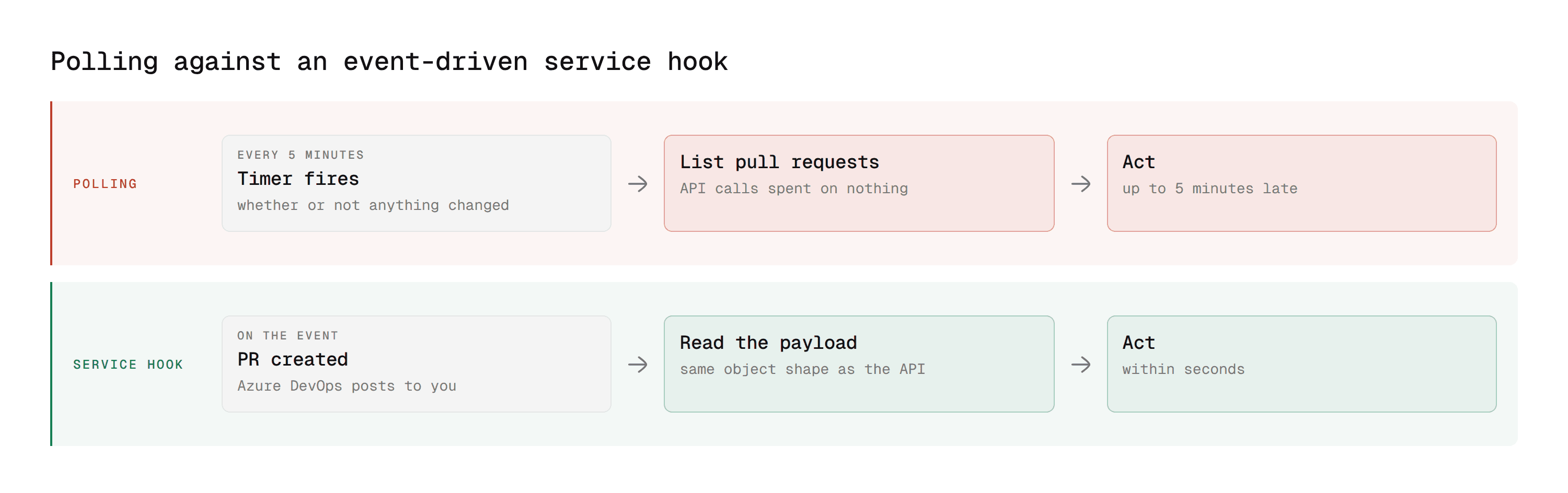
Polling wastes API calls checking for changes that usually haven't happened, and introduces lag between the event and your script noticing it, bounded by how often you poll. A service hook fires within seconds of the actual event, with zero wasted calls in between.
Setting up a service hook
Go to Project Settings, then Service hooks. Click the plus icon to create a subscription. Choose a service (Web Hooks is the generic option for hitting your own endpoint; there are also native integrations for Slack, Microsoft Teams, and others). Choose a trigger event.
Pull request-relevant trigger events include:
Event | Fires when |
|---|---|
Pull request created | A new PR is opened |
Pull request updated | A PR's status, reviewers, or metadata changes |
Pull request merge attempted | Azure DevOps attempts to merge (used to detect merge conflicts) |
Pull request commented on | A comment is added or updated |
Filter by project, repository, and branch to avoid firing on events you don't care about. Set the URL your automation listens on, and choose a payload format (JSON is the default and the one most integrations expect).
What a payload looks like
A "Pull request created" event POSTs a JSON body to your endpoint with the full PR object nested inside an eventType wrapper:
Your endpoint reads eventType to know what happened and resource for the details, the same PR object shape the REST API returns elsewhere, which means code you've already written to parse a PR object from the API works here too.
A minimal webhook receiver
Verify the request is genuinely from Azure DevOps before acting on it in production, either with a shared secret in the URL or by validating the source IP range, since an unauthenticated public endpoint that triggers real actions is a real risk.
Service hooks vs status checks vs build validation
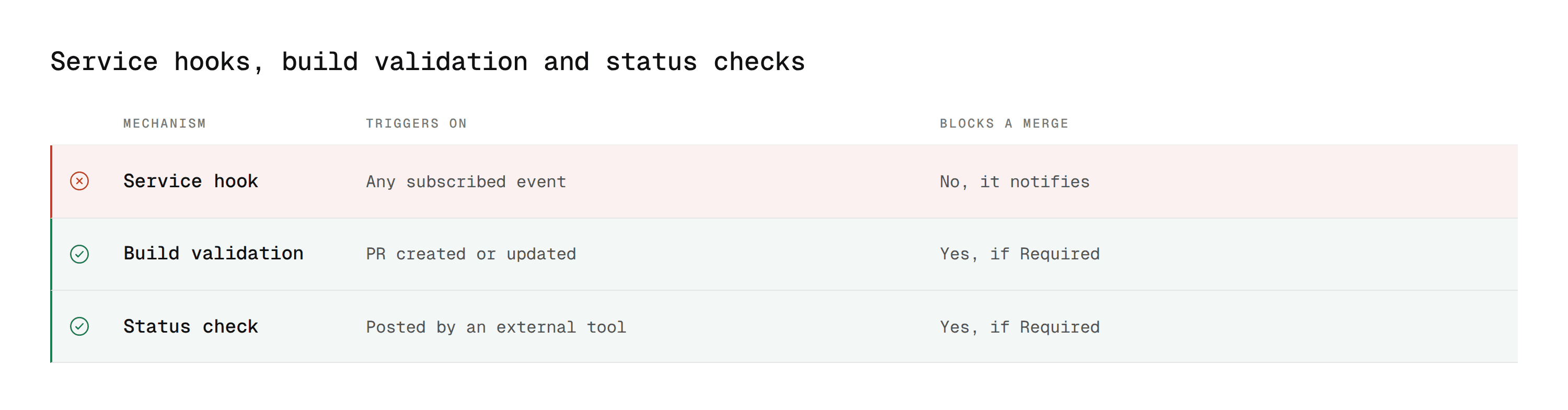
Easy to conflate these three since they all "react" to a PR. They're not the same mechanism.
Mechanism | Triggers on | Can it block a merge? | Typical use |
|---|---|---|---|
Service hook (webhook) | Any subscribed event | No, it's a notification, not a gate | Slack/Teams alerts, kicking off external automation |
Build validation | PR created/updated | Yes, if set to Required | Running your CI pipeline |
Status check | Posted manually via API by an external tool | Yes, if a matching policy is set to Required | Third-party tools like CodeAnt AI gating on their own analysis |
A service hook is how CodeAnt AI itself typically gets notified that a PR was created or updated in the first place, then it does its analysis and posts a status check back, which is the piece that can actually gate the merge. The webhook starts the process; the status check is what enforces the outcome.
Rate Limits and Practical Limits
Azure DevOps enforces rate limiting per organization based on a rolling consumption model rather than a simple fixed request-per-minute cap; heavy automated use (bulk scripts hitting many repos) can trip throttling, which returns a 429 response with a Retry-After header. Respect that header rather than retrying immediately in a loop.
For bulk operations across many repositories, batch requests where the API supports it, and add a short delay between calls in loops rather than firing them as fast as possible.
A few practical limits worth knowing before they surprise you in production:
Consumption-based throttling resets over a rolling window, not a fixed clock minute, so a script that stays well under the limit most of the time can still occasionally hit a
429during a burst. Build retry logic in from the start rather than adding it after the first incident.PATs have a maximum lifetime of one year at creation, and Azure DevOps won't silently renew one. A script that authenticates fine in testing can fail months later purely because the token expired, worth tracking expiration dates somewhere visible, not just in the token itself.
Service hook payloads have a size ceiling. For PRs with very large diffs, some integrations truncate the payload rather than failing outright, so an endpoint that expects the full diff in the webhook body should fetch it via the REST API instead of relying on the webhook payload alone.
Automation Patterns at a Glance
Goal | Mechanism | Endpoint or feature |
|---|---|---|
Create a PR programmatically | REST API |
|
Check if a PR already exists before creating another | REST API |
|
Merge automatically once policies pass | REST API |
|
Approve or vote as a service account | REST API |
|
Gate a merge based on an external check | REST API |
|
React the instant a PR is created or updated | Service hook | Project Settings, then Service hooks |
Notify Slack or Teams on PR events | Service hook | Built-in Slack/Teams integration, no custom endpoint needed |
Run a custom check on every PR | Build validation | See our branch policies guide |
Troubleshooting Common API and Webhook Issues
"400 Bad Request on PR creation"
Almost always a sourceRefName or targetRefName missing the refs/heads/ prefix, or referencing a branch that doesn't exist. Double-check both values before debugging further.
"401 Unauthorized from a pipeline script"
$(System.AccessToken) needs "Allow scripts to access the OAuth token" enabled on the pipeline (under the pipeline's settings, or persistCredentials: true in the checkout step for YAML pipelines). It's off by default.
"The PAT works locally but fails in the pipeline"
The PAT's scope doesn't cover what the pipeline step needs, most commonly missing Code: Read & Write, or the token expired. PATs tied to a personal account can also silently stop working if that account loses repo access, worth using a dedicated service account for anything long-running.
"Service hook isn't firing"
Check the subscription's history under Project Settings, then Service hooks, then the subscription, then History, it shows every attempted delivery and the response your endpoint returned. A common cause is the endpoint being unreachable from Azure DevOps's servers (a local dev URL, or a firewall blocking the incoming request) rather than the subscription itself being broken.
"Webhook fires twice for one event"
Usually two overlapping subscriptions with broad filters both matching the same event. Check for duplicate service hook subscriptions on the same project with overlapping repository or branch filters.
Where CodeAnt AI Fits Into This
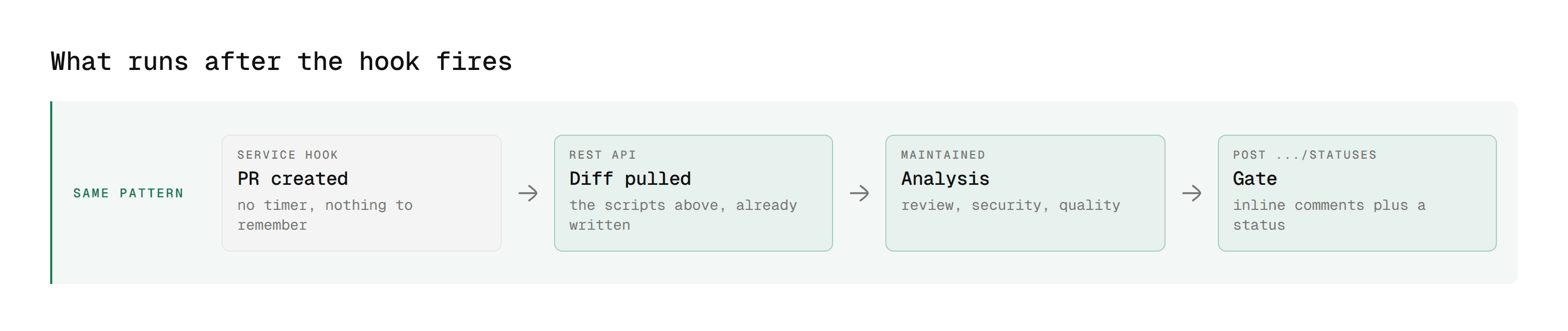
CodeAnt AI uses exactly this integration pattern under the hood: a service hook notifies it the moment a PR is created or updated, it pulls the diff via the REST API, runs its analysis, and posts findings as inline comments plus a status check that branch policies can gate on. For the full breakdown of that pipeline, see our Azure DevOps AI code review guide.
The analysis it posts back covers SAST, secrets detection, dependency risk, and infrastructure-as-code misconfiguration in the same pass as the review, which is the part most teams end up trying to assemble from separate scripts.
If you're already building custom PR automation and want AI-powered review and security scanning added to the same event-driven pipeline rather than building it yourself, CodeAnt AI connects the same way any of the scripts above do, no separate integration pattern to learn. See the cloud setup guide or self-hosted setup guide to connect it directly.
For the policy layer these automations often interact with (auto-complete, required reviewers, status checks), see our branch policies guide, required reviewers guide, and permissions guide for who's allowed to configure and post to any of this in the first place.
Stop Polling. Let the Event Tell You
Most Azure DevOps pull request automation that feels fragile is fragile for the same reason. It asks the API on a timer whether anything happened, instead of being told the moment it did.
The REST API gives you the actions. Service hooks give you the trigger. Once those two are wired together, the automation stops being a script someone remembers to check and becomes part of how pull requests actually move.
Where to start this week
Take Script 1, the sync-PR script. It is the lowest-risk of the three and solves a problem almost every team has, which is a branch that quietly drifts out of sync because opening the PR to fix it is easy to forget. Copy it, fill in your org and repo ID, and run it once by hand before you schedule it. If it works, you have a validated PAT, a confirmed repo ID, and a working auth pattern, which is most of the setup cost for everything else on this page.
Where this stops being worth building yourself is review logic. The service hook is the easy half. The hard half is what runs after it fires, and that half does not hold still. New rule sets, new framework versions, new classes of vulnerability, plus every false positive your team has to tune out by hand before anyone trusts the output again.
CodeAnt AI runs on the same event-driven pattern this page describes. The PR is created, the hook fires, and the review posts inline on the exact lines it applies to, with no timer and nothing to remember to check. The difference is that the logic behind the hook is maintained rather than something you own forever alongside your actual work.
It covers the full spectrum of code security, code review, code quality, and both offensive and defensive security, on every pull request rather than on a schedule. Findings are proof-based, so the thing your automation posts is worth reading the first time.
See what CodeAnt posts on a real pull request →
Azure DevOps AI Code Review Guide: the review layer that sits on top of this integration pattern.
Branch Policies in Azure DevOps: every setting and CLI command for the policy layer these automations interact with.
Required Reviewers in Azure DevOps: path-based auto-assignment, which the reviewer endpoints above interact with directly.
Code Review Permissions in Azure DevOps: who is allowed to configure service hooks and post statuses in the first place.
Best Code Review Tools for Azure DevOps: how the options compare if you are still deciding whether to build or buy.

