

Shipping code without a structured review process is one of the fastest ways to accumulate technical debt, introduce security vulnerabilities, and slow down engineering velocity. As teams grow, informal review habits break down, pull requests wait hours (or days), feedback becomes inconsistent, and security checks get pushed to “later.”
Azure DevOps provides one of the most structured and policy-driven code review systems available today. It combines pull requests, branch policies, pipelines, work item traceability, and merge controls into a single governance workflow designed for enterprise teams.
But simply using pull requests isn’t enough.
To run production-grade code reviews in Azure DevOps, teams need:
Clearly defined branch policies
Automated build validation pipelines
Security and dependency scanning
Merge strategy controls
Work item traceability
And increasingly, AI-assisted review to scale consistency
This guide walks through the complete end-to-end setup, from creating pull requests and configuring branch policies to automating review quality with pipelines and layering AI code review on top.
What is Code Review in Azure DevOps?
Code review in Azure DevOps is the process of reviewing proposed code changes through pull requests (PRs) in Azure Repos before they’re merged into a protected branch.
A typical review looks like this:
Reviewers examine the code diff
Leave inline comments
Vote to approve, request changes, or reject
The entire process is controlled by branch policies, which can require:
A minimum number of approvals
Linked Azure Boards work items
Successful pipeline builds
All comments resolved
Passing status checks from external tools (e.g., security scanners or AI code reviewers)
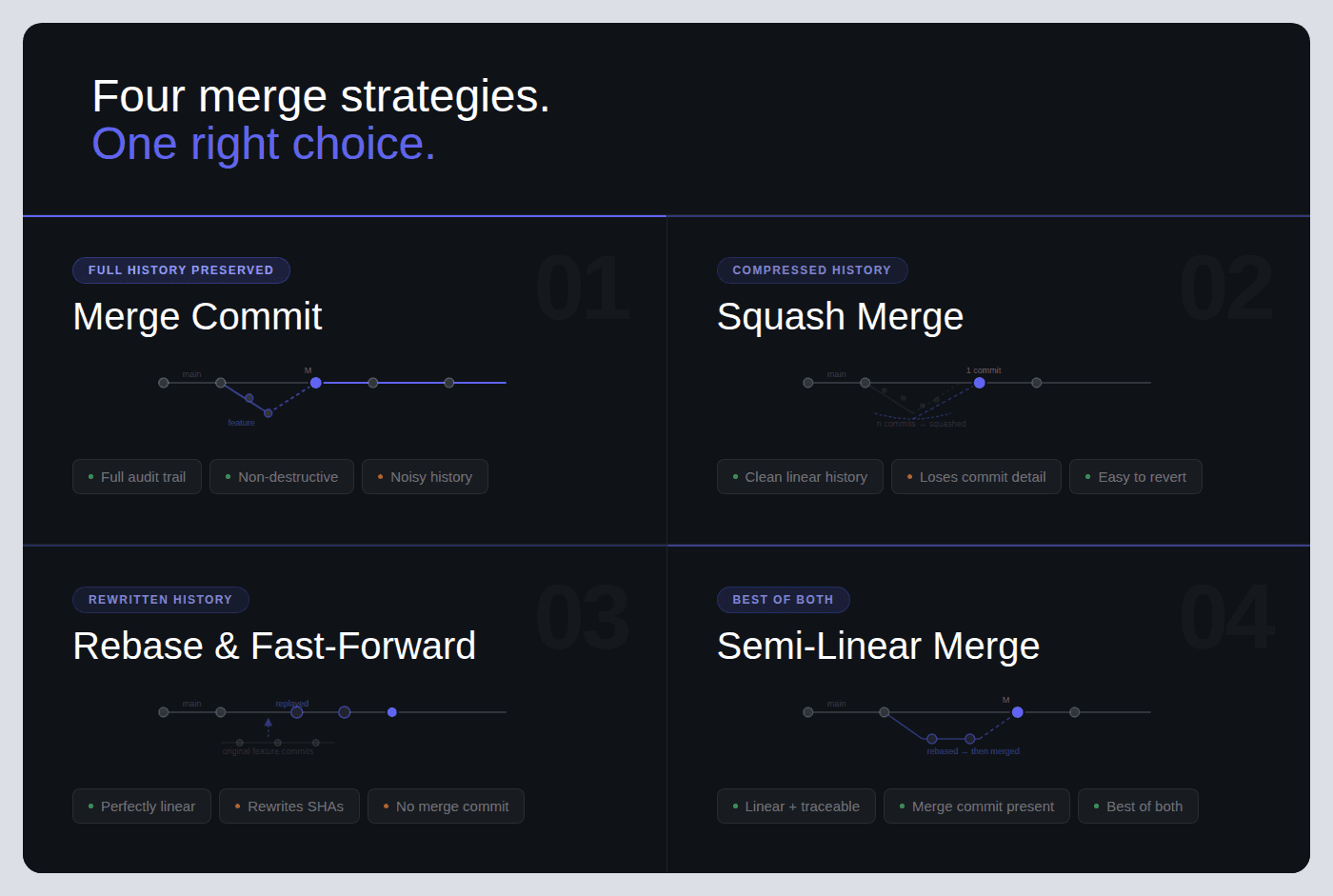
Azure DevOps supports four merge strategies:
Merge commit
Squash merge
Rebase and fast-forward
Semi-linear merge
Pull requests can also be set to auto-complete, meaning they merge automatically once every policy condition is satisfied.
Teams typically extend the built-in review workflow with:
Azure Pipelines for automated builds, testing, and linting
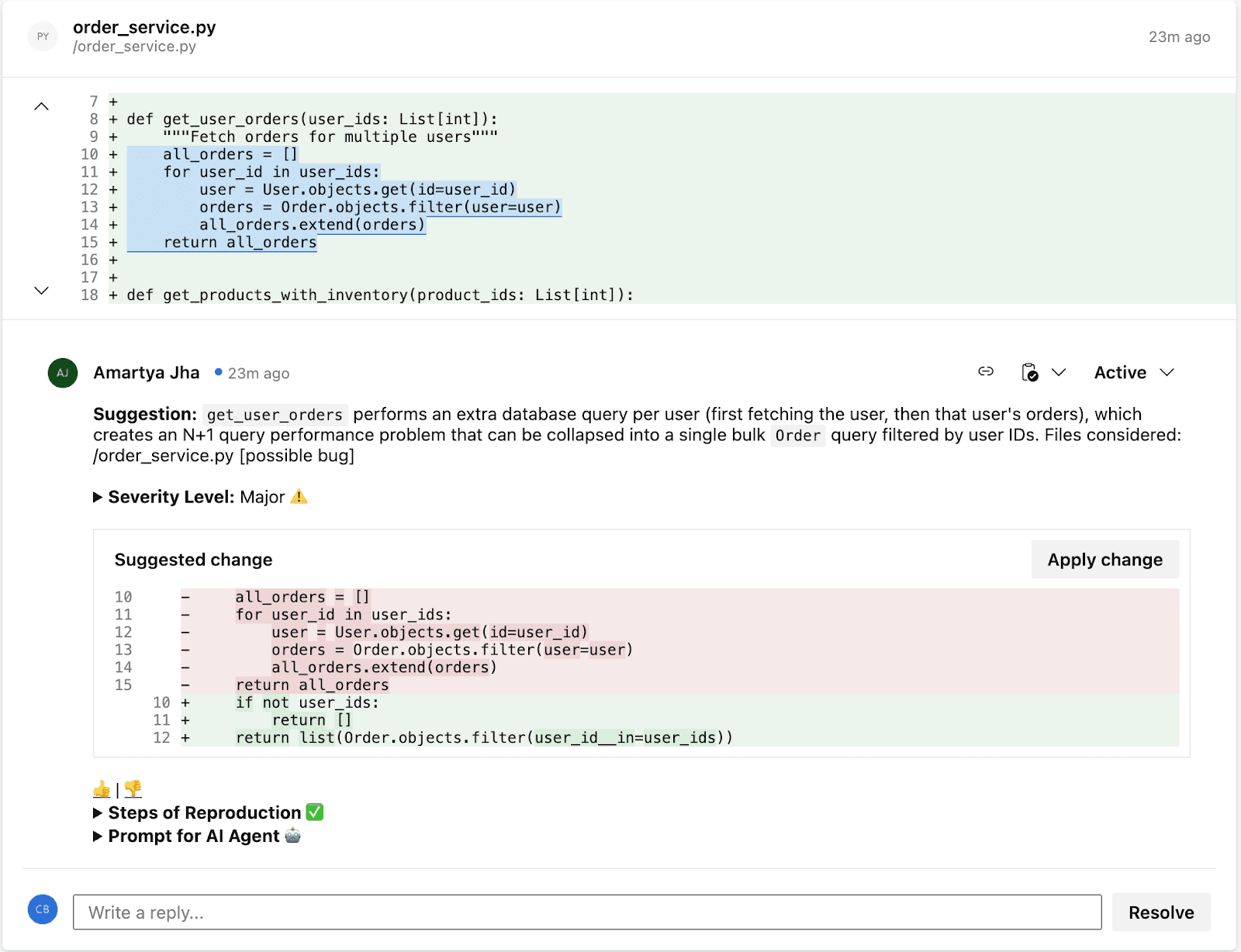
AI-powered code review tools that post inline findings, security alerts, and quality gate results directly on PRs
Unlike GitHub’s review model, which primarily relies on CODEOWNERS and branch protection rules, Azure DevOps offers a tightly integrated, policy-driven workflow.
Every pull request can:
Link directly to Azure Boards work items
Automatically trigger Azure Pipelines
Enforce granular, branch-specific policies
This makes Azure DevOps especially well-suited for enterprise teams that require traceability, compliance controls, and structured governance over code changes.
How Code Reviews Work in Azure DevOps: End-to-End Flow
Every code review in Azure DevOps follows this flow:
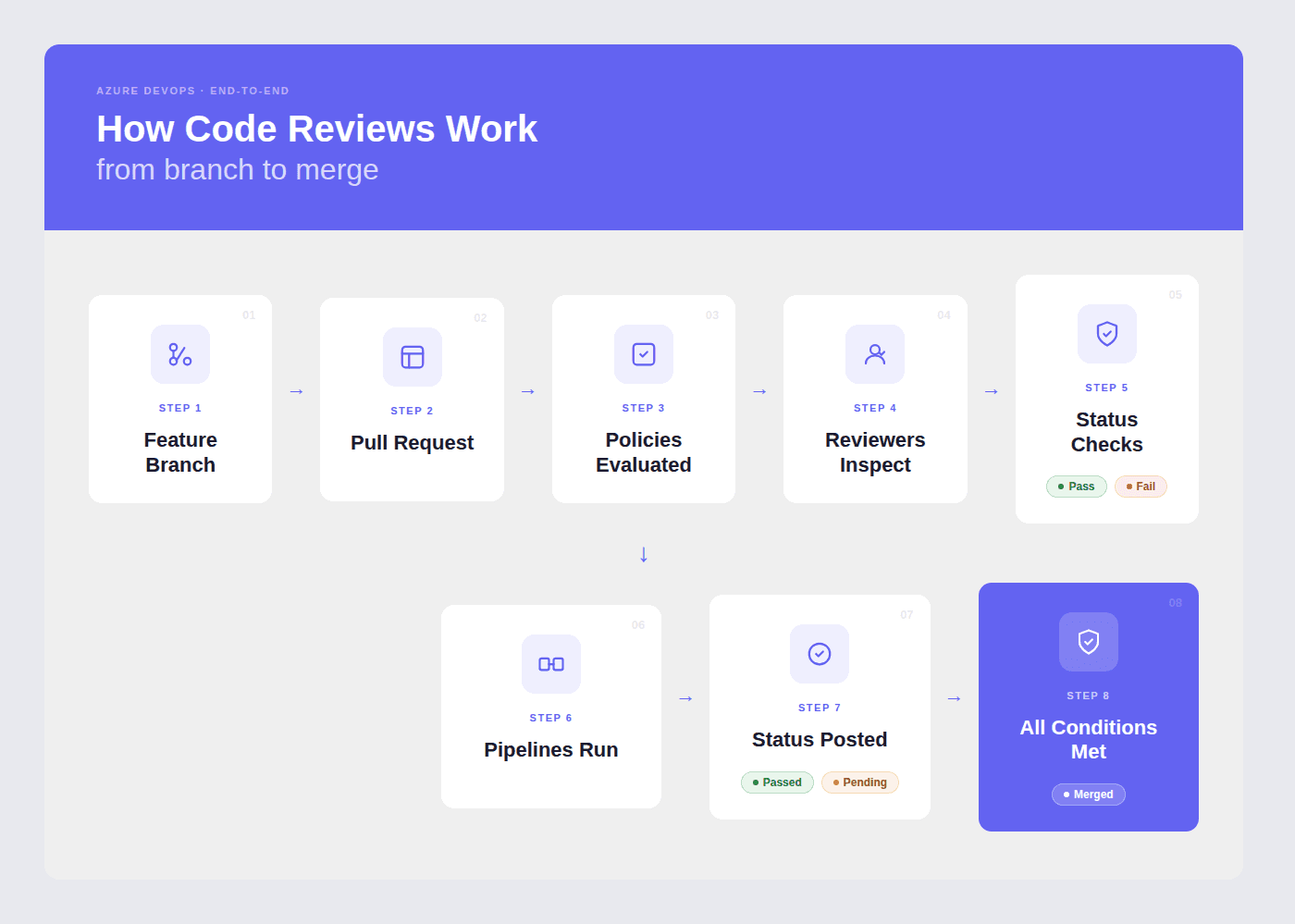
What happens at each stage:
1. Branch + Code Changes
The developer creates a feature branch (e.g., feature/login-fix), makes changes, and commits. Azure DevOps suggests creating a PR when a branch is pushed.
2. Pull Request Created
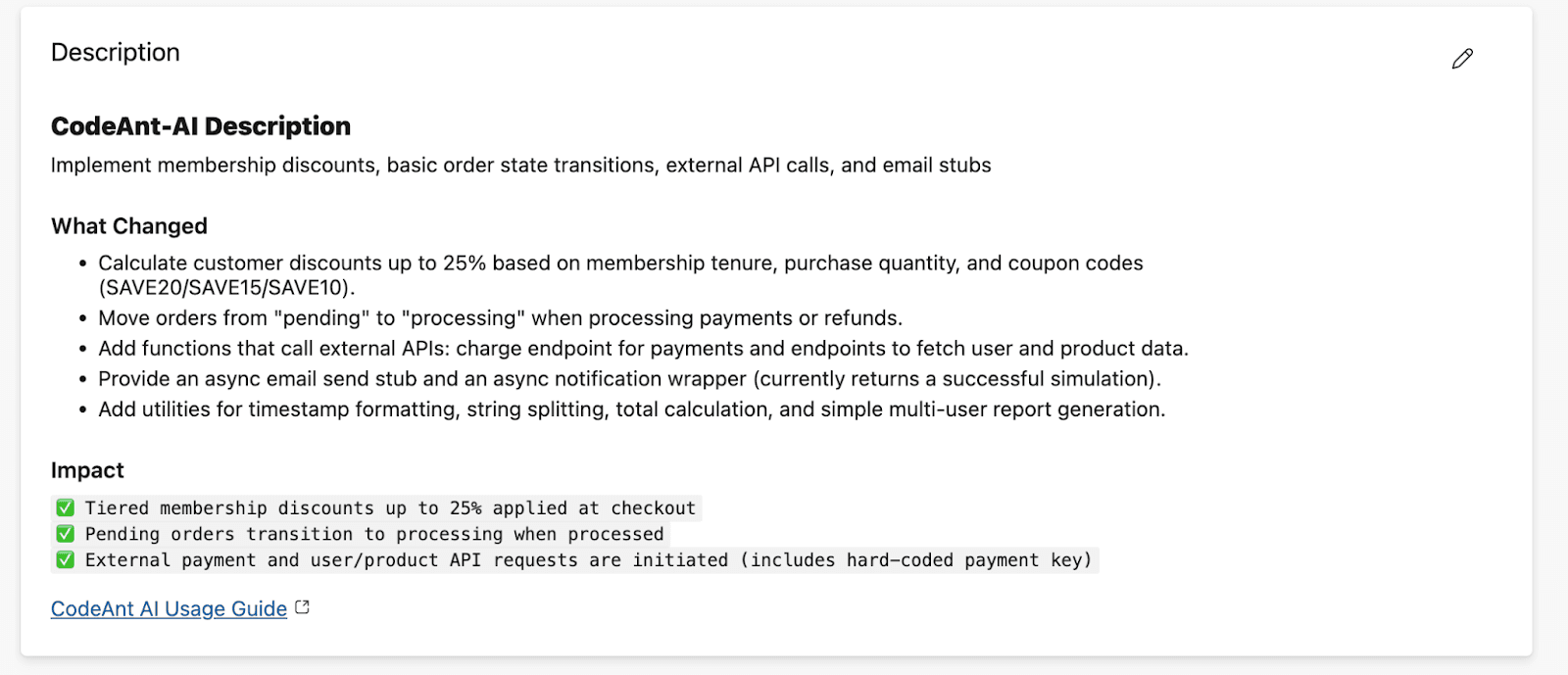
The PR includes a title, description, linked work items from Azure Boards, and assigned reviewers. If a PR template exists in the repo (.azuredevops/pull_request_template.md), it auto-populates the description.
3. Branch Policies
Evaluate Automatically The moment a PR is created, Azure DevOps checks all configured branch policies: minimum reviewers, linked work items, build validation, status checks, and comment resolution requirements. Each policy shows pass/fail status on the PR overview.
4. Pipelines Run
If build validation is configured, Azure Pipelines triggers automatically, running your CI pipeline (build, unit tests, linting, security scans). The pipeline result posts back to the PR as a required status.
5. Reviewers Inspect and Comment
Reviewers open the Files tab, review the diff line-by-line, leave inline comments, and vote: Approve, Approve with Suggestions, Wait for Author, or Reject.
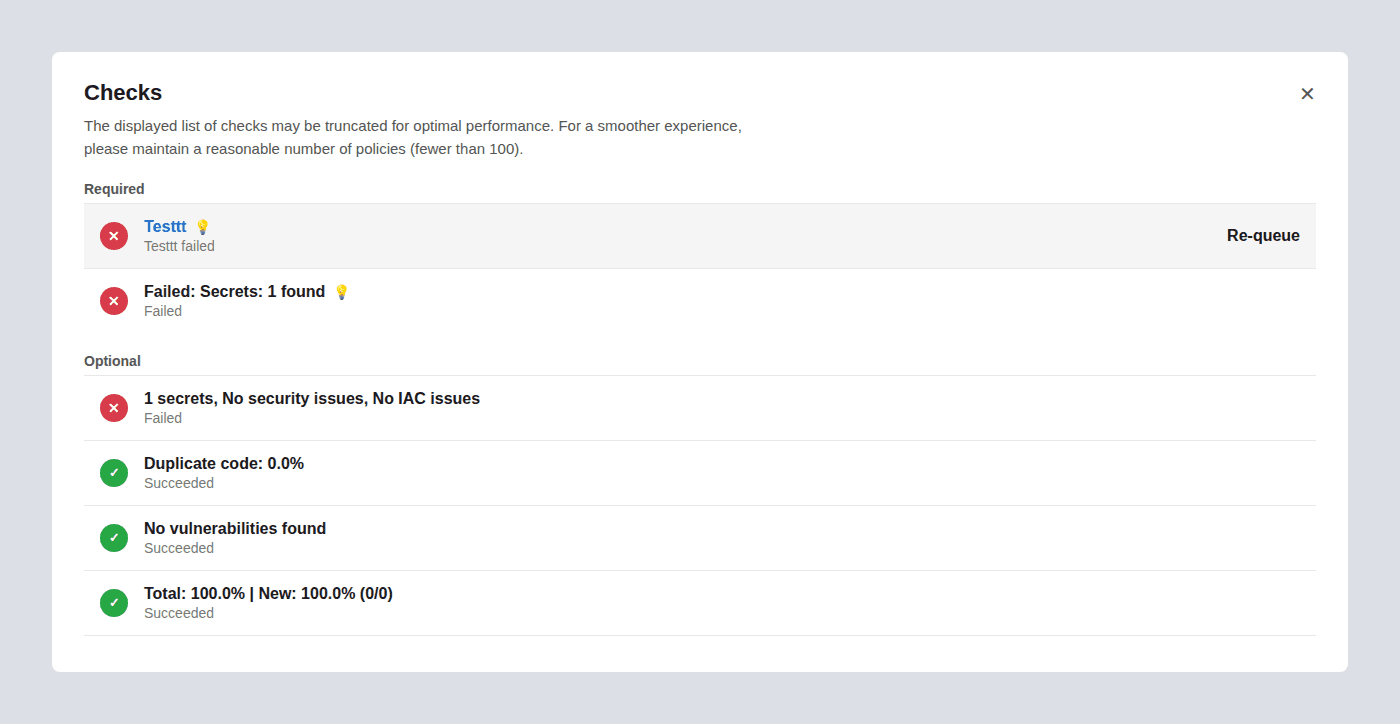
6. Status Checks from External Tools
External services, AI code reviewers, SAST tools, coverage analyzers, post their own pass/fail statuses to the PR. If configured as required policies, these must pass before merge.
7. Merge
When all policies pass and all required reviewers approve, the PR is completed. If auto-complete was enabled, the merge happens automatically. The source branch can be deleted automatically post-merge.
Step-by-Step: Create and Review a Pull Request
Creating a PR
Step 1: Navigate to Repos → Pull Requests in your Azure DevOps project sidebar.
Step 2: Click “New Pull Request” in the top-right corner.
Step 3: Select your source branch (the branch with your changes) and your target branch (usually main or develop).
Step 4: Write a clear title, use present tense and be specific.
Good:
Fix session timeout redirect on login pageBad:
Fixed stufforUpdates
Step 5: Write a description explaining:
What changed and why
Any tradeoffs or edge cases
Testing you’ve done
Screenshots if UI changes are involved
If a PR template is configured, it will pre-populate the description with your team’s checklist.
Step 6: Link work items, search for the relevant Azure Boards task, bug, or story. This provides reviewers with context on why the change exists.
Step 7: Assign reviewers, add team members who know the code area. You can add both required and optional reviewers.
Step 8: Click “Create” (or “Create as draft” if the PR isn’t ready for full review).
Creating a PR via Azure CLI:
Reviewing a PR
Step 1: Open the PR from Repos → Pull Requests → Active.
Step 2: Read the Overview tab first, title, description, linked work items. Understand what the change does and why before looking at code.
Step 3: Switch to the Files tab to review the diff. You can view changes inline or side-by-side.
Step 4: Leave inline comments on specific lines. Be specific and actionable:
Instead of: “This needs work”
Write: “This query runs inside a loop, consider batching to avoid N+1. Here’s a pattern:
SELECT ... WHERE id IN (...)”
Step 5: Vote using the dropdown next to the Approve button:
Vote | What It Means | When to Use |
Approve | Code is good to merge | No issues found, or only trivial items |
Approve with Suggestions | Mergeable, but here are improvements | Non-blocking feedback you’d like the author to consider |
Wait for Author | Needs changes before merge | Bugs, missing tests, or unclear logic that should be fixed |
Reject | Fundamentally wrong approach | Rarely used, only for architectural or direction problems |
Step 6: Once all comments are resolved, all reviewers approve, and all policies pass, click “Complete” or let auto-complete handle it.
Azure DevOps Branch Policies: Complete Reference
Branch policies are the enforcement layer of code review in Azure DevOps. They turn review best practices into rules that every PR must satisfy before merging.
To configure:
Project Settings → Repos → Repositories → [Select repo] → Branch Policies → [Select branch]
Or via CLI: az repos policy list --repository-id <REPO_ID> --branch main
Branch Policy Settings Reference Table
Policy | What It Enforces | Recommended Default | Configuration Notes |
Require minimum number of reviewers | Blocks merge until N reviewers approve the PR | 1 for small teams (2–5 devs), 2 for teams of 6+ | Uncheck “Allow requestors to approve their own changes.” Check “Require re-approval on last iteration” to prevent stale approvals when the author pushes new commits. |
Check for linked work items | Requires PR to be linked to at least one Azure Boards work item | Required (not Optional) | Set to “Required” for traceability. Every code change should map to a task, bug, or story. Set to “Optional” only during early prototyping phases. |
Check for comment resolution | Blocks merge until all review comments are resolved or marked “Won’t Fix” | Required | Prevents “merge and forget” ensures all feedback is addressed. Authors can resolve comments by fixing the code, replying with justification, or marking “Won’t Fix.” |
Limit merge types | Restricts which merge strategies can be used on the target branch | Allow squash + merge commit | Lock down per branch: squash for feature→ develop (clean history), merge commit for develop→ main (preserve merge points). See the merge strategies section below. |
Build validation | Runs an Azure Pipeline and requires it to pass before merge | Required, automatic trigger | Set “Build expiration” to 12 hours or “Immediately when target branch updates.” Choose your CI pipeline that runs build + tests + linting. |
Status checks (external services) | Blocks merge until an external tool posts a “succeeded” status | Required for security/quality tools | Use for AI code review (CodeAnt AI), SAST scanners, coverage tools, or any external validator. Set “Authorized account” to restrict who can post status. |
Automatically included reviewers | Auto-assigns specific reviewers based on file paths changed in the PR | Required for sensitive paths | Scope to |
Reset votes on new pushes | Resets existing approvals when the author pushes new commits to the source branch | “Require at least one approval on last iteration” | Prevents a scenario where a reviewer approves, the author pushes new (unreviewed) code, and the PR merges with stale approvals. “Reset all votes” is stricter but can slow teams down. |
Minimum viable policy set for any team: Require 1 reviewer + successful build + linked work item + resolved comments. This takes 5 minutes to configure and prevents the most common quality failures.
Enterprise policy set: Add required reviewers for sensitive paths, external status checks for SAST/AI code review, vote reset on new pushes, and restrict merge types to squash only.
Configuring Branch Policies via Azure CLI
For teams managing multiple repositories, the CLI lets you script policy enforcement at scale:
PR Templates in Azure DevOps: Examples You Can Copy
Pull request templates auto-populate the PR description when a developer opens a new PR. They ensure every PR includes the context reviewers need and the checks authors should complete.
How PR Templates Work
Create a file named pull_request_template.md and place it in your repo’s default branch in one of these folders (Azure DevOps searches in this order):
/.azuredevops/pull_request_template.md/.vsts/pull_request_template.md/docs/pull_request_template.md
For branch-specific templates, use: /.azuredevops/pull_request_template/branches/<branch-name>.md
Default PR Template (Copy-Paste Ready)
Security Review PR Template
For PRs touching authentication, authorization, cryptography, or sensitive data paths:
Hotfix / Release PR Template
Merge Strategies in Azure DevOps: Which One to Use
Azure DevOps offers four merge strategies when completing a pull request. Each affects your git history differently.
Merge Strategy Comparison Table
Strategy | What It Does | Git History Result | Best For |
Merge (no fast-forward) | Creates a merge commit that joins the source branch into the target | Full history preserved, all individual commits visible plus a merge commit |
|
Squash merge | Combines all commits from the source branch into a single commit on the target | Clean, linear history, one commit per PR with a combined message |
|
Rebase and fast-forward | Replays source commits on top of the target branch tip, then fast-forwards | Linear history with no merge commit, looks like all work happened sequentially | Small teams that want a perfectly linear |
Semi-linear merge | Rebases source commits onto target, then creates a merge commit | Linear base with explicit merge points, combines benefits of rebase + merge visibility | Teams that want linear history but also want to see where PRs were integrated. Good middle ground for medium teams. |
Decision Tree: Which Merge Strategy Should Your Team Use?
Start here: Is your team smaller than 5 developers?
Yes → Squash merge everything. Keeps history clean. One commit = one PR = one feature or fix. Easiest to reason about and revert.
No → Do you need audit-level traceability (compliance, regulated industry)?
Yes → Merge (no fast-forward) for protected branches (
develop → main,release → main). Squash for feature branches (feature → develop). This preserves merge points for audit while keeping feature history clean.No → Squash for features, semi-linear for integration branches. Gives you clean feature history with visible integration points.
How to enforce this per branch:
Go to Branch Policies → Limit merge types on each target branch and check only the allowed strategies. For example:
On
main: Allow only “Merge (no fast-forward)”On
develop: Allow only “Squash merge”
Automate Review Quality with Azure Pipelines
Azure Pipelines can run automated checks on every pull request, catching issues before a human reviewer even opens the Files tab.
What to Automate in PR Validation
Check Type | Tools | Why It Matters |
Build |
| Proves the code compiles, catches syntax errors, missing imports, broken references |
Unit tests |
| Catches functional regressions before review |
Linting |
| Enforces code style so reviewers don’t waste time on formatting |
Formatting |
| Ensures consistent formatting across the team |
Security scanning (SAST) | CodeAnt AI, | Catches vulnerabilities, hardcoded secrets, insecure patterns |
Dependency scanning (SCA) |
| Flags known CVEs in third-party packages |
Code coverage |
| Ensures new code has tests (set a threshold, e.g., 80%) |
Production-Ready PR Validation Pipeline (YAML)
This pipeline runs on every PR and covers build, test, lint, and security:
To connect this pipeline as a branch policy:
Go to Project Settings → Repos → Branch Policies → [branch]
Under Build Validation, click +
Select this pipeline
Set Trigger to “Automatic”
Set Policy requirement to “Required”
Set Build expiration to “Immediately when [branch] is updated” (strictest) or “After 12 hours” (balanced)
Manual Review vs. Branch Policies vs. AI-Assisted Code Review
Most teams start with manual pull request reviews. As they grow, they add branch policies for enforcement. The most effective teams layer AI-assisted review on top for coverage and speed.
Here’s how the three approaches compare:
Dimension | Manual Review Only | Branch Policies + Pipelines | AI-Assisted Review (e.g., CodeAnt AI) |
How it works | Author opens PR, tags reviewers, waits for comments and approval | Policies enforce reviewer count, build pass, linked work items, and status checks before merge | AI tool auto-reviews every PR: posts inline comments, runs SAST/SCA, and posts a quality gate status |
Review speed | Hours to days (depends on reviewer availability and PR size) | Same human speed, but blocks merge if checks fail, no shortcuts | Seconds to minutes for AI pass; humans focus only on logic, architecture, and design |
Consistency | Varies by reviewer: senior dev catches more than a tired junior at 5 PM Friday | Enforces process (who reviews, what must pass) but not review quality | Consistent: every PR gets the same depth of analysis across 30+ languages, every time |
Security coverage | Only what reviewers manually catch, and manual review is inconsistent for security issues | Pipeline can run SAST tools, but needs explicit setup and tuning | Built-in SAST, SCA, secrets detection, and IaC scanning on every PR, automatically |
Setup effort | Zero configuration | 15–30 minutes per repo (branch policies + pipeline YAML) | 5–10 minutes (marketplace install + personal access token + webhook config) |
What it catches | Logic errors, design issues, code clarity, things that need human judgment | Build failures, test regressions, lint violations, things machines verify | Code smells, anti-patterns, security vulnerabilities, duplications, missing edge cases, things that need AI breadth |
What it misses | Style violations, known vulnerability patterns, anything the reviewer doesn’t know about | Review quality, policies ensure reviews happen, not that they’re good | Architectural decisions, business logic correctness, team-specific context |
Best for | Small teams (2–3 devs), low-risk code, early-stage projects | Any team wanting process guardrails and merge-blocking enforcement | Teams wanting speed + security + consistency at scale without burning out senior reviewers |
Our recommendation: Layer all three. Use branch policies as the process foundation, pipelines for automated testing and linting, and AI code review for intelligent, line-by-line feedback on every PR. This gives you enforcement (policies), verification (pipelines), and insight (AI), without asking humans to do everything.
Recommended Code Review Setup by Team Size
There is no one-size-fits-all review configuration. What works for a 3-person startup will slow down a 50-person enterprise team, and vice versa. Here’s what we recommend based on team size, informed by patterns from teams running code reviews on Azure DevOps at scale.
Small Teams (2–5 Developers)
Setting | Recommended Value |
Minimum reviewers | 1 |
Required reviewers (path-based) | Not needed, team is small enough for everyone to review everything |
Build validation | Required, even a simple |
Linked work items | Optional (enforce if using Azure Boards; skip if tracking elsewhere) |
Comment resolution | Required |
Merge type | Squash only |
AI code review | Recommended, compensates for having fewer reviewer perspectives |
Auto-complete | Enable, reduces merge friction |
Why: Small teams move fast. The goal is to add just enough structure to catch regressions without creating bottlenecks. One reviewer + CI + AI code review gives you solid coverage without slowing anyone down.
Medium Teams (6–20 Developers)
Setting | Recommended Value |
Minimum reviewers | 2 |
Required reviewers (path-based) | Yes, assign specialist reviewers for |
Build validation | Required, automatic trigger, 12-hour expiration |
Linked work items | Required |
Comment resolution | Required |
Merge type | Squash for feature→ develop, merge commit for develop→ main |
AI code review | Strongly recommended, catches cross-cutting issues that individual reviewers miss |
Auto-complete | Enable with “reset on new pushes” |
Status checks | Required for SAST/security scanning |
Why: At this size, knowledge silos form. Path-based reviewers ensure the right eyes see the right code. Two reviewers prevent blind spots. AI code review becomes critical because no single person knows the full codebase anymore.
Large Teams (20+ Developers)
Setting | Recommended Value |
Minimum reviewers | 2 (consider 3 for |
Required reviewers (path-based) | Yes, use groups (not individuals) for each domain. Add security team for |
Build validation | Required, automatic, “immediately expire when target updates” |
Linked work items | Required (enforce for compliance/audit trail) |
Comment resolution | Required |
Merge type | Squash for features, merge commit for integration branches, locked down via policy |
AI code review | Essential, manual review alone cannot scale to 20+ PRs/day. Use AI as the first pass; humans focus on architecture and business logic |
Auto-complete | Enable with “reset all votes on new pushes” |
Status checks | Required for: SAST, SCA, code coverage threshold, AI code review quality gate |
Cross-repo policy scripts | Use Azure CLI to enforce identical policies across all repositories |
PR templates | Required, use branch-specific templates for feature, release, and hotfix branches |
Why: At scale, consistency matters more than speed. Policies should be scripted (not manually configured per repo), AI should handle the first review pass, and every PR should have full traceability back to work items. This is also where enterprise features, SOC 2 compliance, audit trails, and RBAC, become non-negotiable.
Troubleshooting Common Code Review Issues in Azure DevOps
“PR won’t merge: policies are blocking”
Cause: One or more branch policies haven’t been satisfied.
Fix: Check the PR overview for policy status. Common blockers:
Build validation failed → check pipeline logs
Required reviewer hasn’t approved → ping the reviewer or check if they’re out
Comments not resolved → scroll through all threads and resolve or mark “Won’t Fix”
Work item not linked → add a work item from Azure Boards
Status check pending → external tool (AI reviewer, SAST scanner) hasn’t posted results yet
“Build validation keeps expiring”
Cause: Someone merged into the target branch after your build passed, causing your build to expire.
Fix: Either:
Re-queue the build manually from the PR
Change build expiration to “After 12 hours” instead of “Immediately when target updates” (in branch policy settings)
Enable auto-complete, Azure will re-trigger the build and merge when it passes
“Reviewer added automatically but I don’t know why”
Cause: An “Automatically included reviewers” policy is configured based on file paths.
Fix: Check Project Settings → Repos → Branch Policies → Automatically included reviewers. You’ll see which paths trigger which reviewers. If the auto-reviewer shouldn’t be required, change their setting from “Required” to “Optional.”
“I approved but the PR still says ‘Waiting for approval’”
Cause: The policy requires a minimum number of reviewers, and your approval alone isn’t enough. Or, the policy has “Require re-approval on last iteration” enabled and the author pushed new commits after your approval.
Fix: Check the reviewer count in the policy. If your approval was reset, re-review the latest changes and approve again.
“Status check shows ‘Not applicable’ or never posts”
Cause: The external service (AI code reviewer, SAST tool) isn’t configured to post status, or its webhook isn’t firing.
Fix:
Verify the tool is installed and connected to the repository
Check Project Settings → Service Hooks for the correct webhook
Verify the tool’s configuration includes the target branch
Check the tool’s logs for errors
If the policy is set to “Apply by default,” it will block even if the tool never posts — change to “Apply only when status is posted” if this is intentional
“Can’t push directly to main: getting TF402455 error”
Message: ! [remote rejected] main -> main (TF402455: Pushes to this branch are not permitted; you must use a pull request to update this branch.)
Cause: Branch policies are enabled on main, which blocks direct pushes.
Fix: This is working as intended. Create a feature branch, push your changes there, and open a pull request. If you need emergency access, a Project Administrator can temporarily bypass the policy (but this should be rare and audited).
Why Teams Choose CodeAnt AI for Code Reviews on Azure DevOps
CodeAnt AI is a defensive and offensive security platform with first-class Azure DevOps support, reviewing pull requests inline with SAST checks in the same pass. It is rated on Gartner Peer Insights for its inline review quality and enterprise security posture.
CodeAnt AI cuts code review time by 80% in Azure DevOps. It reviews every single line of every pull request, not just a sample, not just the diff summary — and posts inline findings for quality and security issues right inside the Azure DevOps PR, with one-click fixes that developers can apply and learn from on every review. What used to take humans hours or days now takes minutes.
What CodeAnt AI Does for Your Team
For developers: CodeAnt AI reviews every PR automatically and posts inline comments covering logical flaws, business logic errors, critical code flaws, performance issues, best practices, security vulnerabilities, and dependency risks. Each finding includes a one-click fix, developers apply the fix directly from the PR, see exactly what changed and why, and internalize the pattern for next time. Over time, the same issues stop appearing because developers learn from every fix.
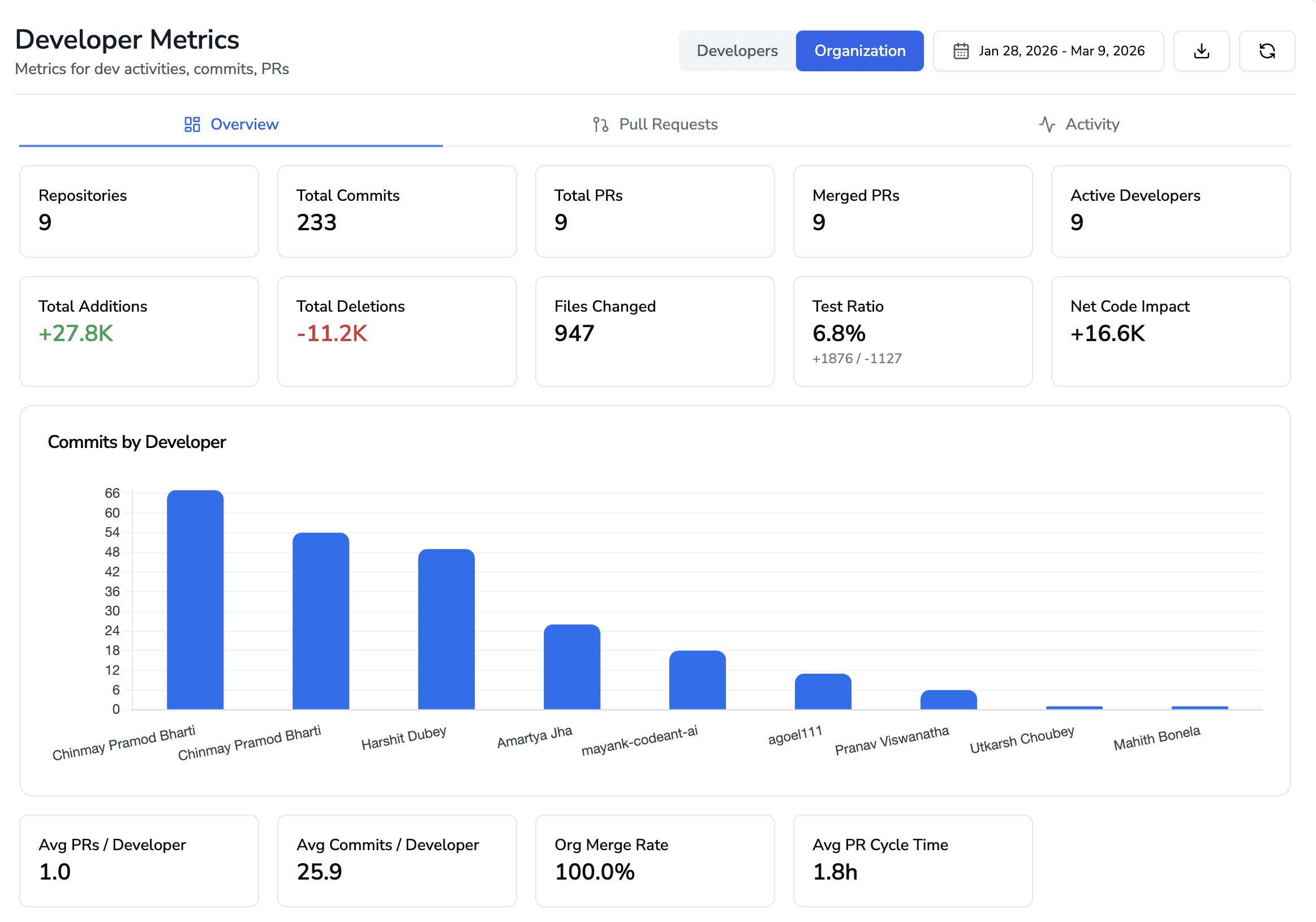
For engineering leaders: CodeAnt AI provides dashboards that show how code is being shipped across the organization, review velocity, code health trends, security posture, and developer productivity metrics. Leaders get visibility into which repositories have the most findings, which categories of issues are most common (indicating systemic patterns), and how code quality trends over time. This replaces the guessing game of “are we shipping quality code?” with data.
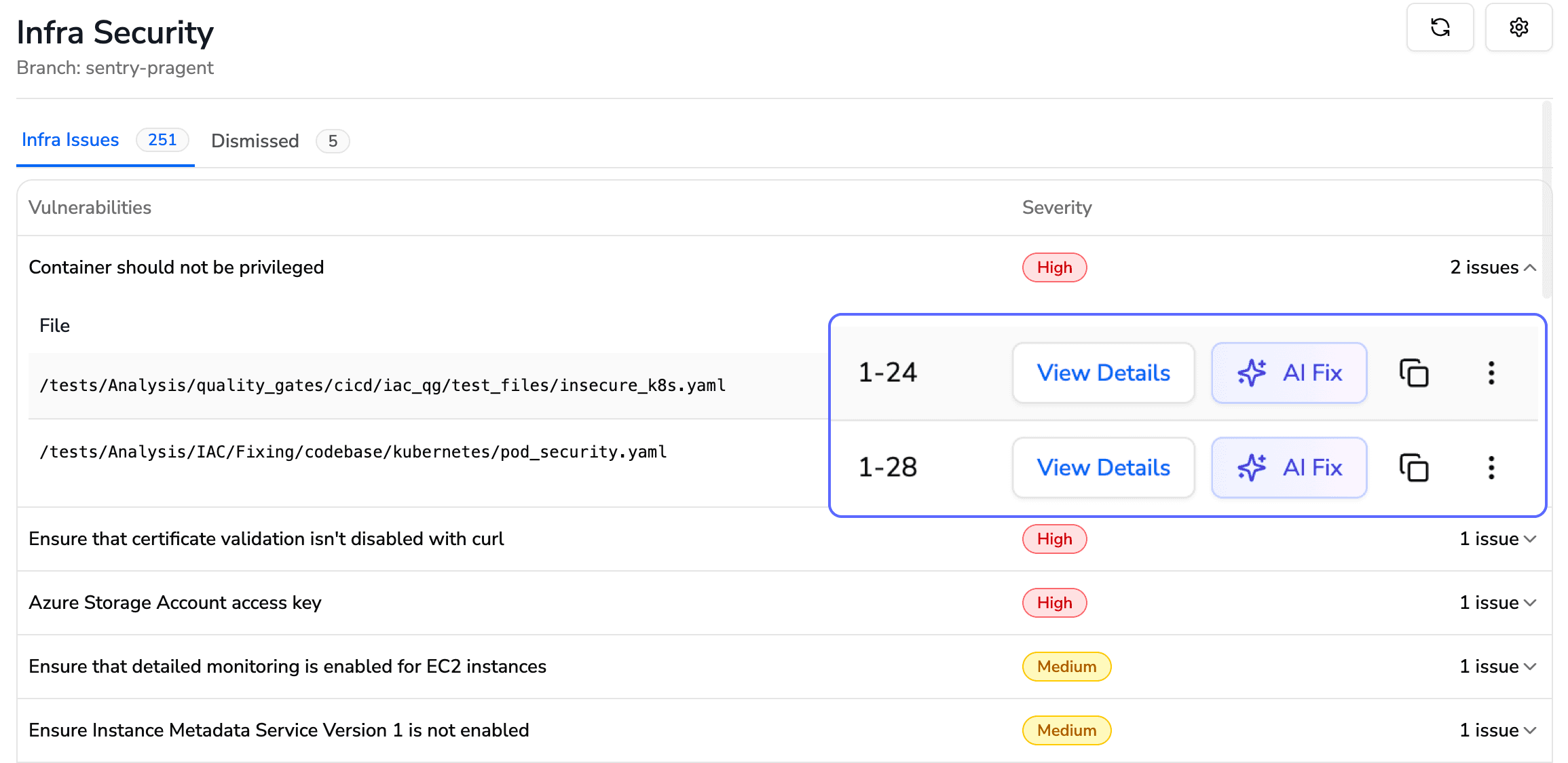
For security and compliance teams: Every PR gets SAST, SCA, IaC scanning, and secrets detection automatically. Security findings include Steps of Reproduction, a detailed proof of the full attack path showing exactly how an attacker would exploit the vulnerability. Quality gates block builds and prevent merges when critical issues are found, ensuring nothing ships to production with known security defects.
Azure DevOps Service | What CodeAnt AI Does |
Azure Repos | Connects directly to your repositories; reviews every line of every pull request automatically |
Pull Requests | Posts inline, context-aware AI review comments with one-click fixes, right inside your PRs, no context switching |
Azure Pipelines | Acts as a quality gate, blocks builds and prevents merges when critical quality or security issues are detected |
Azure Boards | Pulls work item context directly into reviews, so the AI understands why the code exists, not just what changed |
Works on Both Cloud and Self-Hosted Azure DevOps
Many enterprise teams run Azure DevOps Server (on-premises) rather than Azure DevOps Services (cloud), for data residency, compliance, or network isolation reasons. CodeAnt AI supports both deployment models natively:
Azure DevOps Environment | CodeAnt AI Setup | Configuration Docs |
Azure DevOps Services (Cloud): | Connect directly from CodeAnt AI dashboard. No infrastructure to manage. | |
Azure DevOps Server (Self-Hosted): on-premises or private cloud | CodeAnt AI connects to your self-hosted instance. Your code never leaves your network. |
This matters because most AI code review tools, including CodeRabbit and SonarCloud, only support cloud-hosted Azure DevOps. If your organization runs Azure DevOps Server on-prem (common in financial services, healthcare, government, and large enterprises), CodeAnt AI is one of the few tools that integrates natively without requiring you to migrate to the cloud.
What CodeAnt AI Reviews on Every PR
Logical flaws and business logic errors: Incorrect conditionals, off-by-one errors, scope creep beyond the linked work item
Critical code flaws: Null pointer dereferences, unhandled exceptions, resource leaks, deadlocks
Performance issues: N+1 queries, unnecessary allocations, blocking calls in async contexts
Best practices: Framework anti-patterns, naming convention violations, deprecated API usage
Security (SAST): Injection vulnerabilities, broken auth, hardcoded secrets, insecure configurations, with Steps of Reproduction showing the full attack path
Dependencies (SCA): Known CVEs in third-party packages, license compliance issues
One-click fixes: Every finding includes a suggested fix that developers can apply directly from the PR, no copy-pasting, no manual edits
Get started: Connect your Azure DevOps organization → select repos → create a pull request. See the setup guide!

