

A CI/CD pipeline is the automated path a code change takes from a commit to running software: build, test, quality and security checks, then deployment. Once it is set up, almost all of it runs behind the scenes. You push, the pipeline does the rest, and you only hear from it when something needs your attention.
This article covers the part you have to get right yourself: what a pipeline is made of, what you need in place before you build one, how to build it step by step, and the practices that keep it trustworthy once it exists.
What a CI/CD pipeline solves here: every change is built, tested, and checked the same way, every time. Releases stop depending on one person’s memory of the deploy procedure, and broken code is caught minutes after it is written instead of days after it ships.
What you’ll learn
The working definitions of continuous integration, continuous delivery, and continuous deployment, and how they differ
The six stages a production pipeline runs and where merge-blocking gates belong
The prerequisites to sort out before writing any pipeline config
How to build a pipeline step by step, with a complete, valid GitHub Actions workflow
Edge cases that break pipelines in practice: fork PRs, monorepos, migrations, plan limits
The practices that keep a pipeline trustworthy once it is running
What is a CI/CD pipeline?
A CI/CD pipeline is a scripted sequence of jobs that runs automatically whenever code changes. The trigger is usually a push or a pull request. The jobs compile the code, run tests, check quality and security, package the result into an artifact, and deploy that artifact through environments until it reaches production.
The “CI/CD” in the name covers three distinct practices. They stack on top of each other, and you adopt them in order.
Continuous integration (CI)
Continuous integration means developers merge small changes into the main branch frequently, and every merge candidate is built and tested automatically. The point is fast feedback. A failing test surfaces minutes after the push, while the author still has context, instead of during a release week merge marathon.
CI is the non-negotiable foundation. Without it, the two CDs have nothing trustworthy to deploy.
Continuous delivery (CD)
Continuous delivery extends CI so that every change that passes the pipeline produces a deployable artifact, already verified in a staging environment. The software is always in a releasable state. A human still decides when production deployment happens, usually with a one-click approval.
For teams with compliance requirements, scheduled release windows, or customer-facing change management, this is the practical end state.
Continuous deployment (also CD)
Continuous deployment removes the human decision. Every change that passes all automated checks goes to production on its own, often within minutes of merge. This is where the 2024 DORA report’s elite performers operated. They deployed on demand, kept lead time under a day, and held change failure rates around 5%. DORA’s 2025 report retired that four-tier ranking in favor of seven delivery archetypes built on AI-adoption data, but the throughput and stability those elite numbers described remain the practical target for continuous deployment.
Earning that requires deep test coverage, strong monitoring, progressive rollout (canary or blue-green), and automated rollback. Treat it as a destination to grow into after continuous delivery is stable.
What are the stages of a CI/CD pipeline?
A complete pipeline runs six stages. Each stage is a promotion gate, and the change only moves forward if the stage passes.
Stage | What runs | What blocks promotion |
|---|---|---|
Source | Push or PR triggers the pipeline from version control | Nothing runs outside version control |
Build | Compile, resolve dependencies, produce an artifact (binary, bundle, container image) | Compilation or dependency failure |
Test | Unit tests on every change, integration tests after build | Any failing test |
Quality and security gates | Static analysis, code review checks, SAST, secret detection, coverage thresholds | Findings above your severity threshold |
Release and deploy | Artifact is versioned, stored, and deployed to staging, then production | Failed smoke tests, missing approval |
Monitor | Error rates, latency, and logs feed back to the team | Alerts can trigger automated rollback |
Here is what a passing run looks like on a real project. Every job is a gate that held.
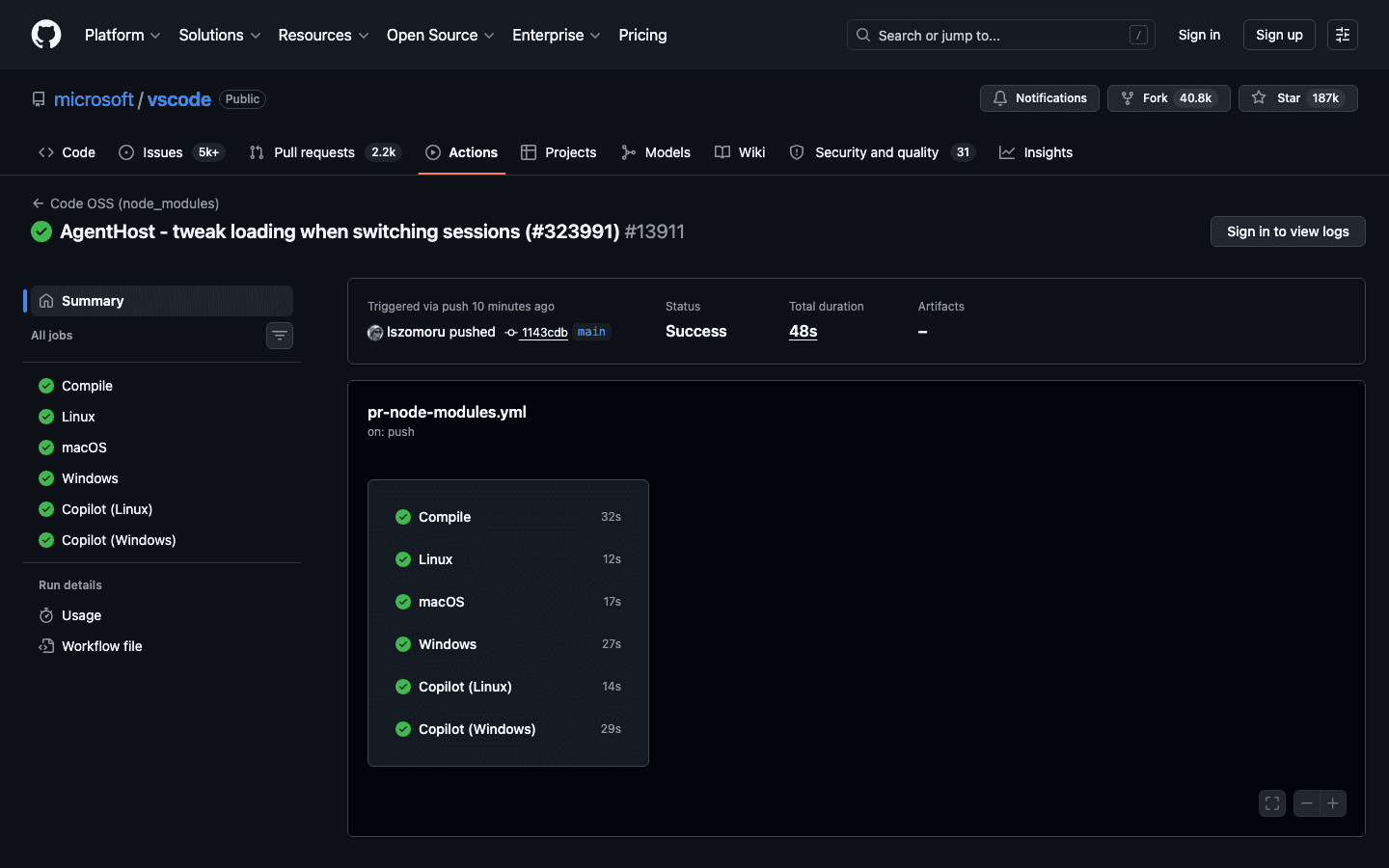
A green workflow run on the public microsoft/vscode repository, with compile and per-platform jobs all passing in 48 seconds. Source: GitHub Actions, github.com/microsoft/vscode.
Two details matter more than the list itself. First, the same artifact must move through every stage. If staging and production get separately built binaries, staging verified nothing. Second, place the gates before merge. A SAST finding reported in a nightly dashboard gets triaged next sprint. The same finding blocking a PR gets fixed in the next commit.
What do you need before you build one?
Pipeline YAML is the easy part. These prerequisites are what actually determine whether the pipeline gets trusted or bypassed.
Version control discipline. Everything the pipeline needs must live in the repository: application code, pipeline config, infrastructure definitions, database migration scripts. Pick a branching model with short-lived branches. Long-lived feature branches recreate the integration pain CI exists to remove.
A test suite you trust. If tests fail randomly, developers will learn to re-run the pipeline until it goes green, and at that point it verifies nothing. A small, fast, reliable suite beats a large flaky one. Coverage can grow after adoption starts.
Reproducible builds. Lock dependency versions, build in containers or otherwise pinned environments, and produce immutable versioned artifacts. “Works on my machine” bugs are build reproducibility bugs.
Secrets management. Deploy credentials, API keys, and signing keys go in your CI platform’s encrypted secrets store or a dedicated manager (Vault, AWS Secrets Manager). Never in the repository, never copied between servers by hand.
Environments that resemble production. Staging catches deployment problems only to the degree it matches production: same runtime, same infrastructure definitions, same configuration mechanism. Define environments as code so any drift shows up as a reviewable diff.
Team agreements. Decide up front what blocks a merge, who approves production deploys, and who fixes a red pipeline. A broken main branch should be the team’s top priority, and that only holds if everyone agreed to it before the first red build.
How do you build a CI/CD pipeline?
Build it in the order below, starting with the platform decision and ending with monitoring wired back in. Each step adds one capability on top of a pipeline that already works.
Pick the runner where your code lives
GitHub Actions for GitHub, GitLab CI for GitLab, Azure Pipelines for Azure DevOps. Jenkins remains the common self-hosted choice when compliance or network isolation demands it. The built-in option removes an integration layer, and the concepts transfer between all of them: triggers, jobs, stages, artifacts, environments.
If you are on Azure DevOps, the same steps below map onto azure-pipelines.yml, and our Azure DevOps pipeline guide walks through that platform’s specifics.
Automate the build first
Start with a pipeline that does two things on every push: install dependencies and build. Nothing else. This proves the trigger works, the environment is reproducible, and the team sees pipeline status on every commit. Add your existing tests once the build is boringly reliable.
Gate merges on tests and static checks
Wire the pipeline into your platform’s branch protection so a PR cannot merge with a red build. Then add the mechanical checks that free human reviewers to focus on design: linting, static analysis, SAST, secret detection, and coverage thresholds.
This is where an automated review layer earns its place in the pipeline. CodeAnt AI runs on every pull request, posts findings inline, and enforces quality gates (complexity, coverage, duplication) and security gates (SAST findings, exposed secrets) that block the merge until they pass. Humans stay in the loop for judgment calls, and the SmartBear study of a Cisco team explains why the split matters. It found that defect detection drops sharply past about 400 changed lines, and review effectiveness falls after about 60 minutes. Machines do not tire at line 401. Our guide to code review best practices covers how teams structure this handoff.
Deploy to staging on every merge
Once gates hold, deploy every merge to main into staging automatically. Pull credentials from the secrets store, deploy the artifact the pipeline already built, and run a smoke test that fails loudly if the deploy is broken. From this point on, “does it deploy?” is a question the pipeline answers dozens of times before production is ever involved.
Add production guardrails
Promote to production with guardrails proportional to your risk:
Manual approval on the production environment. One click, by someone accountable, with the staging result in front of them.
Progressive rollout. Canary deployments send a small slice of traffic to the new version first. Blue-green keeps the old version warm so rollback is just a traffic switch.
Rollback as a first-class path. Keep prior artifacts, and make redeploying the previous version a single command or button. Config changes ride with code so a rollback reverts both.
Wire monitoring back into the pipeline
The pipeline’s job continues past the deploy. Emit a deploy event to your monitoring stack, watch error rates and latency against the deploy marker, and alert (or auto-roll-back) when they spike. This closes the loop that makes continuous deployment survivable, and it gives you the DORA four keys (deployment frequency, lead time, change failure rate, recovery time) as measurable outputs of the pipeline itself.
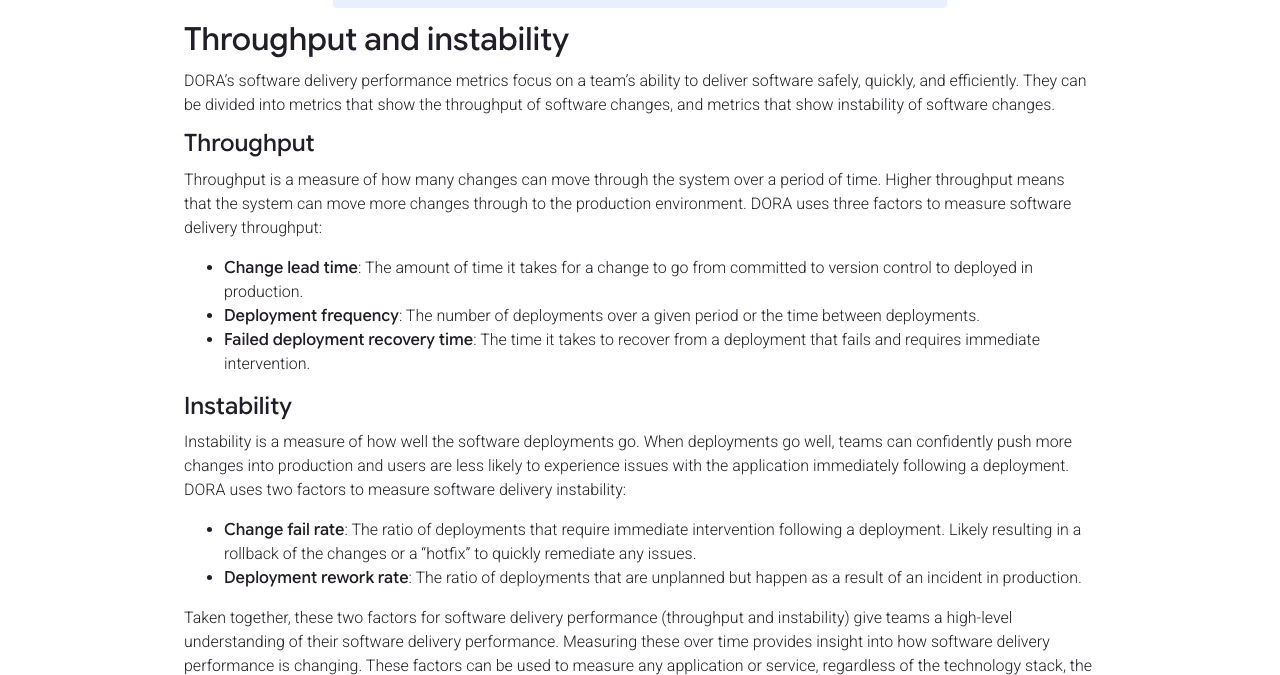
How DORA defines the throughput and instability metrics a pipeline should report. Source: dora.dev.
The full pipeline in one file
Here is a complete GitHub Actions workflow implementing the sequence above for a Node.js service. Action versions are current majors as of July 2026.
The structure does the safety work. PRs only run build-and-test. Merges to main promote one artifact through staging into production. Configure the production environment with required reviewers in the repository settings and the last job pauses for approval. Remove the reviewers later and the same file becomes continuous deployment.
The build-and-test job is the piece you can verify anywhere, so it is worth seeing what it produces. Here is the job on its own, followed by a real execution of its steps against a small Node service in a node:24 container.
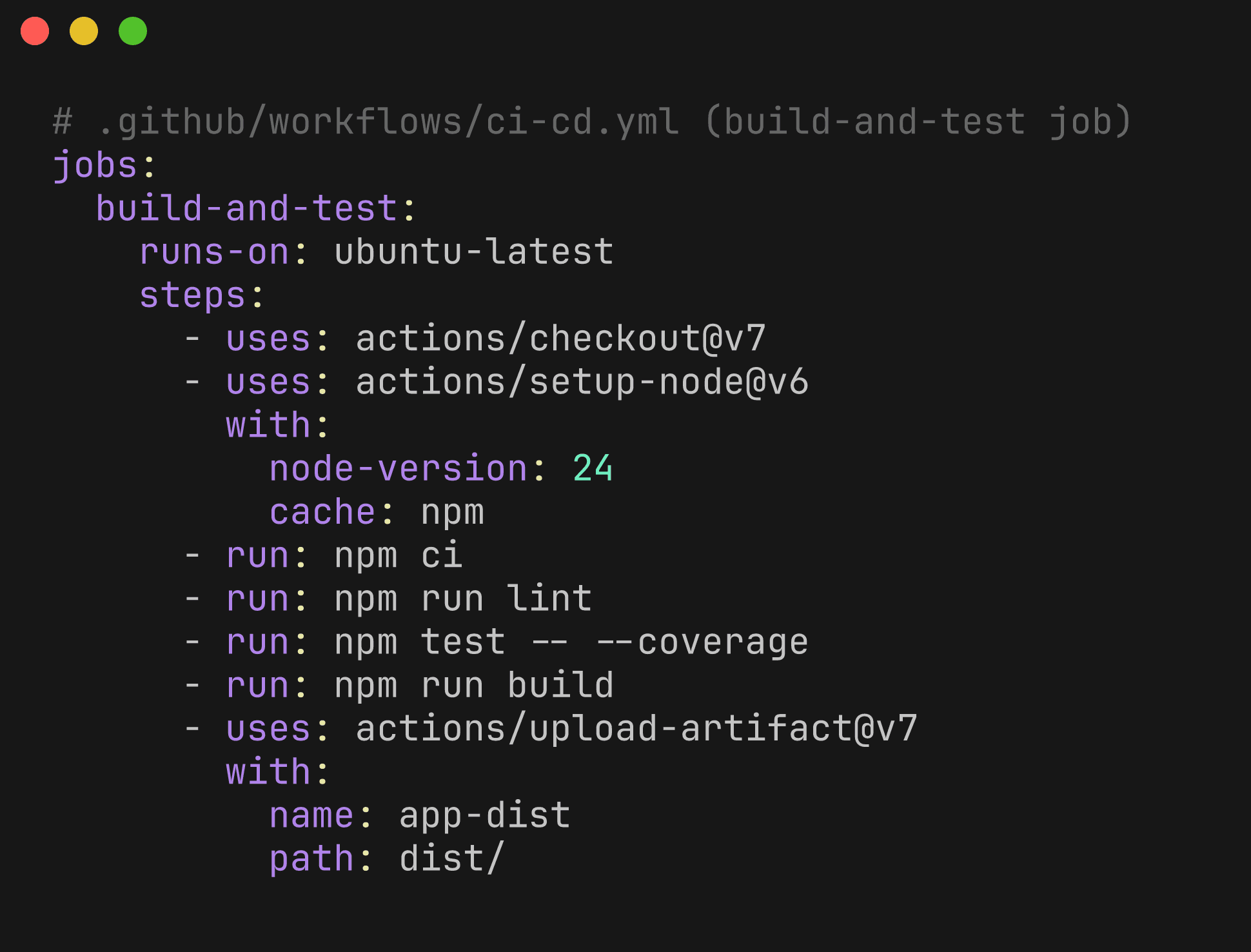
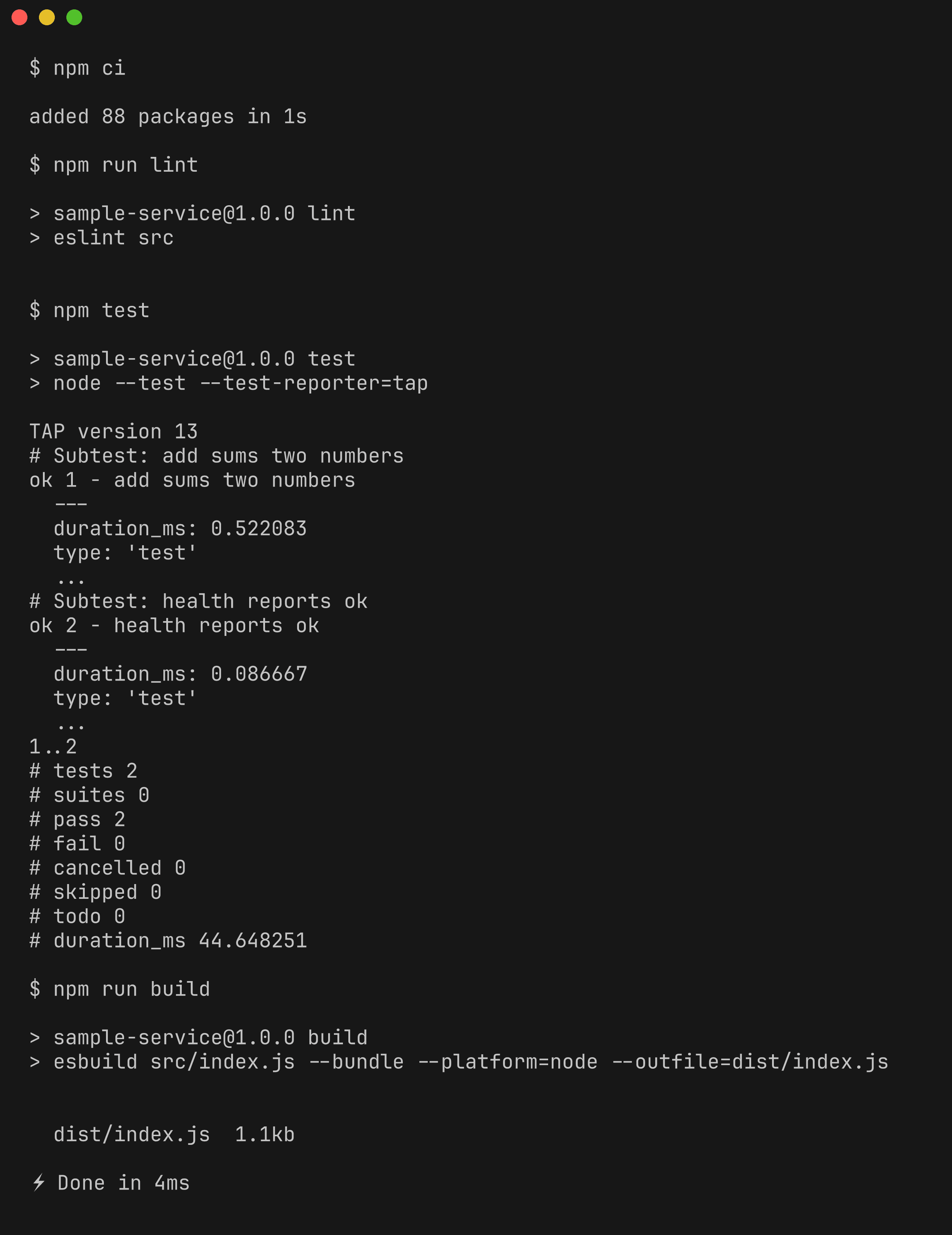
The steps executed in order, the way the runner executes each run: line. eslint prints nothing when the code passes, and an exit code of 0 per step is what turns into the green check. The coverage flag is dropped here because the demo suite uses Node’s built-in test runner.
The GitLab CI equivalent uses the same shape with different keywords: stages, rules instead of if, and when: manual on the production job for the approval gate.
Edge cases worth planning for
Fork pull requests. GitHub does not pass repository secrets to workflows triggered by PRs from forks, with the exception of GITHUB_TOKEN. Design PR jobs to run without secrets, and never use pull_request_target with a checkout of fork code.
Free plan enforcement limits. As of July 2026, GitHub’s branch protection is available on private repositories only on Pro, Team, and Enterprise plans. On a Free-plan private repo your required status checks are advisory. Budget CI minutes too. Private repos get 2,000 free Actions minutes per month on Free and 3,000 on Team, which a chatty pipeline exhausts quickly.
Monorepos. Running every job on every push does not scale. Use path filters or affected-target detection (Nx, Turborepo, Bazel) so a docs change does not rebuild every service, and keep one shared pipeline definition rather than per-team copies that drift.
Database migrations. The pipeline can apply migrations, but only backward-compatible ones (expand and contract). Deploys must be able to roll back without rolling back the schema, so never couple a destructive migration to an app deploy.
Self-hosted runners. Required when builds need private network access or compliance forbids shared infrastructure. They add a new failure domain. Patch them, scale them, and never attach them to public repositories where fork PRs could execute arbitrary code.
CI/CD pipeline best practices
Keep CI feedback under 10 minutes. Past that, developers context-switch and batch their pushes, which makes every failure harder to bisect. Parallelize test jobs, cache dependencies, and move slow suites to post-merge.
Merge small and often. Small changes are the unit the whole system is optimized for. They test faster, review better (the 400-line SmartBear finding again), and make a bad deploy trivially attributable.
Build once, promote everywhere. Version every artifact and promote the exact bytes you tested. Rebuilding per environment invalidates everything the earlier stages verified.
Quarantine flaky tests immediately. One intermittent failure teaches the team to re-run the pipeline, and trust never fully recovers. Track flakes, quarantine on first offense, and fix or delete them.
Scan in the PR, not in a report. Security and quality findings act differently depending on where they surface. In the PR, they block bad code before merge. In a weekly dashboard, they become backlog. Our guide on integrating SAST into CI/CD covers doing this without drowning developers in false positives, and the broader tool landscape is in our code quality tools roundup.
Treat the pipeline as code. Review pipeline changes like application changes, keep them in the same repository, and refactor them when they sprawl. An unreviewable pipeline is an unauditable release process.
Measure the pipeline itself. Track duration, failure rate, and flake rate alongside the DORA keys. A pipeline that slowly degrades from 8 to 25 minutes has quietly changed how your team works.
As the pipeline matures, teams can add automated review alongside tests and other quality gates. See our guide to AI code review tools for GitHub CI/CD for the tools and integration options available for GitHub-based workflows.
Where this leaves you
A CI/CD pipeline is a sequence of promises. The build is reproducible, the tests ran, the gates held, and the artifact in production is the one that was verified. Build those promises in order (build, test, gates, staging, production) and automate the next step only after the team trusts the current one.
CI/CD automation is only one part of the equation. Teams also need developer productivity tools that move DORA metrics by reducing review bottlenecks, improving code quality, and shortening the path from commit to production.
If your immediate next step is security rather than delivery speed, start with where scanning belongs in the flow. Our guide to DevSecOps covers how the security half of the pipeline comes together.

