Obsidian Desktop RCE via the Slides Plugin
CVE-2026-104077
CVSS 8.5


Starting a presentation is supposed to be the safest thing you can do with a note. You open a deck, press play, and read your own slides. In Obsidian Desktop before 1.14.0, pressing play could also hand the note's author a shell on your machine — no community plugin, no macro, just Markdown that Obsidian rendered and a presentation you chose to start.
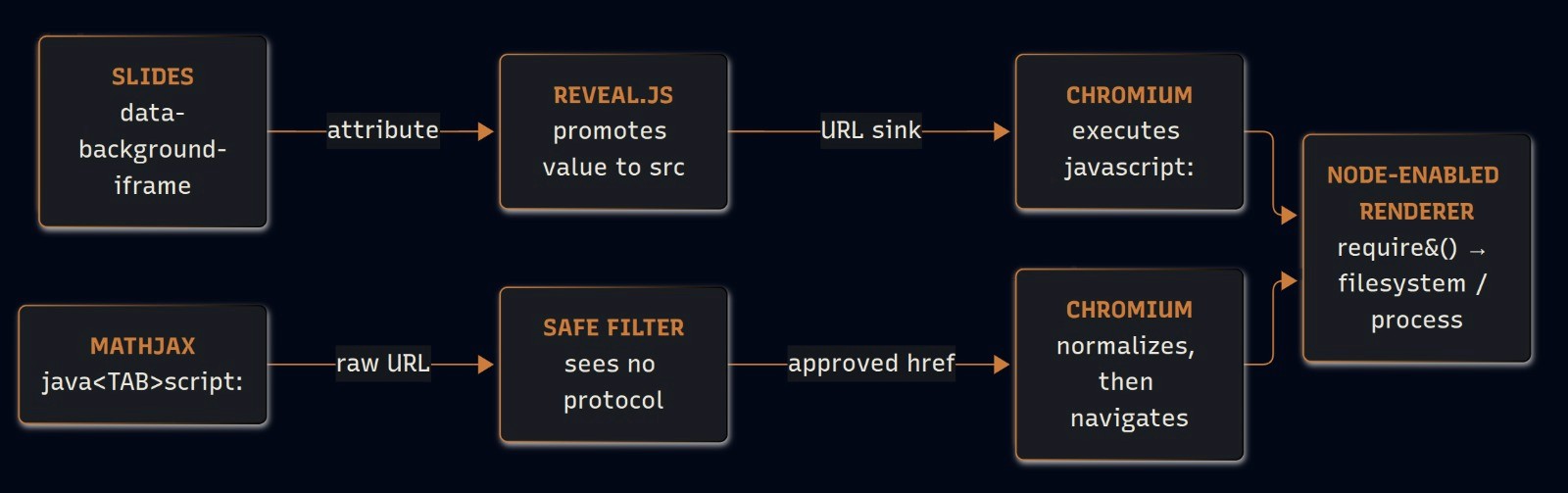
This is the first of two code-execution paths our team found in Obsidian Desktop. Both end in the same place: JavaScript running inside Obsidian's Node-enabled renderer, with the authority of your user account. This post covers the Slides path; the MathJax path is CVE-2026-104078.
At a glance
CVE | CVE-2026-104077 |
|---|---|
Affected component | Slides core plugin + bundled Reveal.js 4.3.1 |
Vulnerability | Stored XSS reaching a |
CVSS | 8.5 High (v4.0) · 7.8 High (v3.1) |
Prerequisite | Slides core plugin enabled; victim opens the note and starts the presentation |
Affected versions | Obsidian Desktop < 1.14.0 |
Fixed version | 1.14.x — iframe injection addressed; our 1.14.x run produced no attacker-controlled iframe |
Impact | Arbitrary OS commands as the Obsidian user |
Discoverer | CodeAnt AI Security Research Team |
Why a note can reach the operating system
Obsidian Desktop is an Electron application, so a note is not painted by a plain, sandboxed web view — and that is the precondition that turns a rendering bug into remote code execution.
Electron runs as two kinds of process. The main process is Node.js: it owns the windows and the filesystem. Each window is painted by a renderer, which is a Chromium page — the same engine as a browser tab. In an ordinary browser that tab is sandboxed: script can touch the page and the network, never the machine. Electron keeps the renderer that weak by default, and a window's webPreferences is what can loosen it.
Two settings decide the blast radius. nodeIntegration is the wall between page script and the machine: off, the page cannot read a file or start a program; on, its JavaScript can call require() and pull in Node built-ins such as fs and child_process. contextIsolation is the wall between the page and the trusted preload script: off, the two share one world. Turn the first on and the second off together, and page JavaScript runs with the authority of a local application.
The Obsidian vault window opened with exactly that configuration:
Configuration extracted from the tested desktop application, not an illustrative Electron sample.
Electron's own security guidance states the consequence plainly: disabling Node integration is what keeps an XSS from becoming code execution, and the sandbox documentation notes that enabling Node integration disables the renderer sandbox. The only remaining question is narrow: can attacker-controlled Markdown get one line of JavaScript to run inside that window?
Where the sanitizer stops and the post-processor begins
Obsidian's rendering pipeline is built to answer that question with "no." A note is parsed from Markdown to HTML, and that HTML passes through a sanitizer — a filter that strips anything dangerous, such as <script> tags, inline event handlers, and risky URL schemes — before it reaches the page. If the pipeline ended there, a note would be inert.
It does not end there. After the sanitized HTML is in the DOM, Obsidian runs post-processors over it: later stages that read the already-approved HTML and build new elements from it. The Slides core plugin hands the deck to a bundled copy of Reveal.js. This is where the bug lives — not in the sanitizer, but in a later stage that re-interprets a value the sanitizer already judged safe.
That gives the path its shape. The sanitizer approves a value because, at the moment it looks, the value is not a URL. A later stage then turns that same value into a URL and navigates to it, without re-checking.
The bug: a data attribute that becomes a URL
The note contains a raw HTML <section>. Its data-background-iframe attribute survives sanitization as custom data. The sanitizer allows it for a simple reason: an attribute named data-* is just storage for an arbitrary value — it holds text, it doesn't do anything — so there is nothing dangerous to strip. That judgment is correct, but only while the attribute stays inert data.
Reveal.js later reads the attribute, creates an iframe, places the value in data-src, and copies it into src:
The excerpt preserves the operations in the shipped minified bundle; variable names are expanded for readability.
The moment the value lands in src, it stops being storage and becomes a URL the browser will load. That is the sink. No URL-scheme check runs at this final transition, so a javascript: value executes inside the generated background iframe and reaches the parent renderer through parent.require().
Proof of concept
The proof is a single slide whose background iframe writes one fixed marker file. It takes no action beyond proving the sink reaches Node, and it does nothing until the presentation starts.
The supplied proof writes one fixed marker. Starting the presentation is the required trigger.
Nothing fires while the note merely sits in the vault, or even while it is open in reading view. The slide's background iframe is only created when Reveal.js builds the deck — that is, when the victim starts the presentation. A real attacker would deliver this inside an ordinary-looking shared note (meeting notes, a template, a vault cloned from a repo) whose title invites the recipient to present it.
What the presentation actually triggers
The Slides core plugin is enabled in the victim's Obsidian, and the victim opens the note and starts the presentation. Nothing before that moment runs code.
When those hold, the background iframe loads the javascript: URL, parent.require('fs') reaches Node's filesystem module, and the same authority extends to child_process — arbitrary OS commands running as the Obsidian user. The marker in the PoC could as easily be a downloaded payload, a modified dotfile, or a spawned process; the research proof deliberately stops at the marker.
That single required click is why this scores UI:P / UI:R rather than a no-interaction bug: it is passive interaction from the victim's point of view (they think they are presenting), but interaction nonetheless.
See if you are affected
Affected: Obsidian Desktop before 1.14.0, with the Slides core plugin enabled. We reproduced the full chain on 1.3.x and 1.13.x.
Fixed: The 1.14.x line. On our 1.14.x run the presentation ended with no attacker-controlled iframe and no marker — the iframe-injection path is closed. See the Obsidian desktop changelog.
If you cannot upgrade yet:
Disable the Slides core plugin (Settings → Core plugins → Slides) on machines that do not need it. With the plugin off, the deck is never handed to Reveal.js and the sink is never reached.
Treat shared vaults and notes as untrusted input. Do not start a presentation on a note you did not author, especially one that arrived from outside your team.
What this finding shows
The sanitizer was not wrong about the data attribute. At the moment it looked, data-background-iframe really was inert text. The failure was a second stage promoting that text into a URL and navigating to it without asking the sanitizer again. Any pipeline that "approves once, re-interprets later" has this shape, and the place to add the missing check is the sink — here, the assignment to iframe.src — not the sanitizer that already did its job on different data.
The reason the bug is an RCE and not a contained script-injection is the renderer configuration. nodeIntegration: true with contextIsolation: false is what converts "a line of script ran in a note" into "a process started on your machine." If you build on Electron, that one line in webPreferences sets the price of every rendering bug you will ever ship.
Timeline
2026-09-16 | Reported to Obsidian. |
2026-10-06 | Obsidian 1.14.x available as a public release. |
2026-10-08 | CVE-2026-104077 published (assigned by VulnCheck). |
2026-10 | CodeAnt AI research published. |
References
Companion research: CVE-2026-104078 — RCE via MathJax Safe-Filter Bypass
Found and reported by the CodeAnt AI Security Research Team.
[FAQ]
Frequently Asked
Questions

Does opening the note trigger it?
Do I need to install a community plugin to be exposed?
Is Obsidian Mobile affected?
Is upgrading enough?
More from CodeAnt


[GET STARTED]
START PENTEST

