In 2023, a researcher changed a single number in a URL, from /api/orders/10021 to /api/orders/10022, and received a complete order record belonging to another customer. Name, address, items purchased, payment method last four digits. That single change exposed an authorization failure: the application returned an object the requesting user did not own.
No exploit chain. No malware. Just a missing ownership check.
This is IDOR: Insecure Direct Object Reference.
IDOR is one of the most important broken-access-control vulnerabilities in modern web applications and APIs. In the OWASP API Security Top 10, the API-specific form is called BOLA, or Broken Object Level Authorization.
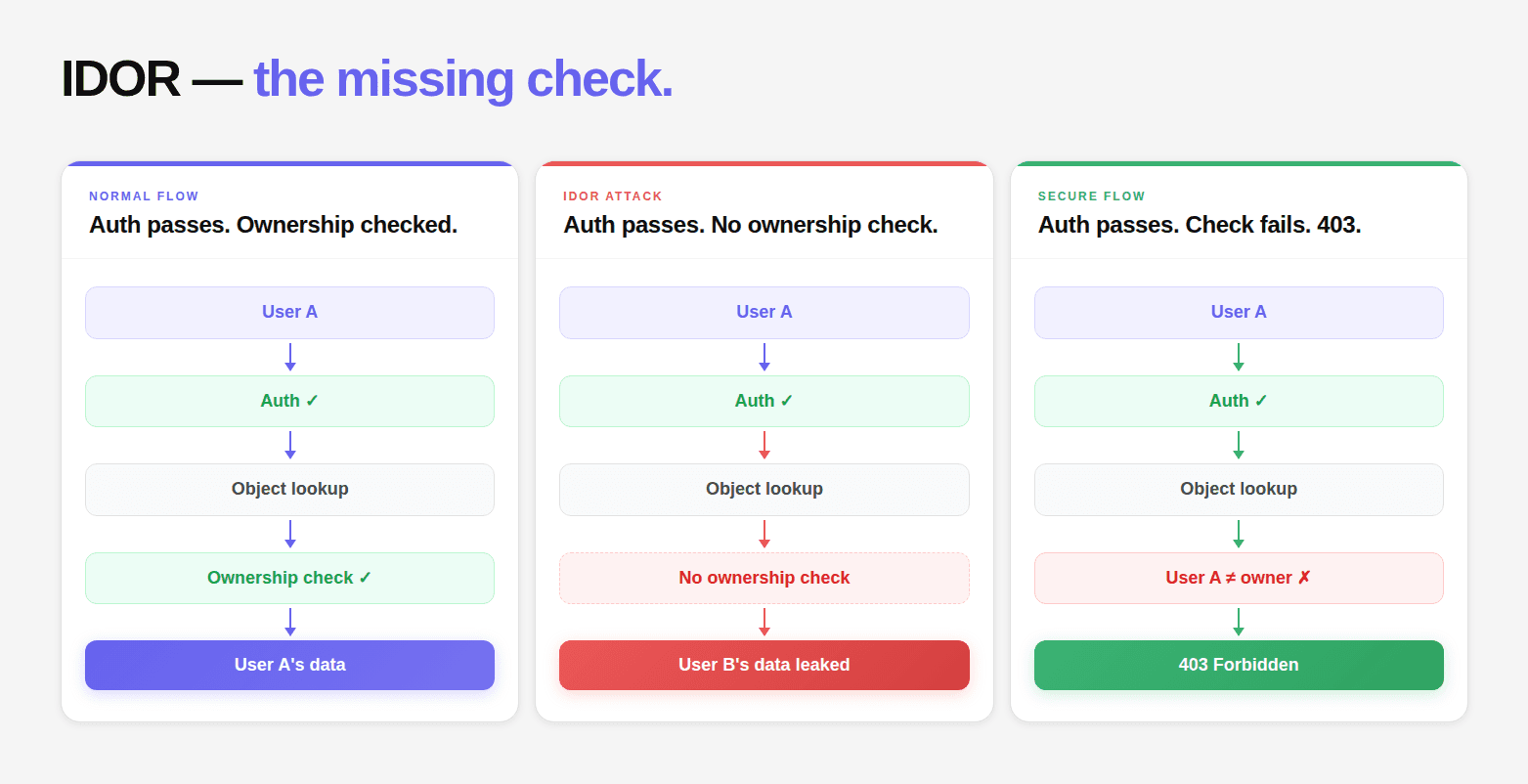
The underlying failure is simple: the application verifies that the user is authenticated, but fails to verify that the user is authorized to access the specific object identified by the request.
What is an IDOR vulnerability?
An IDOR (Insecure Direct Object Reference) vulnerability occurs when an application uses a user-supplied identifier to access an object without verifying that the authenticated user is authorized to access that specific object.
For example, if changing /api/orders/10021 to /api/orders/10022 returns another customer's order, the application has an IDOR vulnerability. In API security, this same class of flaw is commonly called BOLA (Broken Object Level Authorization).
It is the most consistently present vulnerability in modern web applications, API1:2023 in the OWASP API Security Top 10, and the vulnerability class that causes more actual data breaches than SQL injection, XSS, and RCE combined in the SaaS context. Not because it's more sophisticated, but because it's invisible to the tooling most teams rely on and easy to introduce at any point in the software development lifecycle.
This guide covers every dimension of IDOR:
what it is at the code level
every variant from horizontal access to second-order to multi-tenant
the CVSS scoring that actually reflects impact
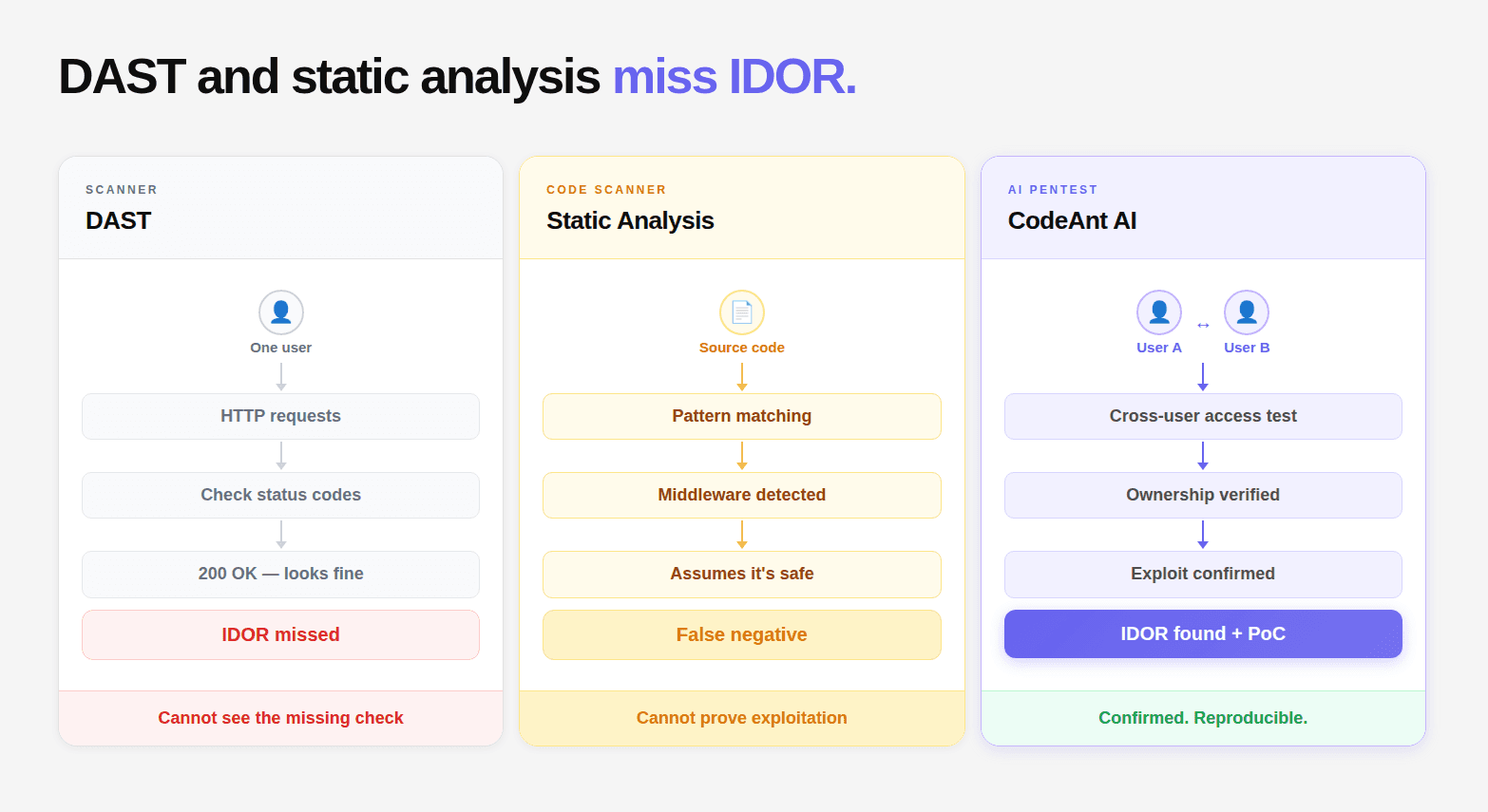
why DAST and static analysis structurally cannot find most IDOR vulnerabilities
the reachability analysis that separates exploitable findings from noise, and the specific code patterns that eliminate it
An application accepts a user-supplied identifier referencing an internal object
The application uses that identifier to access the object
The application does not verify that the requesting user is authorized to access that specific object
The third step is where the vulnerability lives. Not in the existence of the identifier. Not in the exposure of the identifier. In the missing ownership verification between "this identifier was supplied" and "this object was returned."
# The canonical IDOR patterninHTTP:
# Legitimate request — user 42accessing their own invoice:GET /api/v1/invoices/INV-10021HTTP/1.1
Host:api.company.com
Authorization:Bearer eyJ... [token foruser 42]HTTP/1.1200OK{"id":"INV-10021","user_id":42,"amount":299.99,"items":[...]}
# IDOR attack — user 42accessing user 99's invoice:
GET /api/v1/invoices/INV-10022HTTP/1.1
Host:api.company.com
Authorization:Bearer eyJ... [token foruser 42,unchanged]HTTP/1.1200OK ← should be 403{"id":"INV-10022","user_id":99,← different user"amount":1499.00,"items":[...]← unauthorized disclosure}
# The canonical IDOR patterninHTTP:
# Legitimate request — user 42accessing their own invoice:GET /api/v1/invoices/INV-10021HTTP/1.1
Host:api.company.com
Authorization:Bearer eyJ... [token foruser 42]HTTP/1.1200OK{"id":"INV-10021","user_id":42,"amount":299.99,"items":[...]}
# IDOR attack — user 42accessing user 99's invoice:
GET /api/v1/invoices/INV-10022HTTP/1.1
Host:api.company.com
Authorization:Bearer eyJ... [token foruser 42,unchanged]HTTP/1.1200OK ← should be 403{"id":"INV-10022","user_id":99,← different user"amount":1499.00,"items":[...]← unauthorized disclosure}
# The canonical IDOR patterninHTTP:
# Legitimate request — user 42accessing their own invoice:GET /api/v1/invoices/INV-10021HTTP/1.1
Host:api.company.com
Authorization:Bearer eyJ... [token foruser 42]HTTP/1.1200OK{"id":"INV-10021","user_id":42,"amount":299.99,"items":[...]}
# IDOR attack — user 42accessing user 99's invoice:
GET /api/v1/invoices/INV-10022HTTP/1.1
Host:api.company.com
Authorization:Bearer eyJ... [token foruser 42,unchanged]HTTP/1.1200OK ← should be 403{"id":"INV-10022","user_id":99,← different user"amount":1499.00,"items":[...]← unauthorized disclosure}
The authorization check that should be present:
# VULNERABLE:
@app.get("/api/v1/invoices/{invoice_id}")
@login_requireddefget_invoice(invoice_id: str):
invoice = Invoice.query.get_or_404(invoice_id)returnjsonify(invoice.to_dict())# SECURE — ownership verification added:
@app.get("/api/v1/invoices/{invoice_id}")
@login_requireddefget_invoice(invoice_id: str):
invoice = Invoice.query.filter_by(id=invoice_id,user_id=current_user.id# ← This is the check that prevents IDOR).first_or_404()returnjsonify(invoice.to_dict())
# VULNERABLE:
@app.get("/api/v1/invoices/{invoice_id}")
@login_requireddefget_invoice(invoice_id: str):
invoice = Invoice.query.get_or_404(invoice_id)returnjsonify(invoice.to_dict())# SECURE — ownership verification added:
@app.get("/api/v1/invoices/{invoice_id}")
@login_requireddefget_invoice(invoice_id: str):
invoice = Invoice.query.filter_by(id=invoice_id,user_id=current_user.id# ← This is the check that prevents IDOR).first_or_404()returnjsonify(invoice.to_dict())
# VULNERABLE:
@app.get("/api/v1/invoices/{invoice_id}")
@login_requireddefget_invoice(invoice_id: str):
invoice = Invoice.query.get_or_404(invoice_id)returnjsonify(invoice.to_dict())# SECURE — ownership verification added:
@app.get("/api/v1/invoices/{invoice_id}")
@login_requireddefget_invoice(invoice_id: str):
invoice = Invoice.query.filter_by(id=invoice_id,user_id=current_user.id# ← This is the check that prevents IDOR).first_or_404()returnjsonify(invoice.to_dict())
IDOR vs BOLA: Are They the Same Thing?
BOLA Vulnerability: What Does It Mean?
A BOLA vulnerability (Broken Object Level Authorization) occurs when an API fails to verify that an authenticated user is authorized to access or modify the specific object referenced by a request.
For example, an API may correctly verify that a request comes from a logged-in user but fail to verify that the requested invoice, order, document, or customer record belongs to that user.
The term BOLA comes from the OWASP API Security Top 10, where Broken Object Level Authorization is identified as API1:2023. IDOR (Insecure Direct Object Reference) is the older and more broadly used term for the same underlying authorization failure.
In practice, the two terms are usually distinguished by context:
IDOR: The traditional term used across web application security for cases where a user-controlled identifier gives access to an object they are not authorized to access.
BOLA: OWASP's API-specific terminology for broken authorization at the object level, particularly when an API exposes objects through identifiers in paths, parameters, request bodies, or other API inputs.
For example, consider an API endpoint that returns an invoice:
GET /api/invoices/10021
Authorization:Bearer <user-a-token
GET /api/invoices/10021
Authorization:Bearer <user-a-token
GET /api/invoices/10021
Authorization:Bearer <user-a-token
Real IDOR Examples
IDOR vulnerabilities can appear anywhere an application accepts an object reference from the client and uses it to retrieve, modify, or delete a resource. The identifier might be a sequential number, UUID, username, filename, tenant ID, or another application-specific value.
The identifier itself is not the vulnerability. The vulnerability exists when the server accepts the reference without verifying that the authenticated user is authorized to access the referenced object.
Example 1: Sequential Order IDs
Consider an e-commerce application where a customer can view their orders through an API:
GET /api/orders/10021
Authorization:Bearer <user-a-token
GET /api/orders/10021
Authorization:Bearer <user-a-token
GET /api/orders/10021
Authorization:Bearer <user-a-token
The server returns User A's order because User A owns order 10021.
User A changes the identifier:
GET /api/orders/10022
Authorization:Bearer <user-a-token
GET /api/orders/10022
Authorization:Bearer <user-a-token
GET /api/orders/10022
Authorization:Bearer <user-a-token
If order 10022 belongs to User B and the server returns it to User A, the endpoint has an IDOR vulnerability.
The problem is not that the order IDs are sequential. The problem is that the server uses the supplied ID to retrieve the order without checking whether User A is authorized to access it.
An attacker does not need to guess every ID successfully. Any identifier obtained through the application's normal flows can be enough to test whether object-level authorization is enforced.
This is the classic IDOR pattern: change the object reference, keep the same authenticated identity, and see whether the authorization boundary follows the object.
Example 2: BOLA in an API
The same authorization failure is commonly described as BOLA (Broken Object Level Authorization) in API security.
Imagine a vehicle-management API that lets authenticated users remotely control their vehicles:
POST /api/vehicles/ABC123/doors/unlock
Authorization:Bearer <user-a-token
POST /api/vehicles/ABC123/doors/unlock
Authorization:Bearer <user-a-token
POST /api/vehicles/ABC123/doors/unlock
Authorization:Bearer <user-a-token
If ABC123 belongs to User A, the request is legitimate.
Now suppose User A replaces the vehicle identifier with one belonging to User B:
POST /api/vehicles/XYZ789/doors/unlock
Authorization:Bearer <user-a-token
POST /api/vehicles/XYZ789/doors/unlock
Authorization:Bearer <user-a-token
POST /api/vehicles/XYZ789/doors/unlock
Authorization:Bearer <user-a-token
If the API unlocks User B's vehicle, the server has failed to enforce authorization at the object level.
OWASP uses a similar vehicle example in its API Security Top 10: the application accepts a vehicle identifier but fails to verify that the vehicle belongs to the authenticated user. This is classified as API1:2023 Broken Object Level Authorization.
The same pattern can affect much less dramatic objects: invoices, customer records, support tickets, documents, messages, projects, API keys, or account settings.
Example 3: IDOR With UUIDs
Replacing sequential IDs with UUIDs does not eliminate IDOR.
Suppose an application uses unpredictable document identifiers:
GET /api/documents/f47ac10b-58cc-4372-a567-0e02b2c3d479
Authorization:Bearer <user-a-token
GET /api/documents/f47ac10b-58cc-4372-a567-0e02b2c3d479
Authorization:Bearer <user-a-token
GET /api/documents/f47ac10b-58cc-4372-a567-0e02b2c3d479
Authorization:Bearer <user-a-token
The UUID may be difficult to guess, but User A might still obtain User B's document identifier through a shared link, API response, notification, browser history, or another legitimate application flow.
If User A can then request the document and the server returns it without checking ownership, the application is still vulnerable.
Predictability affects how easily an identifier can be discovered. Authorization determines whether the identifier can be used.
Consider an application that stores customer documents using filenames:
GET /static/invoices/10021.pdf
Authorization:Bearer <user-a-token
GET /static/invoices/10021.pdf
Authorization:Bearer <user-a-token
GET /static/invoices/10021.pdf
Authorization:Bearer <user-a-token
If User A can change the filename:
GET /static/invoices/10022.pdf
Authorization:Bearer <user-a-token
GET /static/invoices/10022.pdf
Authorization:Bearer <user-a-token
GET /static/invoices/10022.pdf
Authorization:Bearer <user-a-token
and retrieve User B's invoice, the application has an IDOR vulnerability.
The same problem can occur with profile images, exported reports, chat transcripts, backups, generated PDFs, or other files whose references are controlled by the client.
Example 5: IDOR in GraphQL
GraphQL does not eliminate object-level authorization problems. A GraphQL mutation can still accept an object ID and perform an action without verifying that the requesting user owns the object.
If doc-10022 belongs to User B and User A's request successfully deletes it, the GraphQL resolver has an object-level authorization failure.
The same principle applies whether the identifier appears in a REST URL, query parameter, JSON body, GraphQL variable, or another request location. The server must authorize the specific object before performing the requested operation.
Example 6: Multi-Tenant IDOR
Multi-tenant applications introduce another important IDOR boundary: the organization or tenant.
Consider an API request such as:
GET /api/organizations/acme/invoices
Authorization:Bearer <user-a-token
GET /api/organizations/acme/invoices
Authorization:Bearer <user-a-token
GET /api/organizations/acme/invoices
Authorization:Bearer <user-a-token
User A belongs to organization acme.
If User A changes the organization identifier:
GET /api/organizations/other-company/invoices
Authorization:Bearer <user-a-token
GET /api/organizations/other-company/invoices
Authorization:Bearer <user-a-token
GET /api/organizations/other-company/invoices
Authorization:Bearer <user-a-token
and the API returns invoices belonging to other-company, the application has a cross-tenant authorization failure.
This can be significantly more damaging than a single-user IDOR because the authorization failure may expose resources belonging to an entire organization rather than one individual account.
The application trusts an object reference supplied by the client without enforcing authorization for the object that reference identifies.
The correct security question is therefore not:
"Can the user change the ID?"
It is:
"After the ID changes, does the server still verify that this authenticated user is authorized to access this specific object?"
If the answer is no, the application has an IDOR/BOLA vulnerability.
Part 2: The Complete IDOR Taxonomy: IDOR Vulnerability Types
Type 1: Horizontal IDOR (Same Privilege Level, Different User)
The most common type. User A accesses resources belonging to User B, where both users have the same role. No privilege escalation, just lateral access across users at the same level.
# Horizontal IDOR — accessing another user's profile:
GET /api/users/9832/profile HTTP/1.1
Authorization:Bearer[token foruser 1047]
# Horizontal IDOR — modifying another user's data:
PUT /api/users/9832/address HTTP/1.1
Authorization:Bearer[token foruser 1047]{"street":"123 Attacker St","city":"Exploit City"}
# Horizontal IDOR via query parameter:GET /api/documents?owner_id=9832HTTP/1.1
Authorization:Bearer[token foruser 1047]
# Horizontal IDOR — accessing another user's profile:
GET /api/users/9832/profile HTTP/1.1
Authorization:Bearer[token foruser 1047]
# Horizontal IDOR — modifying another user's data:
PUT /api/users/9832/address HTTP/1.1
Authorization:Bearer[token foruser 1047]{"street":"123 Attacker St","city":"Exploit City"}
# Horizontal IDOR via query parameter:GET /api/documents?owner_id=9832HTTP/1.1
Authorization:Bearer[token foruser 1047]
# Horizontal IDOR — accessing another user's profile:
GET /api/users/9832/profile HTTP/1.1
Authorization:Bearer[token foruser 1047]
# Horizontal IDOR — modifying another user's data:
PUT /api/users/9832/address HTTP/1.1
Authorization:Bearer[token foruser 1047]{"street":"123 Attacker St","city":"Exploit City"}
# Horizontal IDOR via query parameter:GET /api/documents?owner_id=9832HTTP/1.1
Authorization:Bearer[token foruser 1047]
CVSS range: 6.5 (read-only) to 8.8 (write/delete on someone else's data)
Type 2: Vertical IDOR (Standard User Accessing Privileged Resources)
A standard user accesses admin functionality, elevated-privilege data, or role-restricted operations by supplying the identifier of a privileged resource.
# Vertical IDOR — standard user accessing admin endpoint via ID:GET /api/v1/reports/REPORT-ADMIN-001HTTP/1.1
Authorization:Bearer[token forstandarduser]
# The report type is admin-only but the endpoint only checks
# authentication,not whether the resource type is allowed
# forthe authenticated user's role.
# Vertical IDOR — accessing billing configuration:GET /api/accounts/ACC-001/billing-config HTTP/1.1
Authorization:Bearer[token forstandard user — not billing admin]
# Vertical IDOR — standard user accessing admin endpoint via ID:GET /api/v1/reports/REPORT-ADMIN-001HTTP/1.1
Authorization:Bearer[token forstandarduser]
# The report type is admin-only but the endpoint only checks
# authentication,not whether the resource type is allowed
# forthe authenticated user's role.
# Vertical IDOR — accessing billing configuration:GET /api/accounts/ACC-001/billing-config HTTP/1.1
Authorization:Bearer[token forstandard user — not billing admin]
# Vertical IDOR — standard user accessing admin endpoint via ID:GET /api/v1/reports/REPORT-ADMIN-001HTTP/1.1
Authorization:Bearer[token forstandarduser]
# The report type is admin-only but the endpoint only checks
# authentication,not whether the resource type is allowed
# forthe authenticated user's role.
# Vertical IDOR — accessing billing configuration:GET /api/accounts/ACC-001/billing-config HTTP/1.1
Authorization:Bearer[token forstandard user — not billing admin]
CVSS range: 7.5–9.1 depending on what the elevated resource exposes
Type 3: Blind IDOR (Action Succeeds, No Data Returned)
The most underestimated IDOR variant. The application performs a privileged action on another user's resource, but doesn't return any data in the response. The tester can't see the impact directly, only infer it from the fact that the action succeeded.
# Blind IDOR — deleteanother user's comment:
DELETE /api/v1/comments/COMMENT-5521HTTP/1.1
Authorization:Bearer[token foruser who does not own COMMENT-5521]HTTP/1.1204No Content ← successful deletion,no response body
# The comment belonging to another user was deleted.
# Nodata returned — but the action succeeded.
# BlindIDOR — mark another user's notifications as read:
POST /api/v1/notifications/mark-read HTTP/1.1
Authorization:Bearer[token fordifferentuser]{"notification_ids":[881,882,883]}← IDs belonging to another userHTTP/1.1200OK{"updated":3}← no indication these aren't the attacker's notifications
# Blind IDOR — deleteanother user's comment:
DELETE /api/v1/comments/COMMENT-5521HTTP/1.1
Authorization:Bearer[token foruser who does not own COMMENT-5521]HTTP/1.1204No Content ← successful deletion,no response body
# The comment belonging to another user was deleted.
# Nodata returned — but the action succeeded.
# BlindIDOR — mark another user's notifications as read:
POST /api/v1/notifications/mark-read HTTP/1.1
Authorization:Bearer[token fordifferentuser]{"notification_ids":[881,882,883]}← IDs belonging to another userHTTP/1.1200OK{"updated":3}← no indication these aren't the attacker's notifications
# Blind IDOR — deleteanother user's comment:
DELETE /api/v1/comments/COMMENT-5521HTTP/1.1
Authorization:Bearer[token foruser who does not own COMMENT-5521]HTTP/1.1204No Content ← successful deletion,no response body
# The comment belonging to another user was deleted.
# Nodata returned — but the action succeeded.
# BlindIDOR — mark another user's notifications as read:
POST /api/v1/notifications/mark-read HTTP/1.1
Authorization:Bearer[token fordifferentuser]{"notification_ids":[881,882,883]}← IDs belonging to another userHTTP/1.1200OK{"updated":3}← no indication these aren't the attacker's notifications
Why blind IDORs are dangerous: They cause integrity failures without visible data exposure. Attackers can delete content, modify state, consume resources, or disrupt workflows without leaving obvious traces.
CVSS range: 5.0 (low-impact state change) to 8.8 (deletion of critical resources)
Type 4: Second-Order IDOR (Identifier Stored and Used Later)
The identifier is accepted at one point in a workflow, stored server-side, and used at a later stage where ownership is not re-validated. The exploit is separated across time and steps.
# Second-order IDOR — approval workflow example:# Step 1: User creates an approval request (correctly authorized):# POST /api/v1/requests# User A creates REQUEST-001 — correctly stored with user_a ownership# Step 2: User saves work in progress (identifier stored):# PUT /api/v1/requests/REQUEST-001/draft# Ownership checked — correct# Step 3: User resumes draft (identifier reused from stored state):# POST /api/v1/requests/resume# {"request_id": "REQUEST-001"}# Server assumes ownership was validated in Step 1 or 2# ← Second-order IDOR: ownership not re-checked here# The exploit: User B submits REQUEST-001 in the resume endpoint# POST /api/v1/requests/resume# {"request_id": "REQUEST-001"} ← User A's request# Authorization: Bearer [User B's token]# Server finds the request, resumes it under User B — IDOR confirmed
# Second-order IDOR — approval workflow example:# Step 1: User creates an approval request (correctly authorized):# POST /api/v1/requests# User A creates REQUEST-001 — correctly stored with user_a ownership# Step 2: User saves work in progress (identifier stored):# PUT /api/v1/requests/REQUEST-001/draft# Ownership checked — correct# Step 3: User resumes draft (identifier reused from stored state):# POST /api/v1/requests/resume# {"request_id": "REQUEST-001"}# Server assumes ownership was validated in Step 1 or 2# ← Second-order IDOR: ownership not re-checked here# The exploit: User B submits REQUEST-001 in the resume endpoint# POST /api/v1/requests/resume# {"request_id": "REQUEST-001"} ← User A's request# Authorization: Bearer [User B's token]# Server finds the request, resumes it under User B — IDOR confirmed
# Second-order IDOR — approval workflow example:# Step 1: User creates an approval request (correctly authorized):# POST /api/v1/requests# User A creates REQUEST-001 — correctly stored with user_a ownership# Step 2: User saves work in progress (identifier stored):# PUT /api/v1/requests/REQUEST-001/draft# Ownership checked — correct# Step 3: User resumes draft (identifier reused from stored state):# POST /api/v1/requests/resume# {"request_id": "REQUEST-001"}# Server assumes ownership was validated in Step 1 or 2# ← Second-order IDOR: ownership not re-checked here# The exploit: User B submits REQUEST-001 in the resume endpoint# POST /api/v1/requests/resume# {"request_id": "REQUEST-001"} ← User A's request# Authorization: Bearer [User B's token]# Server finds the request, resumes it under User B — IDOR confirmed
Why second-order IDORs are hardest to detect: No automated tool understands multi-step workflow context. The vulnerable endpoint looks correct in isolation, the identifier is valid, the user is authenticated. The ownership failure only manifests when you understand that this identifier was created by a different user in a previous step.
CVSS range: 7.5–9.5 (often high because they bypass the most security-sensitive workflow steps)
Type 5: Multi-Tenant IDOR (Cross-Organization Access)
In multi-tenant SaaS applications, resources belong to organizations (tenants), not just individual users. An IDOR that allows cross-tenant access exposes all data from the target organization, not just a single record.
# Multi-tenant IDOR — accessing another organization's data:
# Request from userinTenant A(org_id: tenant_aaa):GET /api/v1/customers?org_id=tenant_bbb HTTP/1.1
Authorization:Bearer[token foruser intenant_aaa]HTTP/1.1200OK ← should be 403{"customers":[...all customersof tenant_bbb...],"total":2341}
# The org_id parameter is accepted from the request
# instead of being derived from the authenticated user's session.
# Multi-tenant IDOR — accessing another organization's data:
# Request from userinTenant A(org_id: tenant_aaa):GET /api/v1/customers?org_id=tenant_bbb HTTP/1.1
Authorization:Bearer[token foruser intenant_aaa]HTTP/1.1200OK ← should be 403{"customers":[...all customersof tenant_bbb...],"total":2341}
# The org_id parameter is accepted from the request
# instead of being derived from the authenticated user's session.
# Multi-tenant IDOR — accessing another organization's data:
# Request from userinTenant A(org_id: tenant_aaa):GET /api/v1/customers?org_id=tenant_bbb HTTP/1.1
Authorization:Bearer[token foruser intenant_aaa]HTTP/1.1200OK ← should be 403{"customers":[...all customersof tenant_bbb...],"total":2341}
# The org_id parameter is accepted from the request
# instead of being derived from the authenticated user's session.
Multi-tenant IDOR is a force multiplier. A horizontal IDOR between individual users exposes one user's data. A multi-tenant IDOR exposes an entire organization's data, potentially thousands of records, with a single request.
CVSS range: 8.8–9.5, these are almost always critical findings
Type 6: Mass Assignment IDOR
The application accepts a request body that includes fields the user shouldn't be able to set, such as user_id, owner_id, tenant_id, or role and processes them without filtering.
# Mass assignment IDOR — Node.js/Express example:# VULNERABLE:app.put('/api/v1/profile',authenticate,(req,res) => {const updates = req.body // ←acceptseverythingfromrequestawaitUser.update(updates,{where: {id: req.user.id}})res.json({success: true})})# Attack — user sends:# PUT /api/v1/profile# {"name": "Attacker", "user_id": 9999, "role": "admin", "org_id": "target_org"}# The user_id, role, and org_id fields are updated if the ORM doesn't filter# SECURE — explicit field allowlist:app.put('/api/v1/profile',authenticate,(req,res) => {const { name,email,phone} = req.body // ←onlyallowedfieldsawaitUser.update({name,email,phone},{where: {id: req.user.id}})res.json({success: true})})
# Mass assignment IDOR — Node.js/Express example:# VULNERABLE:app.put('/api/v1/profile',authenticate,(req,res) => {const updates = req.body // ←acceptseverythingfromrequestawaitUser.update(updates,{where: {id: req.user.id}})res.json({success: true})})# Attack — user sends:# PUT /api/v1/profile# {"name": "Attacker", "user_id": 9999, "role": "admin", "org_id": "target_org"}# The user_id, role, and org_id fields are updated if the ORM doesn't filter# SECURE — explicit field allowlist:app.put('/api/v1/profile',authenticate,(req,res) => {const { name,email,phone} = req.body // ←onlyallowedfieldsawaitUser.update({name,email,phone},{where: {id: req.user.id}})res.json({success: true})})
# Mass assignment IDOR — Node.js/Express example:# VULNERABLE:app.put('/api/v1/profile',authenticate,(req,res) => {const updates = req.body // ←acceptseverythingfromrequestawaitUser.update(updates,{where: {id: req.user.id}})res.json({success: true})})# Attack — user sends:# PUT /api/v1/profile# {"name": "Attacker", "user_id": 9999, "role": "admin", "org_id": "target_org"}# The user_id, role, and org_id fields are updated if the ORM doesn't filter# SECURE — explicit field allowlist:app.put('/api/v1/profile',authenticate,(req,res) => {const { name,email,phone} = req.body // ←onlyallowedfieldsawaitUser.update({name,email,phone},{where: {id: req.user.id}})res.json({success: true})})
Part 3: Real-World IDOR Breaches: What the Numbers Look Like
Understanding IDOR impact concretely:
Year
Organization
IDOR Type
Records Exposed
Impact
2023
Major e-commerce platform
Horizontal (order IDs)
~1.2M order records
Customer PII, purchase history
2023
Healthcare portal
Multi-tenant
~580K patient records
PHI, HIPAA breach notification required
2024
FinTech API
Vertical (account configs)
Full account access
$2.3M fraudulent transfers
2024
SaaS CRM
Second-order (approval flow)
47K company records
Sales pipeline data
2024
Logistics platform
Blind IDOR (delete)
Operational disruption
14,000 shipment records deleted
2025
Developer tools platform
Mass assignment
89K developer accounts
Role escalation to admin
The consistent pattern: IDOR breaches are discovered by researchers or attackers, not by the organization's own security tooling. In every case above, the vulnerability was present in production for months or years before discovery.
Part 4: CVSS Scoring IDOR Correctly
Most IDOR findings are under-scored because engineers focus on what the finding looks like technically rather than what it enables operationally. A CVSS 3.1 score doesn't reflect what an actual attacker does with mass access.
How to Score IDOR Findings Using CVSS 4.0
Most IDOR findings get scored wrong, either underscored because the engineer focuses on the single HTTP request rather than what it enables at scale, or inconsistently scored across the team because there's no shared reference. The table below fixes that.
IDOR has a set of parameters that are fixed across almost every web and API finding. The only real variable is impact, what the vulnerability exposes or enables. Start with the fixed parameters, then use the impact table to determine your score.
Fixed parameters across all web/API IDORs:
Parameter
Value
Reasoning
Attack Vector (AV)
Network (N)
All web and API IDORs are remotely exploitable
Attack Complexity (AC)
Low (L)
Changing an ID parameter requires no special conditions
Attack Requirements (AT)
None (N)
No preconditions beyond valid authentication
Privileges Required (PR)
Low (L)
Any authenticated user can attempt the access
User Interaction (UI)
None (N)
No victim action required
Two exceptions worth noting: second-order IDORs use AT: Present because they require specific workflow state to exist before exploitation. Unauthenticated IDORs use PR: None, which is rare but produces immediately critical scores.
Impact scoring by IDOR type:
Type
Scenario
What Changes
CVSS 4.0
Read
Single record, low sensitivity
VC: Low
~5.3
Read
Single record, high sensitivity (PII, financial)
VC: High
~6.9
Read
All records for one user
VC: High
~7.1
Read
All records across all users
VC: High + SC: High
~8.8
Read
Multi-tenant, full org exposure
VC: High + SC: High
~9.1
Write
Modify another user's resource
VI: High
~8.8
Write
Modify an admin-level resource
VI: High + SC: High
~9.1
Delete
Delete another user's data (blind)
VI: High
~7.5
Delete
Delete critical business records
VI: High + SC: High
~8.5
Multi-tenant
Any of the above at org scale
Always add SC: High
8.8 to 9.5
The score is almost entirely determined by two questions: how many records are in scope, and can the attacker write or delete, or only read? Write and delete IDORs score consistently higher than read IDORs at equivalent scope. Multi-tenant always adds SC: High because the subsequent impact extends beyond the attacker's own organization.
Part 5: Why Your Current Security Tools Won't Find Most IDORs
Why DAST Doesn't Work for IDOR
Dynamic Application Security Testing tools operate at the HTTP request level. They send requests, analyze responses, compare patterns. What they cannot do is understand ownership.
This is not a limitation of any specific DAST tool. It is a structural limitation of the approach. Request-level testing without object ownership context cannot identify BOLA/IDOR.
Static analysis tools look for patterns in source code. For IDOR, they typically flag: "identifier from user input used in database query without visible authorization check."
# This pattern gets flagged by static analysis:defget_document(doc_id):
doc = Document.query.get(doc_id)# ← identifier from input, query executedreturndoc# This pattern does NOT get flagged — but may still be vulnerable:
@requires_auth# ← authorization check in decoratordefget_document(doc_id):
doc = Document.query.get(doc_id)returndoc# Static analyzer sees the decorator and marks as safe.# But the decorator only checks authentication (is logged in)# not authorization (owns this specific document).
# This pattern gets flagged by static analysis:defget_document(doc_id):
doc = Document.query.get(doc_id)# ← identifier from input, query executedreturndoc# This pattern does NOT get flagged — but may still be vulnerable:
@requires_auth# ← authorization check in decoratordefget_document(doc_id):
doc = Document.query.get(doc_id)returndoc# Static analyzer sees the decorator and marks as safe.# But the decorator only checks authentication (is logged in)# not authorization (owns this specific document).
# This pattern gets flagged by static analysis:defget_document(doc_id):
doc = Document.query.get(doc_id)# ← identifier from input, query executedreturndoc# This pattern does NOT get flagged — but may still be vulnerable:
@requires_auth# ← authorization check in decoratordefget_document(doc_id):
doc = Document.query.get(doc_id)returndoc# Static analyzer sees the decorator and marks as safe.# But the decorator only checks authentication (is logged in)# not authorization (owns this specific document).
The false positive rate for static analysis IDOR detection consistently exceeds 50% in practice. The result: engineers spend time dismissing false positives rather than fixing real issues. And real IDORs buried in complex call chains get missed because the authorization check exists somewhere, just not the right check at the right level.
The Reachability Gap: What It Means for IDOR
For other vulnerability classes like CVEs in dependencies, reachability analysis determines whether the vulnerable function is actually called from your application code. The same principle applies to IDOR, but the question isn't "is this function called?" it's "is this authorization check actually enforced for this specific resource type, from this specific authentication context, at this point in this workflow?"
That's a runtime question. It requires:
An authenticated identity
Ownership of specific resources
A second identity without ownership of those resources
Systematic testing of every endpoint with both identities
Comparison of results
This is what CodeAnt AI's pentest methodology does, automated multi-identity testing with ownership tracking across every endpoint in your API surface, not a static code scan that guesses whether a decorator does the right thing.
Part 6: How to Find IDOR Vulnerabilities: The Testing Methodology
IDOR testing requires at least two identities with different resource ownership. Authenticate as User A, identify resources belonging to User B, and attempt to access or modify those resources using User A's credentials. Repeat this across every endpoint, HTTP method, resource type, tenant boundary, and multi-step workflow that handles object identifiers.
The key question is not whether an identifier can be changed. It is whether the server verifies that the authenticated user is authorized to access the object that identifier resolves to.
Setup: Create the Right Test Accounts
IDOR testing requires multiple accounts with known resource ownership. The setup is everything.
# IDOR test setup — what you need before testing:test_accounts = {"user_a": {"credentials": {"email": "test.a@testdomain.com","password": "TestPass123!"},"token": None,# obtain after login"owned_resources": {"documents": ["doc-001","doc-002","doc-003"],"invoices": ["inv-001","inv-002"],"projects": ["proj-001"],}},"user_b": {"credentials": {"email": "test.b@testdomain.com","password": "TestPass123!"},"token": None,"owned_resources": {"documents": ["doc-101","doc-102"],"invoices": ["inv-101","inv-102","inv-103"],"projects": ["proj-101","proj-102"],}},# For multi-tenant testing:"tenant_a_user": {"org_id": "org-aaa","token": None,},"tenant_b_user": {"org_id": "org-bbb","token": None,}}
# IDOR test setup — what you need before testing:test_accounts = {"user_a": {"credentials": {"email": "test.a@testdomain.com","password": "TestPass123!"},"token": None,# obtain after login"owned_resources": {"documents": ["doc-001","doc-002","doc-003"],"invoices": ["inv-001","inv-002"],"projects": ["proj-001"],}},"user_b": {"credentials": {"email": "test.b@testdomain.com","password": "TestPass123!"},"token": None,"owned_resources": {"documents": ["doc-101","doc-102"],"invoices": ["inv-101","inv-102","inv-103"],"projects": ["proj-101","proj-102"],}},# For multi-tenant testing:"tenant_a_user": {"org_id": "org-aaa","token": None,},"tenant_b_user": {"org_id": "org-bbb","token": None,}}
# IDOR test setup — what you need before testing:test_accounts = {"user_a": {"credentials": {"email": "test.a@testdomain.com","password": "TestPass123!"},"token": None,# obtain after login"owned_resources": {"documents": ["doc-001","doc-002","doc-003"],"invoices": ["inv-001","inv-002"],"projects": ["proj-001"],}},"user_b": {"credentials": {"email": "test.b@testdomain.com","password": "TestPass123!"},"token": None,"owned_resources": {"documents": ["doc-101","doc-102"],"invoices": ["inv-101","inv-102","inv-103"],"projects": ["proj-101","proj-102"],}},# For multi-tenant testing:"tenant_a_user": {"org_id": "org-aaa","token": None,},"tenant_b_user": {"org_id": "org-bbb","token": None,}}
Systematic IDOR Testing Script
importrequestsfromitertoolsimportproductclass IDORTester:
def__init__(self,base_url: str):
self.base_url = base_urlself.session = requests.Session()self.findings = []deftest_horizontal_idor(self,endpoints: list,# e.g. ["/api/v1/documents/{id}", "/api/v1/invoices/{id}"]user_a_token: str,user_b_resources: dict,# {"documents": ["doc-101", ...], ...}):
"""
Test if User A can access User B's resources using User A's token.
Tests every HTTP method against every resource type.
"""headers_a = {"Authorization": f"Bearer {user_a_token}"}forendpoint_templateinendpoints:
resource_type = endpoint_template.split("/")[3]# extract type from pathresource_ids = user_b_resources.get(resource_type,[])forresource_idinresource_ids[:3]: # test first 3 of each typeformethodin["GET","PUT","PATCH","DELETE"]:
url = f"{self.base_url}{endpoint_template.format(id=resource_id)}"resp = self.session.request(method,url,headers=headers_a,json={}ifmethodin["PUT","PATCH"]elseNone,allow_redirects=False)# 200 on GET = data exposure IDOR# 200/204 on PUT/PATCH/DELETE = write/delete IDOR (higher severity)ifresp.status_codenotin[401,403,404]:
severity = "CRITICAL"ifmethodin["PUT","PATCH","DELETE"]else"HIGH"self.findings.append({"type": "HORIZONTAL_IDOR","endpoint": url,"method": method,"resource_id": resource_id,"status_code": resp.status_code,"severity": severity,"cvss": 8.8ifmethod != "GET"else6.5,"proof_of_concept": {"request": f"{method}{url}","auth_context": "User A token","resource_owner": "User B","response_status": resp.status_code,}})returnself.findingsdeftest_vertical_idor(self,admin_endpoints: list,standard_user_token: str,admin_resource_ids: list,):
"""
Test if standard user can access admin-level resources by ID.
"""headers = {"Authorization": f"Bearer {standard_user_token}"}forendpoint_templateinadmin_endpoints:
forresource_idinadmin_resource_ids[:3]:
url = f"{self.base_url}{endpoint_template.format(id=resource_id)}"resp = self.session.get(url,headers=headers)ifresp.status_code == 200:
self.findings.append({"type": "VERTICAL_IDOR","endpoint": url,"severity": "CRITICAL","cvss": 9.1,"notes": "Standard user accessed admin resource"})returnself.findingsdeftest_multi_tenant_idor(self,tenant_scoped_endpoints: list,# endpoints that accept tenant/org parametertenant_a_token: str,tenant_b_org_id: str,):
"""
Test if Tenant A user can access Tenant B resources by supplying
Tenant B's org identifier in the request.
"""headers = {"Authorization": f"Bearer {tenant_a_token}"}forendpointintenant_scoped_endpoints:
# Test query parameter injectionresp = self.session.get(f"{self.base_url}{endpoint}",headers=headers,params={"org_id": tenant_b_org_id})ifresp.status_code == 200andresp.json().get("data"):
self.findings.append({"type": "MULTI_TENANT_IDOR","endpoint": endpoint,"vector": "query_parameter_org_id","severity": "CRITICAL","cvss": 9.1,})# Test path parameter injectionresp = self.session.get(f"{self.base_url}/api/v1/orgs/{tenant_b_org_id}/data",headers=headers,)ifresp.status_code == 200:
self.findings.append({"type": "MULTI_TENANT_IDOR","endpoint": f"/api/v1/orgs/{tenant_b_org_id}/data","vector": "path_parameter_org_id","severity": "CRITICAL","cvss": 9.1,})returnself.findings
importrequestsfromitertoolsimportproductclass IDORTester:
def__init__(self,base_url: str):
self.base_url = base_urlself.session = requests.Session()self.findings = []deftest_horizontal_idor(self,endpoints: list,# e.g. ["/api/v1/documents/{id}", "/api/v1/invoices/{id}"]user_a_token: str,user_b_resources: dict,# {"documents": ["doc-101", ...], ...}):
"""
Test if User A can access User B's resources using User A's token.
Tests every HTTP method against every resource type.
"""headers_a = {"Authorization": f"Bearer {user_a_token}"}forendpoint_templateinendpoints:
resource_type = endpoint_template.split("/")[3]# extract type from pathresource_ids = user_b_resources.get(resource_type,[])forresource_idinresource_ids[:3]: # test first 3 of each typeformethodin["GET","PUT","PATCH","DELETE"]:
url = f"{self.base_url}{endpoint_template.format(id=resource_id)}"resp = self.session.request(method,url,headers=headers_a,json={}ifmethodin["PUT","PATCH"]elseNone,allow_redirects=False)# 200 on GET = data exposure IDOR# 200/204 on PUT/PATCH/DELETE = write/delete IDOR (higher severity)ifresp.status_codenotin[401,403,404]:
severity = "CRITICAL"ifmethodin["PUT","PATCH","DELETE"]else"HIGH"self.findings.append({"type": "HORIZONTAL_IDOR","endpoint": url,"method": method,"resource_id": resource_id,"status_code": resp.status_code,"severity": severity,"cvss": 8.8ifmethod != "GET"else6.5,"proof_of_concept": {"request": f"{method}{url}","auth_context": "User A token","resource_owner": "User B","response_status": resp.status_code,}})returnself.findingsdeftest_vertical_idor(self,admin_endpoints: list,standard_user_token: str,admin_resource_ids: list,):
"""
Test if standard user can access admin-level resources by ID.
"""headers = {"Authorization": f"Bearer {standard_user_token}"}forendpoint_templateinadmin_endpoints:
forresource_idinadmin_resource_ids[:3]:
url = f"{self.base_url}{endpoint_template.format(id=resource_id)}"resp = self.session.get(url,headers=headers)ifresp.status_code == 200:
self.findings.append({"type": "VERTICAL_IDOR","endpoint": url,"severity": "CRITICAL","cvss": 9.1,"notes": "Standard user accessed admin resource"})returnself.findingsdeftest_multi_tenant_idor(self,tenant_scoped_endpoints: list,# endpoints that accept tenant/org parametertenant_a_token: str,tenant_b_org_id: str,):
"""
Test if Tenant A user can access Tenant B resources by supplying
Tenant B's org identifier in the request.
"""headers = {"Authorization": f"Bearer {tenant_a_token}"}forendpointintenant_scoped_endpoints:
# Test query parameter injectionresp = self.session.get(f"{self.base_url}{endpoint}",headers=headers,params={"org_id": tenant_b_org_id})ifresp.status_code == 200andresp.json().get("data"):
self.findings.append({"type": "MULTI_TENANT_IDOR","endpoint": endpoint,"vector": "query_parameter_org_id","severity": "CRITICAL","cvss": 9.1,})# Test path parameter injectionresp = self.session.get(f"{self.base_url}/api/v1/orgs/{tenant_b_org_id}/data",headers=headers,)ifresp.status_code == 200:
self.findings.append({"type": "MULTI_TENANT_IDOR","endpoint": f"/api/v1/orgs/{tenant_b_org_id}/data","vector": "path_parameter_org_id","severity": "CRITICAL","cvss": 9.1,})returnself.findings
importrequestsfromitertoolsimportproductclass IDORTester:
def__init__(self,base_url: str):
self.base_url = base_urlself.session = requests.Session()self.findings = []deftest_horizontal_idor(self,endpoints: list,# e.g. ["/api/v1/documents/{id}", "/api/v1/invoices/{id}"]user_a_token: str,user_b_resources: dict,# {"documents": ["doc-101", ...], ...}):
"""
Test if User A can access User B's resources using User A's token.
Tests every HTTP method against every resource type.
"""headers_a = {"Authorization": f"Bearer {user_a_token}"}forendpoint_templateinendpoints:
resource_type = endpoint_template.split("/")[3]# extract type from pathresource_ids = user_b_resources.get(resource_type,[])forresource_idinresource_ids[:3]: # test first 3 of each typeformethodin["GET","PUT","PATCH","DELETE"]:
url = f"{self.base_url}{endpoint_template.format(id=resource_id)}"resp = self.session.request(method,url,headers=headers_a,json={}ifmethodin["PUT","PATCH"]elseNone,allow_redirects=False)# 200 on GET = data exposure IDOR# 200/204 on PUT/PATCH/DELETE = write/delete IDOR (higher severity)ifresp.status_codenotin[401,403,404]:
severity = "CRITICAL"ifmethodin["PUT","PATCH","DELETE"]else"HIGH"self.findings.append({"type": "HORIZONTAL_IDOR","endpoint": url,"method": method,"resource_id": resource_id,"status_code": resp.status_code,"severity": severity,"cvss": 8.8ifmethod != "GET"else6.5,"proof_of_concept": {"request": f"{method}{url}","auth_context": "User A token","resource_owner": "User B","response_status": resp.status_code,}})returnself.findingsdeftest_vertical_idor(self,admin_endpoints: list,standard_user_token: str,admin_resource_ids: list,):
"""
Test if standard user can access admin-level resources by ID.
"""headers = {"Authorization": f"Bearer {standard_user_token}"}forendpoint_templateinadmin_endpoints:
forresource_idinadmin_resource_ids[:3]:
url = f"{self.base_url}{endpoint_template.format(id=resource_id)}"resp = self.session.get(url,headers=headers)ifresp.status_code == 200:
self.findings.append({"type": "VERTICAL_IDOR","endpoint": url,"severity": "CRITICAL","cvss": 9.1,"notes": "Standard user accessed admin resource"})returnself.findingsdeftest_multi_tenant_idor(self,tenant_scoped_endpoints: list,# endpoints that accept tenant/org parametertenant_a_token: str,tenant_b_org_id: str,):
"""
Test if Tenant A user can access Tenant B resources by supplying
Tenant B's org identifier in the request.
"""headers = {"Authorization": f"Bearer {tenant_a_token}"}forendpointintenant_scoped_endpoints:
# Test query parameter injectionresp = self.session.get(f"{self.base_url}{endpoint}",headers=headers,params={"org_id": tenant_b_org_id})ifresp.status_code == 200andresp.json().get("data"):
self.findings.append({"type": "MULTI_TENANT_IDOR","endpoint": endpoint,"vector": "query_parameter_org_id","severity": "CRITICAL","cvss": 9.1,})# Test path parameter injectionresp = self.session.get(f"{self.base_url}/api/v1/orgs/{tenant_b_org_id}/data",headers=headers,)ifresp.status_code == 200:
self.findings.append({"type": "MULTI_TENANT_IDOR","endpoint": f"/api/v1/orgs/{tenant_b_org_id}/data","vector": "path_parameter_org_id","severity": "CRITICAL","cvss": 9.1,})returnself.findings
Manual IDOR Testing Checklist
Running IDOR tests manually without a structured approach means you cover the endpoints you think to test and miss the ones that matter most. The checklist below walks through every phase in order. Each phase has a reason column because knowing why a check exists is what lets you adapt it when your application does something unusual.
Phase 1: Setup
Check
Why It Matters
Create at least two test accounts with different owned resources
IDOR requires cross-user comparison. One account cannot confirm unauthorized access.
For multi-tenant applications, place accounts in separate organizations
Tests tenant isolation, not just user isolation. Most SaaS apps need both.
Document the specific IDs of resources owned by each account
You cannot confirm IDOR without knowing which resource belongs to whom.
Configure Burp Suite with the Autorize extension
Authorize replays every request automatically using a second identity, flagging response similarities.
Capture baseline requests for Account A accessing their own resources
Establishes the legitimate response pattern you will compare against unauthorized attempts.
Phase 2: Endpoint Discovery
Check
Why It Matters
Enumerate all API endpoints from the OpenAPI spec and JS bundle analysis
Documented endpoints are only part of the surface. Bundles frequently expose internal paths the spec omits.
Identify every endpoint that accepts an object identifier
These are your test targets. IDs appear in URL paths, query parameters, request bodies, and headers.
Classify each endpoint by HTTP method: GET (read), PUT/PATCH (write), DELETE (delete)
Write and delete IDORs score higher than read IDORs. Prioritize accordingly.
Note where identifiers appear in each request
The same IDOR can exist in a path parameter but not a query parameter, or vice versa. Test each location.
Phase 3: Horizontal IDOR Testing
Check
Why It Matters
Replay Account A's request for each endpoint using Account B's resource IDs
This is the core test. If the server returns Account B's data using Account A's token, IDOR is confirmed.
Test every HTTP method, not just GET
Write and delete IDORs can have substantially higher impact than read-only IDORs when they allow unauthorized modification or destruction of sensitive resources. Score the actual impact and affected security properties rather than assigning severity based on HTTP method alone.
Test batch endpoints by mixing owned and unowned IDs in the same request
Batch endpoints frequently check authorization once for the collection, not per item.
Test export and download endpoints specifically
These are high-value targets that engineering teams treat as secondary features and often skip in authorization review.
Test search and filter endpoints with another user's identifier as the filter value
Filtering by another user's ID or name can return their resources if the ownership scope is applied after filtering.
Phase 4: Vertical IDOR Testing
Check
Why It Matters
Identify admin or privileged resource IDs from documentation, error messages, or API responses
Admin resource IDs sometimes appear in error responses or metadata returned to standard users.
Attempt to access those resources using a standard user token
Confirms whether role checks are enforced at the resource level or only at the route level.
Test role-specific endpoints with tokens from lower-privilege roles
An endpoint may be undocumented for standard users but still reachable if the identifier is known.
Phase 5: Multi-Tenant IDOR Testing
Check
Why It Matters
Identify every location where org_id or tenant_id appears in requests
It may appear in the URL path, as a query parameter, or in the request body. Each requires separate testing.
Replace Account A's org ID with Account B's org ID in each location
If the server accepts the substitution, all of Account B's org data may be accessible.
Test the URL path pattern: /api/orgs/{org_id}/resources
Path-based org scoping is the most common multi-tenant pattern and frequently the one missing ownership validation.
Test query parameter injection: ?org_id=other_org
Some endpoints accept org_id as an optional filter and apply it directly without checking the authenticated user's org.
Test body injection: {"org_id": "other_org"}
Particularly relevant for POST and PUT endpoints that accept configuration or filter payloads.
Phase 6: Second-Order IDOR Testing
Check
Why It Matters
Map every multi-step workflow in the application
Second-order IDORs only appear when an identifier created in one step is reused in a later step without re-validation.
Create resources as Account A, then attempt to resume or complete the workflow as Account B
The most common second-order pattern: ownership is checked at creation but not at resumption.
Note which workflows reuse identifiers across steps
Any workflow that stores an identifier server-side and references it in a later step is a candidate.
Confirm whether each workflow's resume or continue step re-validates ownership independently
Do not assume that a correct check in Step 1 carries forward to Step 3. Test each step in isolation.
Phase 7: Blind IDOR Testing
Check
Why It Matters
Test all DELETE and POST action endpoints with another user's resource IDs
Blind IDORs return no data but still complete the unauthorized action. A 204 No Content is not a passing result.
Verify impact by checking the target resource as its legitimate owner after the action
The only way to confirm a blind IDOR is to observe the side effect: the resource was modified, deleted, or actioned.
Specifically investigate 204 No Content responses against resources you do not own
This is the most commonly missed signal in IDOR testing. A clean response with no body is not evidence of authorization.
# GraphQL IDOR — direct object query:query {document(id:"doc-101"){ # ← User B's document
titlecontentowner {email}}}
# If the resolver doesn't check that the authenticated user owns doc-101 → IDOR
# GraphQL Batch IDOR — enumerate via batching:query {
d1:document(id:"doc-001"){title content}
d2:document(id:"doc-002"){title content}
d3:document(id:"doc-003"){title content}
# ...batch all documents by ID}
# Even withrate limiting,GraphQL batching can bypass rate limits
# to enumerate many documentsina single HTTP request
# GraphQL Mutation IDOR:mutation {updateDocument(id:"doc-101",title:"MODIFIED BY ATTACKER"){idtitle}}
# If the mutation doesn't verify ownership → write IDOR
# GraphQL IDOR — direct object query:query {document(id:"doc-101"){ # ← User B's document
titlecontentowner {email}}}
# If the resolver doesn't check that the authenticated user owns doc-101 → IDOR
# GraphQL Batch IDOR — enumerate via batching:query {
d1:document(id:"doc-001"){title content}
d2:document(id:"doc-002"){title content}
d3:document(id:"doc-003"){title content}
# ...batch all documents by ID}
# Even withrate limiting,GraphQL batching can bypass rate limits
# to enumerate many documentsina single HTTP request
# GraphQL Mutation IDOR:mutation {updateDocument(id:"doc-101",title:"MODIFIED BY ATTACKER"){idtitle}}
# If the mutation doesn't verify ownership → write IDOR
# GraphQL IDOR — direct object query:query {document(id:"doc-101"){ # ← User B's document
titlecontentowner {email}}}
# If the resolver doesn't check that the authenticated user owns doc-101 → IDOR
# GraphQL Batch IDOR — enumerate via batching:query {
d1:document(id:"doc-001"){title content}
d2:document(id:"doc-002"){title content}
d3:document(id:"doc-003"){title content}
# ...batch all documents by ID}
# Even withrate limiting,GraphQL batching can bypass rate limits
# to enumerate many documentsina single HTTP request
# GraphQL Mutation IDOR:mutation {updateDocument(id:"doc-101",title:"MODIFIED BY ATTACKER"){idtitle}}
# If the mutation doesn't verify ownership → write IDOR
GraphQL resolvers must check authorization at the resolver level, not just at the gateway level:
The primary fix for an IDOR vulnerability is server-side authorization at the object level. Do not rely on sequential IDs, UUIDs, hidden fields, or client-side checks to enforce ownership. The server must determine the authenticated identity and verify that identity is authorized to access the requested object.
The safest implementation pattern is to scope object queries to the authenticated user or tenant before returning, modifying, or deleting the resource.
Vulnerable vs Secure IDOR Code
A typical IDOR occurs when the application retrieves an object using only the supplied identifier:
The important change is not the identifier format. It is the ownership constraint applied by the server.
Fix Pattern 1: Derive Identity From the Authenticated Session
The single most effective IDOR prevention: never trust the client to tell you who owns a resource. Derive ownership exclusively from the authenticated session.
# VULNERABLE — trusts client-supplied owner:
@app.get("/api/documents")
@login_requireddefget_documents():
user_id = request.args.get("user_id")# ← from requestdocs = Document.query.filter_by(user_id=user_id).all()returnjsonify([d.to_dict()fordindocs])# SECURE — derives identity from session:
@app.get("/api/documents")
@login_requireddefget_documents():
user_id = current_user.id# ← from authenticated session, never from inputdocs = Document.query.filter_by(user_id=user_id).all()returnjsonify([d.to_dict()fordindocs])
# VULNERABLE — trusts client-supplied owner:
@app.get("/api/documents")
@login_requireddefget_documents():
user_id = request.args.get("user_id")# ← from requestdocs = Document.query.filter_by(user_id=user_id).all()returnjsonify([d.to_dict()fordindocs])# SECURE — derives identity from session:
@app.get("/api/documents")
@login_requireddefget_documents():
user_id = current_user.id# ← from authenticated session, never from inputdocs = Document.query.filter_by(user_id=user_id).all()returnjsonify([d.to_dict()fordindocs])
# VULNERABLE — trusts client-supplied owner:
@app.get("/api/documents")
@login_requireddefget_documents():
user_id = request.args.get("user_id")# ← from requestdocs = Document.query.filter_by(user_id=user_id).all()returnjsonify([d.to_dict()fordindocs])# SECURE — derives identity from session:
@app.get("/api/documents")
@login_requireddefget_documents():
user_id = current_user.id# ← from authenticated session, never from inputdocs = Document.query.filter_by(user_id=user_id).all()returnjsonify([d.to_dict()fordindocs])
Fix Pattern 2: Scope Every Query By Owner
Every database query for user-owned resources must include an ownership filter. Not as an optional extra. As a structural requirement baked into the data access layer.
# Implementation using a BaseModel with automatic ownership scoping:class UserScopedModel(db.Model):
__abstract__ = True
@classmethoddefget_for_user(cls,object_id,user_id):
"""Only returns the object if it belongs to the specified user."""returncls.query.filter_by(id=object_id,user_id=user_id).first()
@classmethoddefall_for_user(cls,user_id):
"""Returns all objects belonging to the specified user."""returncls.query.filter_by(user_id=user_id).all()# Usage — IDOR is now structurally impossible via these methods:class Document(UserScopedModel):
id = db.Column(db.String,primary_key=True)user_id = db.Column(db.Integer,db.ForeignKey('users.id'))content = db.Column(db.Text)# In the route:
@app.get("/api/documents/<doc_id>")
@login_requireddefget_document(doc_id):
doc = Document.get_for_user(doc_id,current_user.id)ifnotdoc:
abort(404)# Don't reveal that the resource exists for another userreturnjsonify(doc.to_dict())
# Implementation using a BaseModel with automatic ownership scoping:class UserScopedModel(db.Model):
__abstract__ = True
@classmethoddefget_for_user(cls,object_id,user_id):
"""Only returns the object if it belongs to the specified user."""returncls.query.filter_by(id=object_id,user_id=user_id).first()
@classmethoddefall_for_user(cls,user_id):
"""Returns all objects belonging to the specified user."""returncls.query.filter_by(user_id=user_id).all()# Usage — IDOR is now structurally impossible via these methods:class Document(UserScopedModel):
id = db.Column(db.String,primary_key=True)user_id = db.Column(db.Integer,db.ForeignKey('users.id'))content = db.Column(db.Text)# In the route:
@app.get("/api/documents/<doc_id>")
@login_requireddefget_document(doc_id):
doc = Document.get_for_user(doc_id,current_user.id)ifnotdoc:
abort(404)# Don't reveal that the resource exists for another userreturnjsonify(doc.to_dict())
# Implementation using a BaseModel with automatic ownership scoping:class UserScopedModel(db.Model):
__abstract__ = True
@classmethoddefget_for_user(cls,object_id,user_id):
"""Only returns the object if it belongs to the specified user."""returncls.query.filter_by(id=object_id,user_id=user_id).first()
@classmethoddefall_for_user(cls,user_id):
"""Returns all objects belonging to the specified user."""returncls.query.filter_by(user_id=user_id).all()# Usage — IDOR is now structurally impossible via these methods:class Document(UserScopedModel):
id = db.Column(db.String,primary_key=True)user_id = db.Column(db.Integer,db.ForeignKey('users.id'))content = db.Column(db.Text)# In the route:
@app.get("/api/documents/<doc_id>")
@login_requireddefget_document(doc_id):
doc = Document.get_for_user(doc_id,current_user.id)ifnotdoc:
abort(404)# Don't reveal that the resource exists for another userreturnjsonify(doc.to_dict())
Fix Pattern 3: Enforce Multi-Tenant Scope at the Data Layer
For multi-tenant applications, implement row-level security at the ORM or database level so tenant isolation is enforced before any application code runs.
# SQLAlchemy — tenant-aware query scope:class TenantAwareSession:
"""Wraps db.session to automatically scope all queries by tenant."""def__init__(self,tenant_id: str):
self.tenant_id = tenant_iddefquery(self,model):
"""All queries automatically filtered by tenant."""ifhasattr(model,'tenant_id'):
returndb.session.query(model).filter(model.tenant_id == self.tenant_id)returndb.session.query(model)# In request context:
@app.before_requestdefset_tenant_context():
ifcurrent_user.is_authenticated:
g.db = TenantAwareSession(current_user.organization_id)# Usage — cross-tenant access structurally impossible:
@app.get("/api/v1/customers")
@login_requireddefget_customers():
# g.db.query(Customer) automatically includes# WHERE tenant_id = current_user.organization_idcustomers = g.db.query(Customer).all()returnjsonify([c.to_dict()forcincustomers])
# SQLAlchemy — tenant-aware query scope:class TenantAwareSession:
"""Wraps db.session to automatically scope all queries by tenant."""def__init__(self,tenant_id: str):
self.tenant_id = tenant_iddefquery(self,model):
"""All queries automatically filtered by tenant."""ifhasattr(model,'tenant_id'):
returndb.session.query(model).filter(model.tenant_id == self.tenant_id)returndb.session.query(model)# In request context:
@app.before_requestdefset_tenant_context():
ifcurrent_user.is_authenticated:
g.db = TenantAwareSession(current_user.organization_id)# Usage — cross-tenant access structurally impossible:
@app.get("/api/v1/customers")
@login_requireddefget_customers():
# g.db.query(Customer) automatically includes# WHERE tenant_id = current_user.organization_idcustomers = g.db.query(Customer).all()returnjsonify([c.to_dict()forcincustomers])
# SQLAlchemy — tenant-aware query scope:class TenantAwareSession:
"""Wraps db.session to automatically scope all queries by tenant."""def__init__(self,tenant_id: str):
self.tenant_id = tenant_iddefquery(self,model):
"""All queries automatically filtered by tenant."""ifhasattr(model,'tenant_id'):
returndb.session.query(model).filter(model.tenant_id == self.tenant_id)returndb.session.query(model)# In request context:
@app.before_requestdefset_tenant_context():
ifcurrent_user.is_authenticated:
g.db = TenantAwareSession(current_user.organization_id)# Usage — cross-tenant access structurally impossible:
@app.get("/api/v1/customers")
@login_requireddefget_customers():
# g.db.query(Customer) automatically includes# WHERE tenant_id = current_user.organization_idcustomers = g.db.query(Customer).all()returnjsonify([c.to_dict()forcincustomers])
Fix Pattern 4: Block Mass Assignment
// Node.js/Express — allowlist approach:constALLOWED_PROFILE_FIELDS = ['name','email','phone','bio'];app.put('/api/profile',authenticate,async(req,res)=>{// Only allow explicitly listed fieldsconstupdates = Object.keys(req.body)
.filter(key=>ALLOWED_PROFILE_FIELDS.includes(key))
.reduce((obj,key)=>{obj[key] = req.body[key];returnobj;},{});// Never allow user_id, role, org_id, tenant_id to be set from inputawaitUser.update(updates,{where:{id:req.user.id}});res.json({success:true});});
// Node.js/Express — allowlist approach:constALLOWED_PROFILE_FIELDS = ['name','email','phone','bio'];app.put('/api/profile',authenticate,async(req,res)=>{// Only allow explicitly listed fieldsconstupdates = Object.keys(req.body)
.filter(key=>ALLOWED_PROFILE_FIELDS.includes(key))
.reduce((obj,key)=>{obj[key] = req.body[key];returnobj;},{});// Never allow user_id, role, org_id, tenant_id to be set from inputawaitUser.update(updates,{where:{id:req.user.id}});res.json({success:true});});
// Node.js/Express — allowlist approach:constALLOWED_PROFILE_FIELDS = ['name','email','phone','bio'];app.put('/api/profile',authenticate,async(req,res)=>{// Only allow explicitly listed fieldsconstupdates = Object.keys(req.body)
.filter(key=>ALLOWED_PROFILE_FIELDS.includes(key))
.reduce((obj,key)=>{obj[key] = req.body[key];returnobj;},{});// Never allow user_id, role, org_id, tenant_id to be set from inputawaitUser.update(updates,{where:{id:req.user.id}});res.json({success:true});});
Fix Pattern 5: Re-Validate Ownership at Every Workflow Step
For multi-step workflows, re-validate ownership at every step. Never assume ownership established in a previous step carries forward.
# Workflow ownership re-validation — every step independently checks:
@app.post("/api/v1/requests/resume")
@login_requireddefresume_request():
request_id = request.json.get("request_id")# Re-validate ownership at this step — not assumed from earlier steps:pending_request = ApprovalRequest.query.filter_by(id=request_id,owner_id=current_user.id,# ← ownership checkstatus="DRAFT"# ← state check).first_or_404()# Now safe to proceedreturnprocess_resume(pending_request)
# Workflow ownership re-validation — every step independently checks:
@app.post("/api/v1/requests/resume")
@login_requireddefresume_request():
request_id = request.json.get("request_id")# Re-validate ownership at this step — not assumed from earlier steps:pending_request = ApprovalRequest.query.filter_by(id=request_id,owner_id=current_user.id,# ← ownership checkstatus="DRAFT"# ← state check).first_or_404()# Now safe to proceedreturnprocess_resume(pending_request)
# Workflow ownership re-validation — every step independently checks:
@app.post("/api/v1/requests/resume")
@login_requireddefresume_request():
request_id = request.json.get("request_id")# Re-validate ownership at this step — not assumed from earlier steps:pending_request = ApprovalRequest.query.filter_by(id=request_id,owner_id=current_user.id,# ← ownership checkstatus="DRAFT"# ← state check).first_or_404()# Now safe to proceedreturnprocess_resume(pending_request)
Part 9: Testing for IDOR with Burp Suite
Burp Suite is useful for testing IDOR because it lets you capture an authenticated request, change the object reference, and compare the response.
The goal is not simply to find parameters that contain IDs. The goal is to determine whether changing an object reference allows one user to access another user's resource without authorization.
Step 1: Identify Object References
Start by browsing the application normally while logged in as a test user.
Look for requests containing values that appear to identify an object, such as:
GET /api/orders/10021GET /api/users/1842GET /api/invoices?id=10021GET /documents/8f3c2aGET /download?file=invoice-10021.pdf
GET /api/orders/10021GET /api/users/1842GET /api/invoices?id=10021GET /documents/8f3c2aGET /download?file=invoice-10021.pdf
GET /api/orders/10021GET /api/users/1842GET /api/invoices?id=10021GET /documents/8f3c2aGET /download?file=invoice-10021.pdf
Do not limit the search to numeric IDs. Potential object references can include:
Sequential integers
UUIDs
Usernames
Email addresses
Slugs
Filenames
Document IDs
Account IDs
Tenant IDs
Resource IDs inside JSON bodies
GraphQL variables
PortSwigger's IDOR testing workflow similarly starts by identifying locations where the application uses user-controlled values to reference objects.
Step 2: Capture a Request for Your Own Object
Suppose User A requests their own invoice:
GET /api/invoices/10021
Authorization:Bearer <user-a-token
GET /api/invoices/10021
Authorization:Bearer <user-a-token
GET /api/invoices/10021
Authorization:Bearer <user-a-token
Send the request to Burp Repeater.
First, confirm that the request legitimately returns User A's invoice. This gives you a baseline response.
Step 3: Change the Object Reference
Change only the object identifier:
GET /api/invoices/10022
Authorization:Bearer <user-a-token
GET /api/invoices/10022
Authorization:Bearer <user-a-token
GET /api/invoices/10022
Authorization:Bearer <user-a-token
Keep the authentication credentials unchanged.
This distinction matters. You are testing whether the same authenticated user can cross an authorization boundary by changing the object reference.
If the response contains User B's invoice, you have strong evidence of an IDOR vulnerability.
Step 4: Compare Responses
Do not rely only on the HTTP status code.
A vulnerable endpoint might return:
HTTP/1.1200OK
HTTP/1.1200OK
HTTP/1.1200OK
but so might a properly protected endpoint that returns an error message in the response body.
What to compare
What to look for
HTTP status
Does the modified request succeed instead of returning an authorization error?
Response body
Does it contain another user's object or sensitive data?
Object identifier
Does the response correspond to the object you requested?
User or tenant data
Does the response identify a different owner or organization?
Response length
Is the response substantially different from a denied request?
Side effects
Did the request modify, delete, or otherwise affect another user's object?
A 200 OK response alone does not prove an IDOR. You need to establish that the response exposes or modifies an object the authenticated user should not be authorized to access.
Likewise, a 403 Forbidden response is not necessarily the end of the investigation. Authorization behavior should be evaluated consistently across the relevant endpoints and request variations.
Step 5: Test Multiple Object References
If changing one ID produces an authorization failure, do not immediately conclude that the entire application is protected.
Test other object references and endpoints.
For example:
GET /api/orders/10022GET /api/orders/10023PUT /api/orders/10022DELETE /api/orders/10022GET /api/invoices/10022GET /api/invoices/10022/download
GET /api/orders/10022GET /api/orders/10023PUT /api/orders/10022DELETE /api/orders/10022GET /api/invoices/10022GET /api/invoices/10022/download
GET /api/orders/10022GET /api/orders/10023PUT /api/orders/10022DELETE /api/orders/10022GET /api/invoices/10022GET /api/invoices/10022/download
Read access and write access may be protected differently.
An application might correctly prevent User A from viewing User B's invoice while still allowing User A to modify or delete it.
Step 6: Test With Two Authorized Test Accounts
The most reliable IDOR test uses two accounts with different ownership boundaries.
For example:
User A owns Object A
User B owns Object B
First authenticate as User A and access Object A.
Then attempt to access Object B while keeping User A's authentication context:
GET /api/documents/<object-b>
Authorization: Bearer <user-a-token>
GET /api/documents/<object-b>
Authorization: Bearer <user-a-token>
GET /api/documents/<object-b>
Authorization: Bearer <user-a-token>
If User A can access Object B, the authorization boundary has failed.
This is particularly important for multi-tenant applications. The same approach can be used to test whether a user from Tenant A can access objects belonging to Tenant B.
Step 7: Test at Scale Carefully
Once you identify a potentially vulnerable object reference, Burp Intruder can help test a controlled list of identifiers.
For example:
GET /api/orders/§10021§
Authorization:Bearer <user-a-token
GET /api/orders/§10021§
Authorization:Bearer <user-a-token
GET /api/orders/§10021§
Authorization:Bearer <user-a-token
You can supply a small set of known test identifiers and compare the resulting responses.
The purpose is to identify authorization inconsistencies, not to blindly enumerate large ranges.
For authorized security testing, keep the test scope limited to objects and accounts you are permitted to access.
What Confirms an IDOR?
A useful confirmation pattern is:
1.User A is authenticated2.User A can access Object A3.Object B belongs to User B4.User A changes the object reference from A → B5.The server returns or modifies Object B6.No additional authorization is performed
1.User A is authenticated2.User A can access Object A3.Object B belongs to User B4.User A changes the object reference from A → B5.The server returns or modifies Object B6.No additional authorization is performed
1.User A is authenticated2.User A can access Object A3.Object B belongs to User B4.User A changes the object reference from A → B5.The server returns or modifies Object B6.No additional authorization is performed
The key evidence is the mismatch between the authenticated user and the object they were allowed to access.
Burp makes this comparison easier by letting you replay requests with modified parameters and compare the resulting responses.
For larger assessments, this process can be incorporated into a broader authorization-testing workflow rather than performed manually for every endpoint.
Part 10: UUID Misconception: Why Random IDs Don't Fix IDOR
One of the most persistent misconceptions in web security: "we switched to UUIDs so we don't have IDOR anymore."
UUIDs prevent enumeration. They do not prevent unauthorized access once an identifier is obtained.
# With sequential IDs — attacker can enumerate:GET /api/invoices/1001→UserA's invoiceGET /api/invoices/1002→UserB's invoice ← IDOR (enumerable)GET /api/invoices/1003→UserC's invoice ← IDOR (enumerable)# With UUIDs — attacker cannot enumerate, but IDOR still exists:GET /api/invoices/a4b8c2d1-9e3f-4a7b-8c2d-1e5f6a9b3c7d→IDORifobtained
# With sequential IDs — attacker can enumerate:GET /api/invoices/1001→UserA's invoiceGET /api/invoices/1002→UserB's invoice ← IDOR (enumerable)GET /api/invoices/1003→UserC's invoice ← IDOR (enumerable)# With UUIDs — attacker cannot enumerate, but IDOR still exists:GET /api/invoices/a4b8c2d1-9e3f-4a7b-8c2d-1e5f6a9b3c7d→IDORifobtained
# With sequential IDs — attacker can enumerate:GET /api/invoices/1001→UserA's invoiceGET /api/invoices/1002→UserB's invoice ← IDOR (enumerable)GET /api/invoices/1003→UserC's invoice ← IDOR (enumerable)# With UUIDs — attacker cannot enumerate, but IDOR still exists:GET /api/invoices/a4b8c2d1-9e3f-4a7b-8c2d-1e5f6a9b3c7d→IDORifobtained
How attackers obtain UUIDs in practice:
The fix for IDOR is ownership verification at the server. Not obscuring the identifier. Every example in Part 8 works regardless of whether the identifier is sequential or UUID.
How CodeAnt AI Finds IDOR Vulnerabilities at Scale
The fundamental problem with IDOR testing is the cross-user context requirement. Every meaningful IDOR test requires an object owned by one identity and an attempt to access that object using another identity.
That makes IDOR fundamentally different from vulnerabilities that can be detected by sending an isolated payload to an endpoint.
Doing this manually covers the endpoints a tester specifically thinks to test. Doing it systematically across every endpoint, every resource type, every HTTP method, and every workflow step requires automation that understands ownership context, not just request patterns.
Authenticates as multiple real user identities simultaneously
Enumerates the complete API surface (documented + undiscovered)
Maps which resources belong to which identity
Tests every endpoint with cross-identity resource references
Tracks multi-step workflow state to catch second-order IDORs
Verifies exploitability before reporting (zero false positives on IDOR findings)
Delivers findings with HTTP request/response proof of concept ready for engineers
The goal is not to report every endpoint that looks suspicious. It is to prove whether an authenticated identity can cross an ownership boundary it should not be able to cross.
When an IDOR is confirmed, the finding should include the affected endpoint, requesting identity, object owner, object accessed, impact, and reproducible proof of the unauthorized access.
The Vulnerability That Scales With Your User Count
Most vulnerabilities have bounded blast radius. An XSS vulnerability affects users who visit a particular page. A SQL injection might expose a single query's results. IDOR is different, its blast radius scales directly with the size of your user base and the sensitivity of your data.
XSS has its own prevention and detection considerations. For a practical developer-focused walkthrough, see our XSS prevention guide.
An untested SaaS application processing 10,000 customer records has 10,000 records potentially exposed via a single missing ownership check. A multi-tenant application with 500 customer organizations has 500 organizations' worth of data potentially accessible to any authenticated user who knows to change a parameter.
IDOR isn't a sophisticated attack. The attacker doesn't need specialized tools, exploit code, or advanced techniques. They need patience and arithmetic. What makes it devastating is its combination of simplicity and scale, and the fact that it lives entirely in your application logic, invisible to every scanner your team uses by default.
The only reliable detection is authentication-aware, ownership-tracking, multi-identity testing that systematically asks "what happens if this resource belonged to someone else?" at every endpoint, every method, every step.
That's what CodeAnt AI's penetration testing approach is designed to do: test authorization boundaries across identities, resources, endpoints, and workflows, then validate whether the access violation is actually exploitable.